WordPress Services for UK Businesses
Tell us a little about what you’re looking for, and our team will be in touch to discuss how we can help.
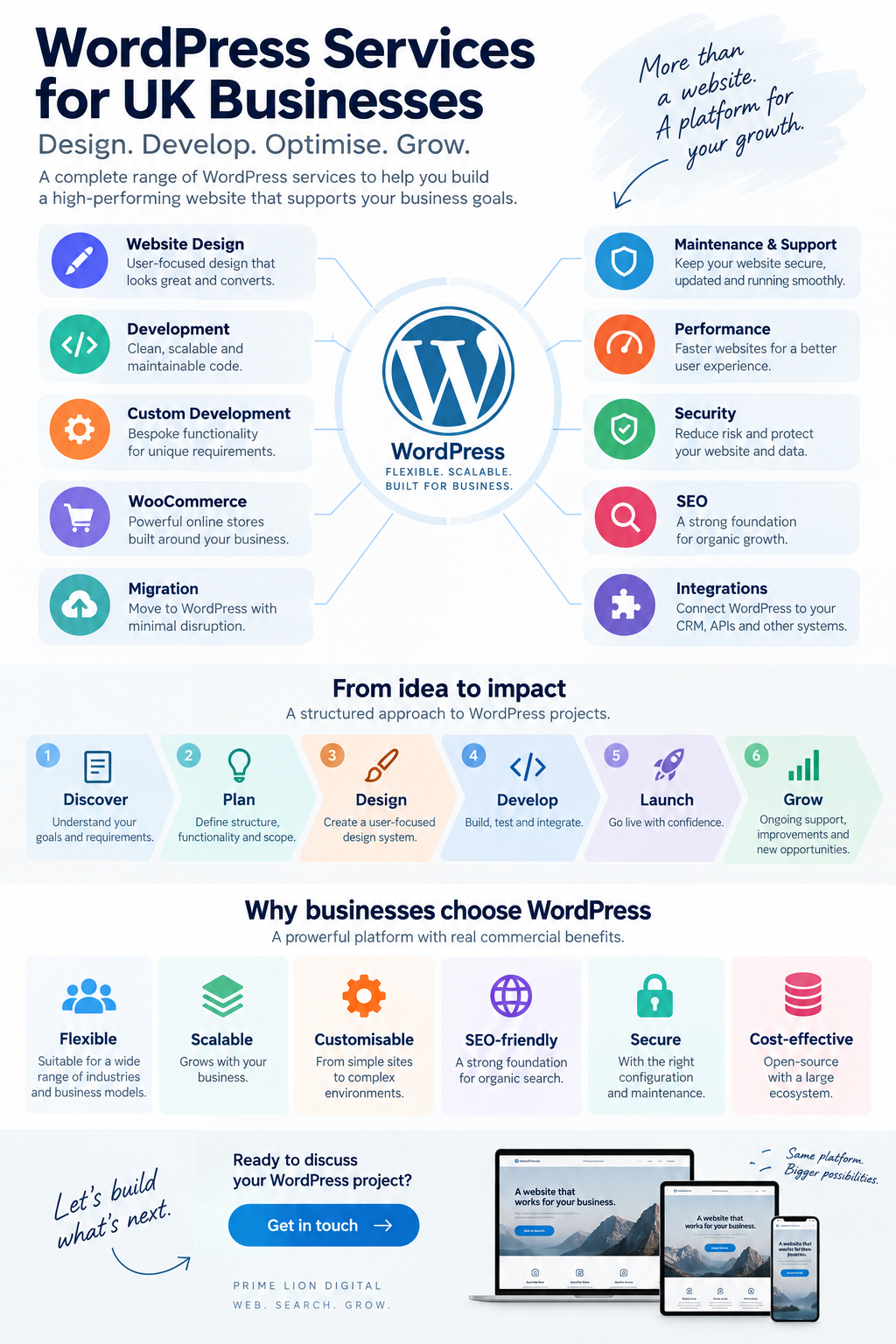
WordPress can power a straightforward company website, a content-led lead generation platform, an online shop or a more complex digital environment connected to CRM, payment and operational systems. What changes from project to project is not simply the number of pages. It is the way design, development, content, data and third-party technology need to work together.
Prime Lion Digital provides WordPress services across website design, development, custom functionality, WooCommerce, migration, performance, security, SEO and ongoing support. This hub explains how those areas fit together, where they overlap and which route is likely to make sense for different types of WordPress project.
WordPress is a platform. What you need from it is the real question.
Two businesses can both use WordPress and have very different technical requirements. A professional services firm may depend on a clear content hierarchy, organic search visibility and enquiry generation. An ecommerce business has to consider products, payments, checkout, customer accounts and fulfilment. Another organisation may need WordPress to exchange data with a CRM, booking platform or internal system.
That is why WordPress services extend beyond building pages in a CMS. Information architecture, UX, development, integrations, hosting, performance, security and ongoing management all influence whether the website remains useful as the business changes.
The sensible starting point is the business requirement. Once that is clear, it becomes much easier to decide which parts can use established WordPress functionality and where specialist or custom development is justified.
Where WordPress fits in a modern business
For many organisations, WordPress is the public-facing layer of a wider digital setup. Visitors may arrive through search or advertising, interact with content and forms, enter a CRM, complete a transaction through WooCommerce, receive automated emails and generate analytics data used by marketing and sales teams.
Those connections matter when the website is planned. A CRM integration can affect form architecture. Multilingual publishing changes content modelling. Ecommerce can change hosting and performance requirements. A redesign may need to preserve years of established URLs and organic visibility.
Good WordPress architecture therefore considers what happens after launch: who will manage content, which systems own particular data, how the website can expand and whether another developer will be able to understand the setup in two or three years.
Explore our WordPress services
Most WordPress projects involve more than one discipline. The services below address different parts of the ecosystem and provide a useful starting point for identifying what a project actually needs.
WordPress Website Design
WordPress website design covers information architecture, UX, navigation, responsive layouts and the visual system used across the site. It is particularly important when an existing website has grown without a clear structure or when a new site needs to support several audiences, services or conversion journeys.
WordPress Development
WordPress development services cover the technical implementation behind the website: templates, reusable components, CMS configuration, front-end behaviour, forms, content structures and integrations.
The development approach should be proportionate. A small marketing website does not need the architecture of a complex platform; equally, a large content estate should not be assembled as though it were a five-page brochure site.
Custom WordPress Development
Custom WordPress development becomes relevant when standard themes, plugins or editing patterns create a genuine limitation. This may involve purpose-built themes, plugins, Gutenberg blocks, specialised content structures, APIs or business logic designed around a particular workflow.
Custom code should solve a defined problem rather than become a default measure of project quality. Where established functionality does the job cleanly, using it can reduce cost and future maintenance. Where it forces awkward compromises, bespoke development can provide a cleaner route.
WooCommerce
WooCommerce development services add a transactional layer to WordPress. Product structures, checkout behaviour, payment gateways, tax, shipping, customer accounts and integrations all have operational consequences beyond the appearance of the storefront.
As a store grows, catalogue management, performance and back-office workflows can become as important as the customer-facing design.
WordPress Migration
A WordPress migration may involve moving from another CMS, changing hosting infrastructure, rebuilding an older installation or transferring an established content library into a new architecture.
The visible pages are only part of that work. URLs, redirects, metadata, media, forms, analytics, integrations and search-engine indexing may all need to be mapped and tested. This is one area where apparently small omissions can have consequences after the new site goes live.
WordPress Maintenance & Support
WordPress core, plugins, themes, PHP versions and connected services continue to change after launch. Maintenance can therefore involve controlled updates, backups, monitoring, staging, compatibility checks, troubleshooting and incremental improvements rather than simply applying updates whenever they appear.
The level of oversight should reflect the website. A relatively simple informational site has different operational exposure from a busy WooCommerce store or an installation connected to several external systems.
WordPress Performance
Performance problems can originate in hosting, database growth, image handling, scripts, fonts, third-party tracking, plugin behaviour or front-end implementation. Adding another optimisation plugin does not necessarily address the underlying bottleneck.
Performance work is most useful when the cause is identified first and changes are tested against the actual site rather than a generic checklist.
WordPress Security
Security depends on more than keeping WordPress core updated. Administrator access, authentication, hosting configuration, backups, plugin selection and deployment practices all contribute to the overall risk profile.
A small publishing site and an ecommerce environment handling customer transactions should not automatically use the same security approach. Controls need to reflect what the website does and what the business stands to lose if something fails.
WordPress SEO
WordPress can provide a strong technical and editorial foundation for search, but an SEO plugin is only one small part of that picture. Architecture, internal linking, indexation, structured data, content quality, performance and redirects all influence organic visibility.
These considerations become particularly important during redesigns and migrations. More complex crawl, indexation and architecture problems may also require dedicated technical SEO work, particularly where organic search is an established acquisition channel.
Which WordPress service is the likely starting point?
| Business situation | Likely starting point | Related considerations |
|---|---|---|
| Planning a new business website | WordPress Website Design and Development | Content architecture, UX, SEO foundations, analytics and future expansion |
| Existing website looks or feels outdated | Website Redesign | Existing URLs, content value, analytics, UX and technical condition |
| Standard plugins cannot support a requirement cleanly | Custom WordPress Development | Custom functionality, APIs, plugins, blocks and long-term maintainability |
| Selling products or services online | WooCommerce | Payments, shipping, product management, checkout, integrations and performance |
| Moving from another CMS or rebuilding an old installation | WordPress Migration | Content mapping, redirects, SEO continuity, integrations and testing |
| WordPress website has become slow | Performance Optimisation | Hosting, database, scripts, images, plugins and Core Web Vitals |
| Website needs regular technical oversight | Maintenance & Support | Updates, backups, monitoring, staging and troubleshooting |
| Organic search is a major acquisition channel | WordPress SEO | Technical SEO, architecture, content, internal linking and performance |
This is only a starting point. A migration may also require redesign and SEO work; a WooCommerce project can involve custom development; and an existing WordPress website may need performance improvements before any larger redevelopment is justified.
New website, rebuild or targeted improvement?
 A new WordPress project provides the greatest architectural freedom. Content structure, UX, design and development can be planned together before legacy decisions become constraints.
A rebuild needs a different approach. Existing URLs, analytics, content, integrations and organic visibility should be understood before deciding what stays and what changes. An old website can contain commercially valuable assets even when its design no longer represents the business well.
Then there are websites that do not need rebuilding at all. If the underlying architecture is sound, targeted work on performance, UX, SEO, content or functionality can be more economical and considerably less disruptive.
This distinction is worth making early. Rebuilding something that only needs improvement wastes budget; repeatedly patching an architecture that has reached its limits wastes it in a different way.
Standard WordPress or custom development?
There is a broad middle ground between installing an off-the-shelf theme and engineering a completely bespoke WordPress platform.
An established theme and proven plugins may be entirely appropriate for straightforward requirements. A more distinctive website might combine bespoke UX and visual design with carefully selected existing components. More specialised projects can require a custom theme, purpose-built blocks, plugins or integrations with external systems.
Custom development earns its place when it removes a genuine constraint: an awkward editorial process, unusual data structure, specialised customer journey, excessive plugin dependency or integration that cannot be implemented reliably with existing tools.
There is a trade-off. More custom code creates greater control, but it also creates code that must be documented, tested and maintained. The objective is not to maximise customisation. It is to choose the simplest architecture that can meet the requirement without creating foreseeable problems later.
The technology around WordPress matters too
A production WordPress website typically sits within a wider technical environment. PHP and MySQL underpin the platform; HTML, CSS and JavaScript shape the front end; Gutenberg and structured custom fields influence how content is managed. REST APIs can connect WordPress to external applications, while Git and staging workflows help teams control changes safely.
Beyond the application itself are hosting, caching, content delivery networks, DNS, transactional email, consent management, payment gateways, CRM platforms and analytics tools such as Google Analytics 4 and Google Search Console.
These are not separate concerns once the website becomes commercially important. An integration can influence data architecture. WooCommerce can alter hosting requirements. Analytics requirements affect consent and tracking implementation. A large SEO migration may dictate how thousands of legacy URLs are handled before development is considered complete.
A WordPress website still has to work after launch
Launch is a milestone, not a useful definition of project success.
Once real visitors and editors begin using the site, different issues emerge. Content grows. Marketing teams request new landing pages. Plugins and APIs change. Forms need to continue delivering reliably. Tracking needs to remain accurate, and updates should not routinely introduce regressions.
The right post-launch model varies. Some websites need little more than disciplined maintenance and backups. Others justify ongoing development, SEO, performance monitoring and conversion work because the website is an active part of sales or operations. For sites that require broader ongoing technical oversight, website care and support provides the wider operational context beyond the initial build.
What affects the cost of WordPress services?
 Page count alone is a poor predictor of WordPress project cost. A ten-page marketing site with established content can be considerably simpler than a six-page website that needs custom calculations, CRM integration and specialised editorial controls.
Cost is usually shaped by the amount of UX and visual design required, the number and complexity of reusable templates, content preparation, custom functionality, ecommerce requirements, integrations, migration work, SEO considerations and the condition of any existing codebase.
Ownership cost matters as well. A low-cost implementation built around overlapping plugins can generate recurring maintenance work. A heavily bespoke build can become expensive for the opposite reason if custom code is undocumented or unnecessarily complex. The useful comparison is not simply the initial build price, but whether the chosen architecture remains proportionate to the business over time.
What affects a WordPress project timeline?
Smaller projects can move quickly when scope, content and decision-making are clear. On larger builds, dependencies tend to determine the schedule more than coding speed.
Content approval can delay design. Design changes can affect development. An integration may depend on credentials or documentation from another supplier. Migration testing needs a stable information architecture. Even a technically complete website may still be waiting for redirects, analytics configuration, compliance review or DNS access.
A realistic schedule therefore separates discovery, design, development, content, integrations, testing and launch preparation instead of treating the project as one uninterrupted production period.
What businesses often underestimate about WordPress
The consequences of early technical choices often appear months or years later.
A plugin can solve an immediate requirement in an afternoon, but each additional dependency has to coexist with the rest of the stack. A flexible page builder can help editors move quickly, yet without sensible controls it can also allow layouts to drift until different parts of the website no longer feel related.
Content governance is easy to overlook for the same reason. Giving every editor unrestricted control sounds convenient. In practice, well-designed constraints can make publishing faster because teams can create new pages without repeatedly making design decisions or accidentally breaking established patterns.
Ownership is less glamorous but equally important. A business should know who controls its domain, hosting, premium licences, administrator accounts, source code and backups. Those details tend to become urgent only when a supplier relationship changes or something needs to be recovered quickly.
Why WordPress projects become difficult to maintain
Technical debt rarely arrives as one dramatic failure. It accumulates through individually reasonable decisions.
A form plugin is added, then a separate tool for tracking, another for redirects and several more for visual components. A small piece of custom code is introduced without documentation. Somebody edits functionality directly in a theme. The staging environment stops reflecting production. Former users retain administrator access. Years later, nobody is completely certain which integrations are still business-critical.
At that point, routine changes become risky because the relationships between components are unclear.
The answer is not simply “use fewer plugins” or “build everything custom”. Both approaches can be appropriate. Maintainability comes from understandable architecture, controlled dependencies, documentation and clear ownership of the environment.
Where WordPress makes commercial sense
WordPress is particularly well suited to organisations where content is an important part of acquisition, education or customer decision-making. Professional services firms, B2B companies, local and multi-location businesses, publishers and organisations with substantial service or resource libraries can benefit from its mature content-management model.
WooCommerce extends the platform into many ecommerce scenarios, while custom development can support specialised workflows and connections to other business systems.
There are also projects where WordPress is not the most sensible starting point. A highly specialised SaaS product or real-time application may be better served by an application framework. At the other end of the scale, a very small business requiring only a simple online presence may gain little from an elaborate bespoke implementation.
Platform selection should follow the operating model rather than forcing the operating model to fit the platform.
WordPress projects in practice
A professional services website that became a content ecosystem
Prime Lion Digital’s work around the Audit Consulting Group website illustrates how a WordPress project can extend beyond the initial website build. The platform needed to support a growing accounting and tax service structure alongside educational content, enquiry journeys and organic search activity.
That creates a different architectural problem from simply publishing more pages. Service relationships, supporting articles, forms, local content and internal linking need to remain understandable as the content estate expands. WordPress development, content architecture, analytics and SEO therefore operate as connected parts of the same system.
The practical lesson is that content growth needs architecture. Without it, a successful publishing programme can eventually make a website harder for both users and search engines to understand.
WooCommerce where catalogue management matters as much as design
For Freizeit Camper in Germany, the work involved a WooCommerce store rather than a conventional company website. Ecommerce adds dependencies that are less visible in a design mock-up: product data, catalogue structure, customer journeys, analytics and the day-to-day process of managing the store.
The implementation included the ecommerce build alongside GA4 and Google Search Console setup. That matters because the storefront is only one layer of the finished system. Measurement and ongoing catalogue management have to work once the project leaves the development environment.
The broader point applies to many WooCommerce projects: the best-looking implementation is not necessarily the best operational implementation if routine store management becomes unnecessarily difficult.
A smaller service-business website without unnecessary complexity
The Construction & Repair Work website presented a different requirement. The project was delivered as a focused UK service-business website, with the core build completed over roughly two weeks and GA4 and Google Search Console configured as part of the setup.
There was no reason to engineer a complex WordPress platform simply to make the project appear more sophisticated. The more useful objective was a manageable structure that could support the business’s services, measurement and future search work without unnecessary technical overhead.
Smaller WordPress projects often benefit from this restraint. Future flexibility matters, but flexibility is not the same as complexity.
When WordPress is the right platform — and when it may not be
WordPress is not automatically the right choice simply because it is widely used.
Compared with closed website builders, it generally offers greater control over development, content and hosting. Shopify approaches ecommerce from a different direction, with commerce at the centre of the platform. A fully custom application offers far greater freedom over application logic, but also requires capabilities that a mature CMS already provides to be engineered or integrated separately.
These are trade-offs, not a universal ranking. A business that values editorial flexibility, organic search, extensibility and control may find WordPress a strong fit. A retailer whose requirements sit almost entirely within a conventional ecommerce model may prefer an ecommerce-first platform. A software product dominated by complex application logic may need an architecture where a CMS plays only a supporting role, if any.
The useful question is not whether WordPress can technically be made to do something. It often can. The question is whether doing it in WordPress creates a clear, maintainable and commercially sensible system.
WordPress project perspectives
Audit Consulting Group
The website needed to support a much broader service and content structure as it grew, rather than simply adding pages without a clear relationship between them. Having the development, content architecture and search work considered together made the site easier to expand in a controlled way.
Freizeit Camper
The WooCommerce project involved more than the storefront. Product management, analytics and the structure behind the shop all needed to work once the site was being used day to day, which made the practical side of the implementation particularly important.
Construction & Repair Work
The process stayed focused on what the business actually needed. We ended up with a manageable website, the tracking setup in place and a structure we could build on without adding unnecessary complexity.
How WordPress development is changing
Block-based editing has changed the balance between developer control and editorial flexibility. Well-designed Gutenberg components can allow teams to build varied pages without turning every page into an unrestricted design exercise.
APIs and headless approaches also give WordPress a role beyond the traditional theme-and-template model when a project genuinely benefits from separating content management from the front-end application. At the same time, expectations around accessibility, Core Web Vitals, privacy and maintainable integrations continue to rise.
AI-assisted development may accelerate parts of production, but it does not remove architectural decisions. Faster code generation does not decide where data should live, which dependencies are sensible, how editors should work or whether a particular integration is appropriate for a business-critical process.
How the WordPress services connect
It is more useful to view WordPress as a set of connected layers than as a menu of unrelated services.
Design shapes how people navigate and interact with the website. Development determines how that experience is implemented and managed. Custom development extends the platform where established functionality no longer fits. WooCommerce introduces transactional requirements. Migration protects continuity when technology changes. Performance, security and maintenance protect the environment after launch, while SEO connects technical structure and content with search demand.
A project may begin in only one of those areas, but decisions rarely remain isolated. A redesign can become an SEO migration. A WooCommerce build may expose a need for custom integrations. Performance work can uncover architectural problems that maintenance alone will not solve.
Understanding those relationships early makes it easier to decide what needs attention now, what can wait and which choices might restrict future options.
Frequently asked questions
What WordPress services do you provide?
Prime Lion Digital’s WordPress website services cover design, development, custom functionality, WooCommerce, migration, performance, security, SEO and ongoing maintenance. The relevant combination depends on whether the project involves a new website, an existing installation or a specific technical or commercial problem.
Do you provide both WordPress design and development services?
Yes. Design deals with information architecture, UX, visual direction and responsive behaviour; development turns that system into a functioning WordPress website and manageable CMS. On substantial projects, decisions in the two disciplines need to be coordinated rather than treated independently.
Can you work with an existing WordPress website?
Yes. An existing site may need focused development, redesign, performance work, troubleshooting, migration, SEO improvements or ongoing support rather than a complete rebuild. Reviewing the existing architecture first helps establish how much actually needs to change.
When is custom WordPress development necessary?
Custom development is useful when established themes and plugins cannot meet a requirement cleanly or create significant compromises. Examples include specialised content structures, purpose-built plugins, API integrations and workflows that need to reflect the way a business actually operates.
Can an existing website be migrated to WordPress?
In many cases, yes. A proper migration considers URLs, redirects, metadata, images, forms, analytics, structured data and integrations as well as visible page content. Search visibility should be considered before the migration structure is finalised.
Do you provide WooCommerce development?
Yes. WooCommerce work can include storefront design, product architecture, checkout, payments, shipping, integrations, custom functionality and performance improvements. The scope depends heavily on catalogue complexity and the operational systems around the store.
How much do professional WordPress services cost in the UK?
There is no useful single figure because a small marketing website, a bespoke corporate build, an ecommerce store and a custom WordPress platform involve very different amounts of design, development and testing. Content readiness, integrations, migration requirements and the condition of an existing installation can materially change the scope.
Do WordPress websites need ongoing maintenance?
Some level of maintenance is sensible because WordPress core, plugins, themes and hosting environments change over time. A simple informational site may need relatively light oversight; ecommerce and heavily integrated websites generally justify more structured backups, monitoring, testing and update management.
Is WordPress suitable for SEO?
WordPress can provide a strong foundation for SEO, but the CMS alone does not create search visibility. Site architecture, content, internal linking, performance, metadata, structured data and indexation still need to be planned and maintained properly.
Is WordPress suitable for large or complex websites?
Yes, where the architecture fits the requirement. WordPress can support substantial content estates, ecommerce, custom functionality and integrations. Application-heavy requirements still need careful evaluation; the fact that something can be built in WordPress does not automatically mean that WordPress is the best architectural choice.
Not sure where a WordPress project should start?
It is not always obvious whether an existing website needs a redesign, deeper development work, migration, performance improvements or simply a better maintenance approach. New projects can have the same ambiguity because decisions about content, design, functionality and integrations overlap before the technical scope becomes clear.
The useful starting point is to define what the website needs to achieve, what already exists around it and which constraints are genuinely important. From there, the appropriate WordPress services — and the parts that do not need changing — become much easier to identify.