
Tell us a little about what you’re looking for, and our team will be in touch to discuss how we can help.
WordPress Maintenance Services for UK Businesses — From £79/Month
A WordPress update can finish successfully while a contact form, booking or checkout stops working as expected. WordPress core, themes, plugins and connected services need considered maintenance, not just a series of update clicks.
Prime Lion Digital provides WordPress maintenance services for UK businesses from £79/month. Our WordPress-focused approach covers planning updates, assessing dependencies, reviewing recovery options and testing agreed business-critical functions. We define the work, frequency, exclusions and approvals in a tailored quotation; the entry price is not a promise that every task described on this page is included.
Need ongoing WordPress care? Request a WordPress maintenance quote. Share your URL, whether the site uses WooCommerce or bookings, and the functions you most need to protect.
Why WordPress Websites Need Controlled Maintenance
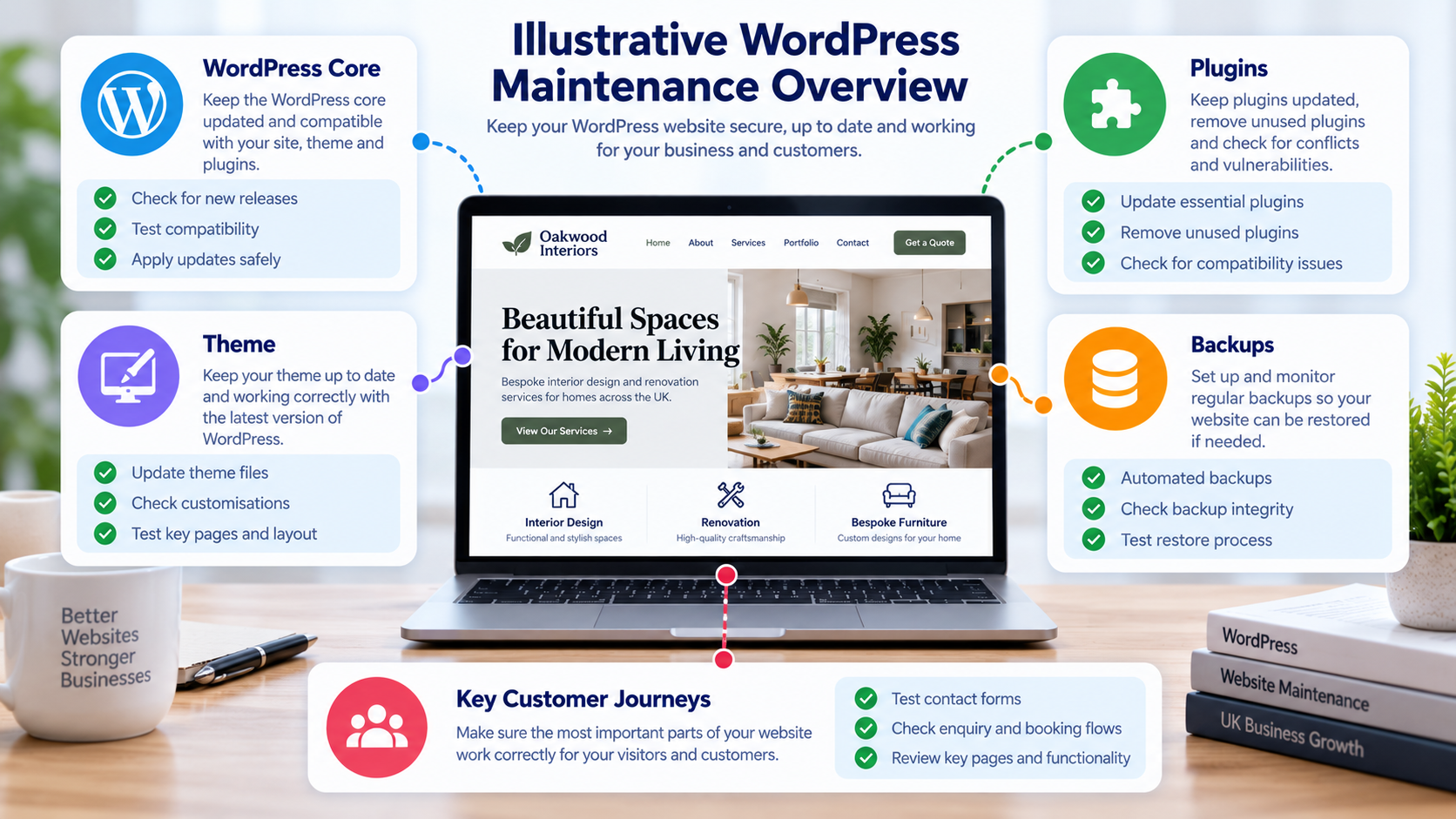
WordPress is flexible because websites can combine a theme, extensions and third-party tools. Those parts change at different times. A plugin update may depend on a PHP version, a theme override may affect WooCommerce templates, and an external service may be essential to an enquiry or booking. Delaying updates indefinitely is not a safe default either. Unlike platform-neutral website maintenance services, WordPress website maintenance focuses on the compatibility of WordPress core, themes, plugins and their integrations.
Four underlying risks deserve attention:
- Component dependencies: a change in core, a theme or a plugin may affect another component.
- Uncertain recovery readiness: a backup may exist without a confirmed owner, accessible copy or appropriate restore procedure.
- Untested business journeys: a website can appear normal while an enquiry notification or checkout step fails.
- Unclear ownership: no one may be assigned to approve changes, review exceptions or follow up on issues.
Signs Your WordPress Website Needs Attention
These are observable symptoms, not confirmed causes. The right next step is to check the relevant evidence rather than assume that every problem can be solved by updating a plugin.
| What you notice | Possible explanations | What to check |
|---|---|---|
| Core or plugin updates remain pending | Compatibility concerns, licences, permissions or an absent routine | Versions, dependencies and change risk |
| Forms submit but enquiries do not arrive | Mail delivery, spam filtering or form integration | Test submission, notification route and available logs |
| Checkout or bookings fail after a change | Plugin, theme, gateway or external-service interaction | Reproduce the journey and review recent changes |
| Admin access or editing becomes unreliable | Roles, plugin conflicts, hosting or security settings | Error details, permissions and environment |
| Pages behave differently or seem slower | Caching, hosting, scripts, images or updates | Comparable tests and recent changes |
| Nobody can identify a usable backup | Missing records, inaccessible storage or unclear responsibility | Backup ownership, access and restore options |
A pending update is not proof that updating immediately is safe. Compatibility, recovery options and critical user journeys should be considered before higher-risk changes.
How WordPress Components Can Affect Each Other
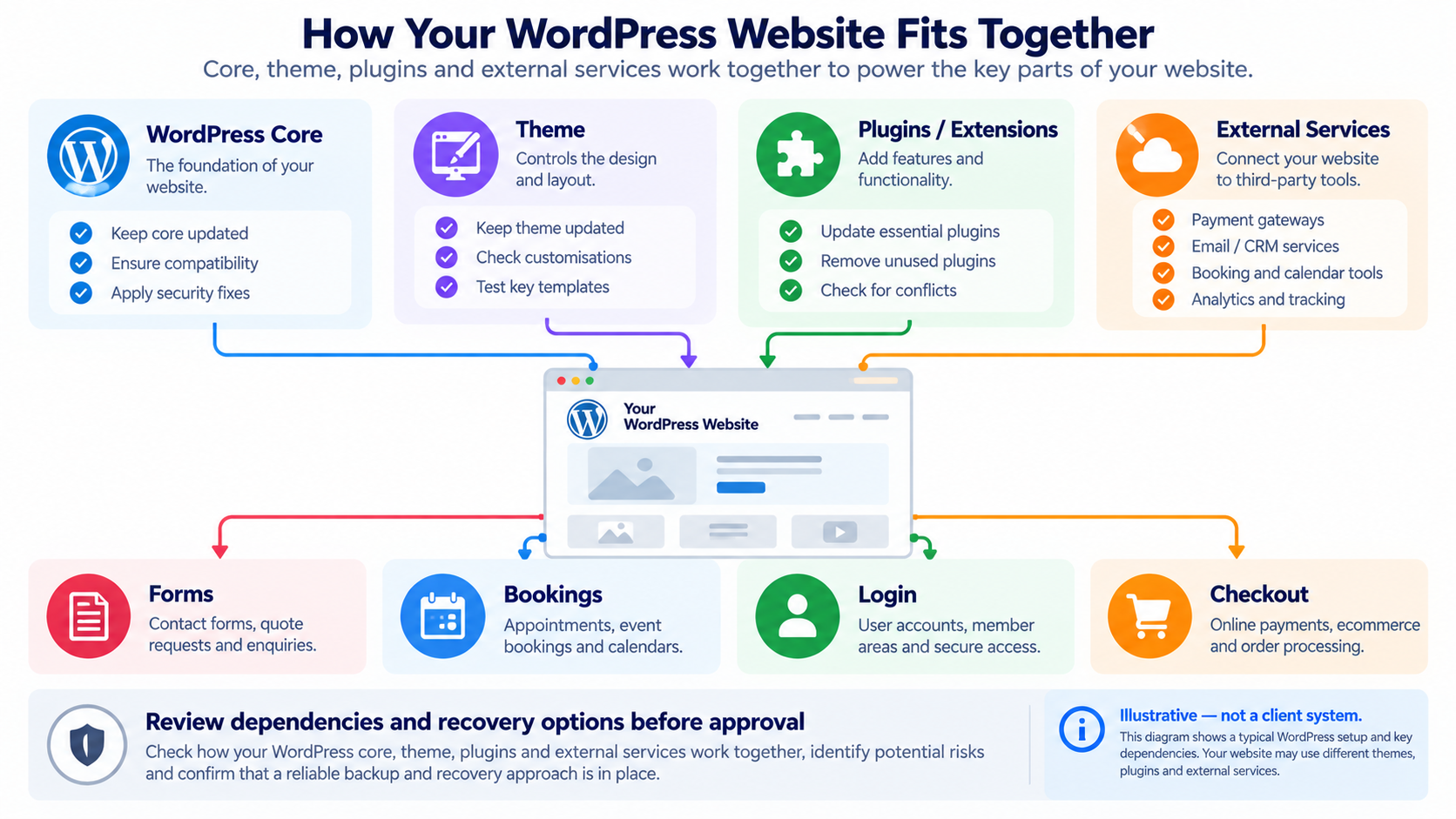
WordPress core, the active theme, plugins, hosting configuration and external services form a connected system. A form plugin may depend on an email service; a WooCommerce extension may interact with checkout and payments. This explains why identifying a symptom and diagnosing its cause are different tasks.
What WordPress Maintenance Services Can Cover
Our WordPress website maintenance services are structured around the needs of your particular installation, not a one-size-fits-all checklist. The following areas help define an appropriate scope.
The table describes areas that may form part of a WordPress website maintenance arrangement. It is not a list of guaranteed £79/month inclusions. The signed-off plan must distinguish recurring work, conditional checks and separately priced remediation.
| Area | Potential maintenance work | Scope boundary |
|---|---|---|
| WordPress core | Review available updates, compatibility and approved implementation | Major migrations and bespoke redevelopment are separate |
| Plugins | Review versions, licences, dependencies and authorised updates | Premium licences and extensive conflict fixes are not assumed included |
| Themes | Assess theme and child-theme considerations before changes | Custom theme redevelopment is separate |
| Backups | Review ownership, access, backup evidence and recovery options | Creating backups, off-site storage and restore tests depend on agreement |
| Key functions | Check selected forms, logins, bookings or checkout journeys | Which journeys and how deeply they are tested must be specified |
| Security-related observations | Consider update notices, relevant settings and visible warnings | No security guarantee or implied 24/7 monitoring |
| Performance observations | Identify notable issues worth separate investigation; dedicated website performance optimisation can be quoted separately | Full optimisation and guaranteed scores are not implied |
| Maintenance records | Document agreed changes, findings and follow-up decisions | Report format and frequency must be confirmed |
When choosing a WordPress site maintenance service, ask what is actually checked, who approves higher-risk work and what happens when testing reveals a problem. A suitable managed WordPress maintenance arrangement should make those responsibilities explicit. These details are more useful than a long feature list.
Routine maintenance is not emergency repair. Planned WordPress care may help identify risks, but a hacked website, broken checkout, major plugin conflict or incident restoration can require separately scoped investigation and repair. Support hours, response expectations and charges must be agreed; do not assume round-the-clock cover.
WordPress Maintenance for Different Websites
Small-business and professional-services websites
For a service website, the enquiry form, key landing pages and editor access may matter more than the number of installed plugins. A useful maintenance scope prioritises those functions and the people responsible for them.
Websites with bookings, memberships or CRM connections
Connected services create extra points to check. A booking may depend on an external calendar or email notification; a membership journey may depend on login permissions. Any integration testing must be agreed as part of the scope.
WooCommerce shops
Cart, checkout, payment gateways, order emails and extensions can all be business-critical. A WooCommerce maintenance arrangement may need broader functional checks than a brochure site. Larger functional changes belong to WooCommerce development rather than routine maintenance. An already broken store may instead need a one-off repair.
Our Approach to Controlled WordPress Maintenance
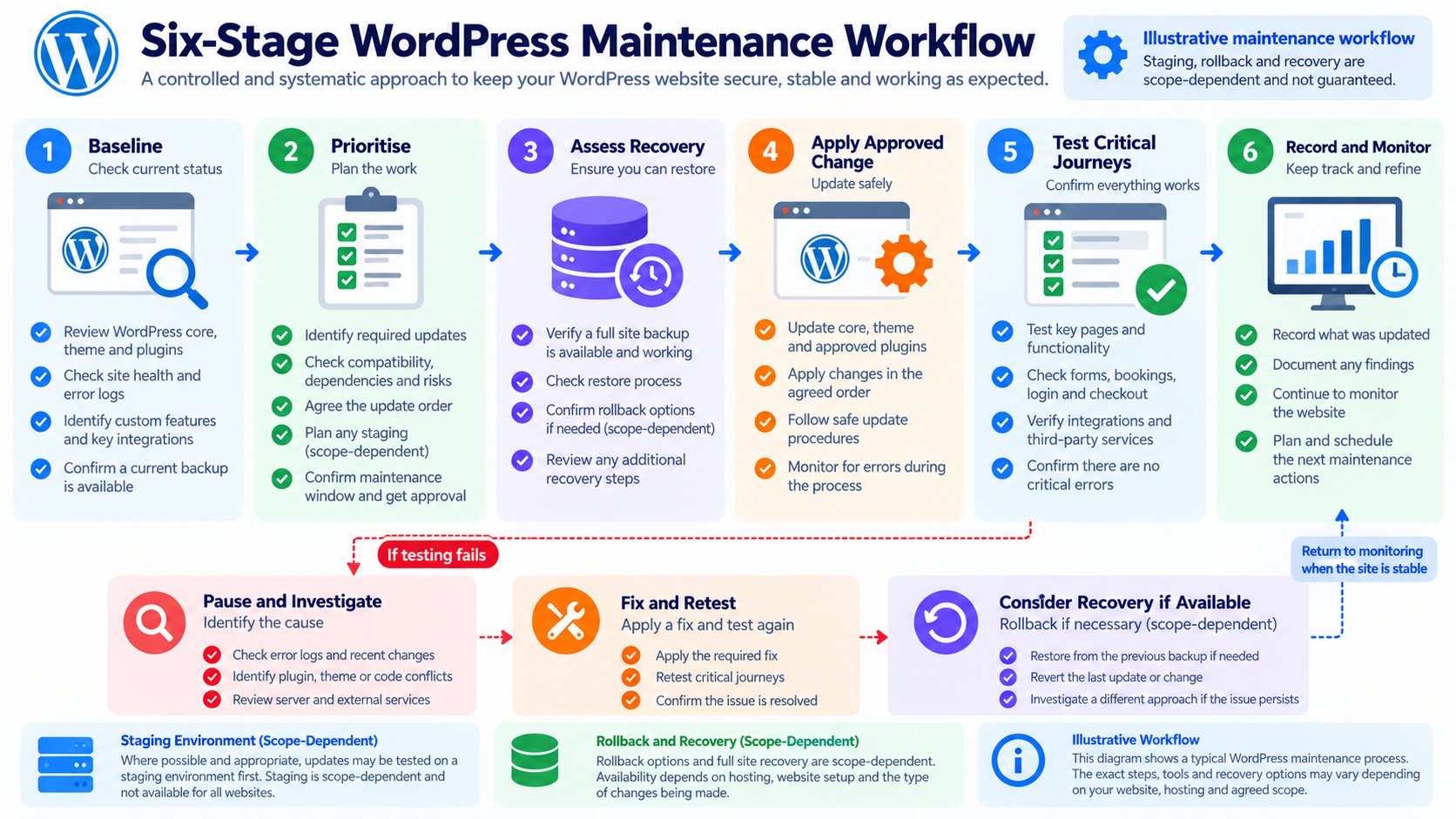
Rather than updating every component at once, the proposed approach follows six decisions. The exact operational workflow and included checks are confirmed when your plan is agreed.
1. Establish a baseline
Identify the WordPress version, active theme, relevant plugins, licences, access limitations and essential customer journeys. This establishes which components matter and where evidence is missing. Output: an initial component inventory and risk notes, where included.
2. Prioritise changes
Consider update relevance, dependencies, known concerns and potential impact. Decide what appears routine, what needs additional review and what should await approval. Output: proposed priorities and an approval decision.
3. Assess recovery readiness
Review available backup evidence and whether a suitable restore or staging route exists. A backup notification alone does not prove recoverability. See our website security and backups service for broader backup and security requirements. Output: a documented decision about readiness and limitations. Staging and rollback are not guaranteed.
4. Apply authorised changes
Where agreed, implement changes in a controlled order that respects dependencies, then perform immediate checks. Output: a record of attempted and completed work.
5. Verify critical journeys
Test the functions included in the plan, potentially an enquiry notification, booking, login or WooCommerce checkout. A dashboard success message is not a substitute for checking user-facing behaviour. Output: observations, test results and any exceptions.
6. Record findings and decide what follows
Document outstanding issues and recommended actions. If a test fails: pause further risky changes, investigate, correct and retest where authorised; consider recovery only if an appropriate route is available and its implications are understood. Output: a maintenance summary or follow-up decision, according to the agreed plan.
What You Receive From an Agreed Maintenance Plan
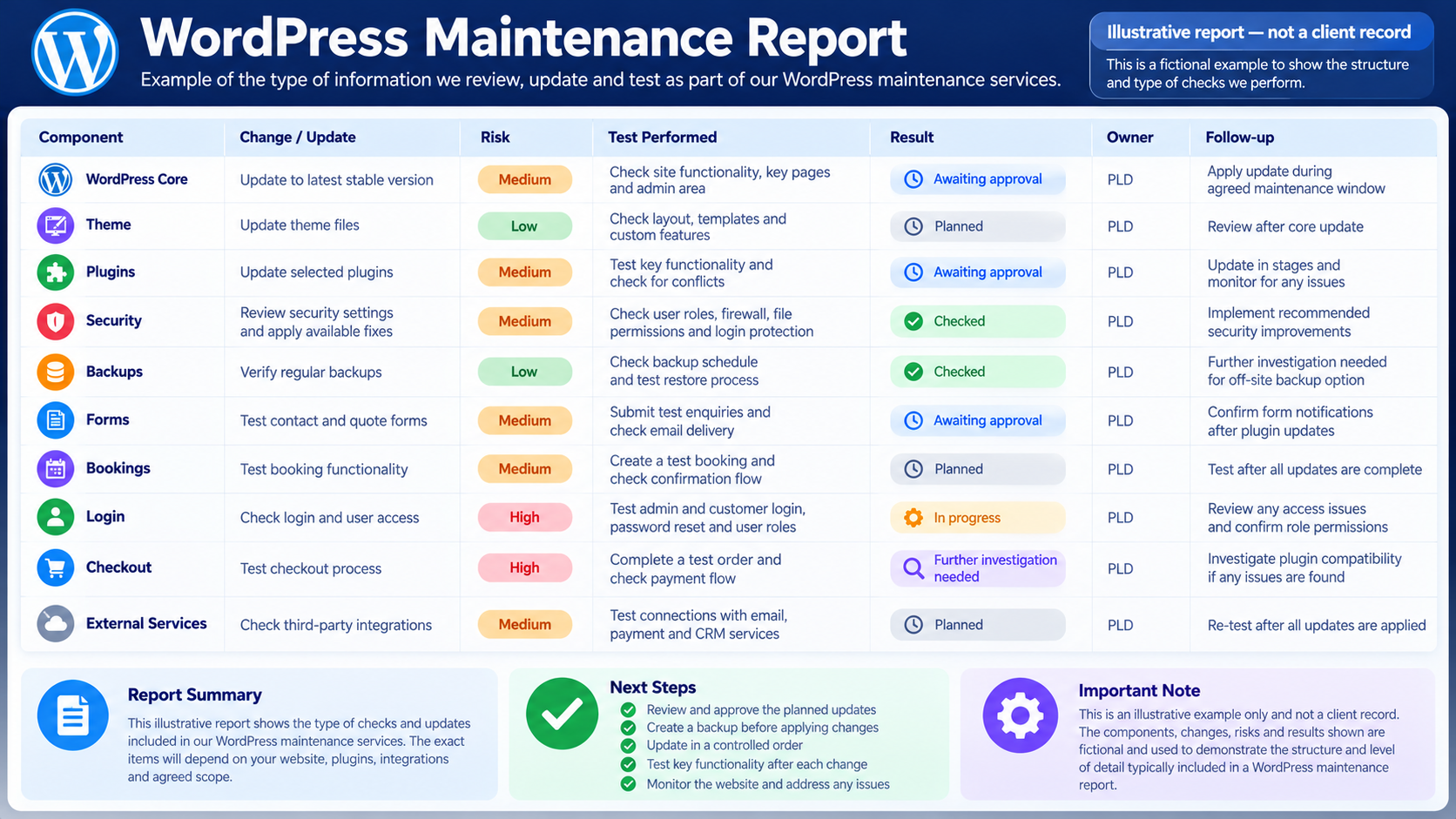
Clear deliverables help you assess a maintenance proposal. The following are examples of records and checks available for discussion; your quotation identifies which apply and how frequently they are provided. Not every item is included in the £79 entry price.
| Potential deliverable | What it explains | Status |
|---|---|---|
| Component overview | Relevant core, theme and plugin information | As agreed in plan |
| Prioritised action list | What should happen next and which changes need approval | As agreed in plan |
| Change record | Which authorised updates were attempted or completed | As agreed in plan |
| Backup/recovery notes | Available evidence, ownership and identified limitations | Optional, by agreement |
| Functional test notes | Which agreed journeys were checked and what was observed | Optional, by agreement |
| Exceptions and follow-up | Unresolved issues, owners and any separately quoted work | As agreed in plan |
How Onboarding and Approvals Work
For a website built by another provider, the initial discussion may cover administrator access, hosting arrangements, licences, existing errors, backup ownership and the functions your business relies on. We would need to establish who can approve higher-risk changes and who should receive findings. Access should be shared securely and limited to what the work requires. For websites needing structural or plugin changes beyond maintenance, explore WordPress development services.
Any additional repair, licence purchase or development should be approved separately when outside the agreed plan. The onboarding timetable depends on the condition of the website and the information available; no fixed start date is promised.
Relevant Work and Evidence
See the Prime Lion Digital portfolio for examples of website and digital delivery work. A portfolio example may demonstrate general development capability, but does not establish that PLD provided recurring WordPress maintenance or achieved a maintenance-specific outcome.
When reviewing an agency, ask to see the relevant work scope, change documentation and test evidence where the client has authorised sharing. Development portfolio examples are useful for understanding technical capability, but they should not be mistaken for verified ongoing maintenance results.
Expert Insight: An Update Success Message Is Not a Functional Test
When WordPress reports that a plugin update succeeded, it confirms that an installation step completed. It does not confirm that the site’s important business journeys still work. A form can display its thank-you message while its email notification is blocked. A booking can look complete but fail to create the expected record. A checkout can display correctly while a payment or order email behaves differently.
That is why a useful maintenance plan identifies a few priority journeys before changes begin. Decide which checks are necessary, how they can be performed safely and what counts as a failed test. For a professional-services website, an enquiry route may take priority. For an online shop, checkout and order notifications may need explicit attention, including appropriate test arrangements.
There is also an important commercial distinction: discovering a problem during maintenance does not mean every repair is included. The plan should say who investigates, who authorises extra work and how any recovery decision is made. Good reporting records not just what changed, but what was checked and what remains unresolved.
WordPress Maintenance, One-Off Repairs or Hosting?
| Option | Best when | Not automatically included |
|---|---|---|
| Ongoing WordPress maintenance | You need planned WordPress-specific care and agreed checks | Unlimited fixes, bespoke development or 24/7 incident response |
| One-off WordPress repair | Something is already broken or behaving unexpectedly | An ongoing maintenance schedule |
| Managed WordPress hosting | You need hosting infrastructure and provider-defined hosting support | Every plugin, theme or customer-journey test |
| General website maintenance | You need ongoing care across platforms or a non-WordPress CMS | WordPress-specific tasks unless expressly agreed |
Whether you are comparing a WordPress maintenance company or a WordPress maintenance agency, ask how its proposed service fits your theme, plugins, integrations and support needs. Managed hosting can complement maintenance, but the two are not automatically interchangeable.
WordPress Maintenance Pricing and Plan Options — From £79/Month
Prime Lion Digital’s WordPress maintenance plans start from £79/month. This is the confirmed entry price, not a fixed quote for every website or a promise that every potential service above is included.
| Maintenance option | Suitable for | Pricing approach |
|---|---|---|
| Essential WordPress maintenance | Smaller WordPress websites requiring a defined, limited routine | From £79/month; inclusions agreed in writing |
| Business WordPress maintenance | Sites with enquiry forms, bookings, memberships or connected services | Custom quotation based on agreed checks |
| WooCommerce maintenance | Online shops with order, checkout and payment dependencies | Custom quotation based on testing and support scope |
These are illustrative service categories, not three published fixed-price packages. We confirm the actual plan name, tasks, frequency, VAT treatment and contract terms before you proceed.
Costs can vary with the number and type of plugins, theme customisation, premium licences, WooCommerce or booking integrations, backup arrangements, critical-function testing and the level of support agreed. Existing errors or major technical debt may require separately quoted work before regular maintenance begins.
To request a quote: provide the website URL, main business-critical functions, any existing problems and whether you already have backups or hosting support.
Check What Your WordPress Site Actually Needs
If you are unsure whether your site needs routine care, more extensive testing or a one-off repair first, send the URL and describe the most important user journeys. If the issue is urgent or already affecting users, see WordPress errors and fixes instead of waiting for the next maintenance cycle. We can discuss the appropriate scope rather than assume that the starting plan fits every WordPress installation.
Related Website Support Services
For an active WordPress error or plugin conflict, see WordPress Errors & Fixes. For cart, checkout, payment or order failures, see WooCommerce & Online Store Problems. If the issue is not WordPress-specific, Website Help & Solutions covers broader website troubleshooting.
For platform-neutral ongoing care, compare website maintenance services and the broader Website Care & Support options. Related services include website content updates, performance optimisation, website security and backups and ongoing website improvements. These services address different needs and are not automatically part of a WordPress maintenance plan.
WordPress Maintenance FAQs
What do WordPress maintenance services include?
They may include agreed reviews of WordPress core, themes and plugins, selected updates, recovery-readiness checks, functional testing and maintenance records. The precise work, frequency and exclusions are specified in the quotation; not every item is part of the £79/month entry level.
How much does WordPress maintenance cost in the UK?
PLD’s service starts from £79/month. The final fee depends on your site’s complexity, critical functions and agreed level of testing and support. VAT treatment, contract length and payment terms are confirmed in your quotation.
Is managed WordPress maintenance the same as managed hosting?
No. Hosting typically covers the server environment and services defined by the host. Maintenance concerns the agreed WordPress software and website-function checks. Check both providers’ responsibilities for any overlap.
Can you take over maintenance of a site built by another agency?
It can be assessed. Acceptance depends on access, theme and plugin dependencies, licence arrangements, backups and any existing issues that require separate attention.
Can WordPress updates break a website?
They can introduce compatibility or functional problems, although not every update does. Reviewing dependencies and checking agreed user journeys helps manage risk but cannot eliminate it.
Are backups, staging and rollback included?
Do not assume so. Backup creation, storage, restore testing, staging and rollback availability are separate scope questions. Some environments do not provide a simple or risk-free recovery path.
Do WordPress maintenance plans cover WooCommerce?
WooCommerce sites can be considered, but checkout, payment and order-related testing may require additional scope. An existing urgent store failure may need a separately quoted repair.
What happens if an update fails?
The appropriate response is to pause further risky changes, investigate, determine the authorised correction or escalation and retest. Recovery should be considered only where an appropriate route exists. Response arrangements and charges must be agreed in advance.
Request a WordPress Maintenance Quote
Tell us your website URL, whether you use WooCommerce, bookings or other important integrations, and what currently worries you about updates or backups. We can discuss a WordPress-specific maintenance scope from £79/month, including what would be checked, what would need separate approval and how the arrangement would work.
What to send: your website URL; your main contact details; WordPress/WooCommerce use; any existing errors; your current hosting and backup arrangements (if known); and the key user journeys you want covered. Do not send passwords in the form.
Tell us a little about what you’re looking for, and our team will be in touch to discuss how we can help.