WordPress Web Design Services for UK Businesses
Tell us a little about what you’re looking for, and our team will be in touch to discuss how we can help.
WordPress web design is about more than the appearance of a website. Information architecture, user journeys, responsive behaviour, content structure and the editing experience all influence how useful the site remains once more pages, campaigns, integrations and people are added.
The right approach depends on what the website needs to do. A straightforward service business may benefit from a deliberately simple WordPress structure, while a content-heavy organisation, ecommerce business or company with distinctive user journeys may need a more tailored design system. This hub explains those different approaches, where design meets development, and when a specialist WordPress service becomes the better route.
What WordPress Web Design Actually Covers
Website design is sometimes treated as the visual stage that happens before development. That distinction is too simple for WordPress.
A desktop layout can look complete while leaving important questions unresolved. What happens when a heading becomes twice as long? How should navigation change as new services are introduced? Can an internal team create a new landing page without rebuilding the layout? What happens to a complex section on a small screen?
Professional WordPress web design therefore connects information architecture, UX, visual hierarchy, responsive behaviour, reusable components and content presentation with the way those decisions will eventually work inside the CMS.
The editing experience matters too. A polished frontend is only part of the finished product if routine content changes remain unnecessarily difficult for the people managing the website.
When WordPress Is the Right Fit for a Business Website
 WordPress is particularly useful when a website is expected to evolve. Services can expand, articles can be published, campaign pages introduced, locations added and existing content reorganised without replacing the entire platform.
That flexibility does not mean every WordPress project should be built in the same way. A company publishing a few pages each year has different needs from a marketing team running frequent campaigns. A business developing hundreds of service and location pages needs stronger taxonomy and navigation. Ecommerce introduces product data, filtering, checkout behaviour and operational requirements that a conventional company website does not have.
There are also projects where WordPress may not be the most appropriate starting point. If the requirement is primarily a specialised application rather than a content-managed website, another architecture may make more sense. Platform choice should follow the business and technical requirement, not the other way around.
Different WordPress Projects Need Different Design Approaches
WordPress web design covers several distinct project types. Identifying the right one early helps prevent a straightforward website from becoming unnecessarily complex, or a demanding project from being forced into an approach that cannot support it comfortably.
New WordPress Website Design
A new website provides an opportunity to establish the structure before content and functionality begin accumulating. The work can start with audiences, business requirements, content relationships and important user journeys, then move into layouts and visual design.
The depth of that process should remain proportionate. A smaller service website may have relatively simple requirements, while a larger organisation may need substantially more planning around content types, navigation and future publishing.
Custom WordPress Web Design
Custom WordPress web design becomes useful when the business needs a distinctive interface, greater control over content relationships, a reusable design system or user journeys that do not fit comfortably into standard layouts.
Bespoke work is not automatically the better option. Established patterns can be efficient and entirely appropriate for conventional requirements. Customisation earns its place when additional design control solves a genuine brand, UX, content or operational problem.
Projects that need a design system built specifically around the organisation’s content and user journeys belong within the specialist custom WordPress web design pathway rather than being treated as the default for every WordPress website.
WordPress Website Redesign
Redesigning an existing website involves decisions that do not exist on a blank installation. Useful content, established URLs, organic visibility, analytics, forms, integrations and existing functionality may all need to survive the change.
That is why a redesign should begin with an assessment of what is already there. Some websites genuinely need substantial restructuring. Others can be improved through targeted changes to navigation, templates, key user journeys or responsive behaviour without discarding everything that already works.
Figma to WordPress
Where an internal designer or external agency has already produced the interface in Figma, the visual direction may be established but the implementation specification is rarely complete.
Static screens do not automatically define every responsive state, content variation, CMS requirement, form behaviour or unusual interaction. Those details need to be resolved during the handover so the WordPress implementation does not depend on assumptions.
The objective is not simply to reproduce a screenshot in a browser. It is to translate the approved design system into responsive, reusable and manageable WordPress components.
Responsive WordPress Web Design
Responsive design deals with how the experience changes when available space and interaction methods change. Navigation, calls to action, forms, imagery, tables and filters may need different treatment on smaller screens rather than simply being stacked beneath one another.
For projects where mobile usability is the main problem, a focused responsive review may be more appropriate than redesigning the whole website.
Custom WordPress Design or a More Standard Approach?
The useful question is not whether custom or standard design is universally better. It is where additional design freedom produces a meaningful operational or user benefit.
| Project situation | More standardised approach | Custom WordPress design |
|---|---|---|
| Straightforward company website | Often sufficient when content and functionality are conventional | May add complexity without solving a meaningful problem |
| Distinctive brand and user experience | Existing patterns may restrict the design system | Provides greater control over layouts, components and interactions |
| Complex content relationships | Can become restrictive as the website expands | Can structure templates and components around the content model |
| Limited initial budget | A simpler implementation may be more proportionate | Additional investment should be justified by genuine requirements |
| Unusual workflows or functionality | May require compromises or additional tools | Can be planned around the specific requirement |
| Frequent future content expansion | Works well when the underlying component system remains consistent | Offers more control over reusable patterns and governance |
WordPress Design and Development Need to Work Together
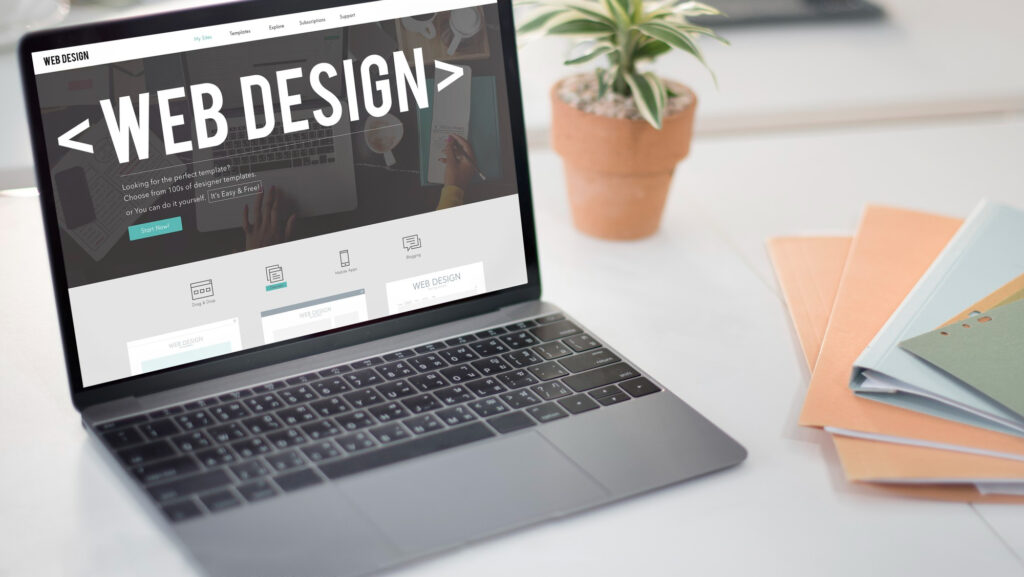 Design determines how information is organised and experienced. Development turns those decisions into a working system. Problems appear when the two disciplines meet too late.
Information Architecture and UX
Services, products, locations, articles and other content types need understandable relationships. Navigation should reflect those relationships without forcing every important page into the main menu.
This matters more as the website expands. An architecture that feels adequate with twenty pages can become confusing after hundreds have accumulated without a clear hierarchy.
Visual Design and Design Systems
Typography, spacing, colour, imagery and interface components create the visual language of the site. Repeated elements such as buttons, cards, forms and content sections also need consistent rules so future pages do not become a collection of one-off design decisions.
A useful design system provides consistency without making every page identical.
WordPress Implementation
Implementation introduces decisions around themes, blocks, templates, plugins, custom functionality and integrations. When technical architecture or bespoke functionality becomes the dominant requirement, the project moves beyond web design into WordPress development services.
Keeping that boundary clear prevents complex functionality from being treated as a visual design problem and avoids turning ordinary interface requirements into unnecessary engineering work.
CMS Editing Experience
The appropriate editing model depends on who will manage the site. A marketing team may need flexible campaign components; another organisation may be better served by controlled templates that reduce accidental layout changes.
Neither maximum flexibility nor maximum restriction is inherently better. The CMS should reflect the publishing workflow that exists outside WordPress.
What Businesses Often Underestimate About WordPress Web Design
Some of the decisions that determine whether a website remains manageable are barely visible on launch day.
Real Content Changes the Design
Launch content is usually carefully prepared. Day-to-day content is less predictable. Titles get longer, services are added, new campaign pages appear and teams need components for situations nobody considered in the first set of layouts.
A good component system allows for normal variation without encouraging every new page to become a separate design exercise.
Mobile UX Requires Priorities
Smaller screens force decisions. Navigation competes with content for space, forms become more demanding, large visual elements can push important information down the page and ecommerce filters become harder to use.
Responsive behaviour therefore needs to be considered during design, not checked only after desktop layouts have been approved.
SEO Architecture Begins Before Launch
Search visibility is not something that can always be added cleanly at the end. Page relationships, taxonomy, headings, navigation, internal links and content templates influence how a growing website can be understood by users and search systems.
The aim is not to design primarily for search engines. It is to avoid structural decisions that make useful content unnecessarily difficult to organise and discover later.
WordPress Design Options and Technologies
WordPress does not prescribe a single way to build a website. The same platform can support controlled block-based publishing, visual page building, custom themes and substantially more specialised technical architectures.
Gutenberg
The native WordPress block editor can provide a structured editing experience while still allowing teams to assemble pages from reusable blocks and patterns. The quality of the result depends on the component system around it; a large collection of poorly defined blocks can become difficult to manage regardless of the editor being used.
Elementor
Elementor can suit organisations that value visual editing and page-building flexibility. Performance, consistency and editor permissions still need to be considered so flexibility does not gradually produce a fragmented site.
Where Elementor is central to the implementation, our Elementor development work covers the platform in greater depth.
Custom Themes and Components
A custom theme or component system can provide tighter control over presentation and editing behaviour where the project genuinely needs it. It may also reduce dependence on unrelated features bundled into general-purpose themes.
That control comes with technical ownership. Maintenance and documentation therefore need to be considered alongside the initial design freedom.
WooCommerce
Once products, categories, filters, baskets, checkout flows and customer accounts become part of the experience, the design problem changes. Ecommerce also introduces operational requirements that do not exist on a conventional service website.
Where selling online is the primary requirement, specialist WooCommerce development should inform the project from the beginning rather than being treated as a shop added to an otherwise finished website.
New Website, Redesign or Targeted Improvement?
An existing WordPress site does not need to be replaced simply because part of the experience has become dated or difficult to use. The appropriate intervention depends on where the underlying problem sits.
| Situation | Likely direction | What needs investigating first |
|---|---|---|
| No existing website, or the current platform no longer fits the requirement | New WordPress website | Business requirements, content, functionality and future publishing needs |
| Brand and UX feel outdated but the underlying content remains useful | WordPress website redesign | Existing URLs, content, search visibility, integrations and technical condition |
| Only specific user journeys perform poorly | Targeted UX improvement | Where users encounter friction and whether the problem is localised |
| The site looks acceptable but is difficult to manage | CMS or component restructuring | Editor workflows, theme structure, builders and plugin dependencies |
| Mobile experience is the primary weakness | Responsive design improvements or a wider redesign | Navigation, content hierarchy, forms, interactions and templates |
| Years of expansion have fragmented the architecture | Structural redesign | Taxonomy, overlapping content, navigation, templates and internal linking |
Why WordPress Websites Become Difficult to Manage Later
WordPress itself is often blamed for problems that actually come from the way a website has evolved.
A site can begin with a manageable theme and a small plugin set. Later, campaign tools are connected, different teams introduce their preferred page-building methods, new functionality is layered over older systems and templates are modified to solve isolated problems. Eventually, nobody is completely certain which parts depend on which plugins or what an apparently minor update might affect.
The same fragmentation happens to content. Teams create new landing pages instead of improving existing ones, service topics begin overlapping and navigation becomes harder to keep coherent.
No architecture can anticipate every future requirement. The practical goal is to provide enough structure that ordinary growth does not depend on an expanding collection of workarounds.
Designing for SEO Without Designing for Search Engines
 Clear service hierarchies, useful page relationships, logical navigation and consistent templates help visitors understand a website. They also give search engines clearer context about how topics relate.
Problems arise when SEO enters the project only after the architecture has been approved. Several services may have been combined into one page despite representing different search needs, or dozens of loosely related pages may sit at the same level with no meaningful parent topic.
The opposite extreme is equally unhelpful. Creating near-identical pages for minor keyword variations produces poor navigation and can leave several URLs competing for essentially the same purpose.
A stronger architecture gives broad pages clear category ownership and allows specialist pages to go deeper only where the user genuinely has a different requirement. That parent-child relationship becomes increasingly important as a WordPress site grows.
Responsive Design Changes the Experience, Not Just the Layout
Desktop interfaces benefit from space. Smaller screens require priorities. A wide navigation system may need a different interaction model, comparison tables may need another presentation and forms that feel straightforward with a keyboard can become tedious on a phone.
The objective is to preserve the hierarchy and purpose of the experience rather than every detail of the desktop composition. This matters particularly around enquiries, booking journeys and ecommerce, where unnecessary interaction can interrupt someone who was already close to completing an action.
Where mobile behaviour is the dominant problem rather than one part of a wider redesign, responsive WordPress web design can be treated as a focused specialist requirement.
Planning for Content Growth and CMS Usability
The website visible at launch is only one version of the system. For organisations that publish regularly, the more revealing test comes months later when people who were not involved in the original build need to create and update content.
Reusable components help when their purpose is clear. Too many similar variations eventually become difficult to distinguish, while unrestricted page building can lead individual editors to solve the same layout problem in different ways.
Larger teams may also need different levels of control. Someone publishing an article does not necessarily need permission to alter structural templates, while forcing marketing staff to request developer support for every routine change creates its own bottleneck.
The right CMS model sits somewhere between those extremes and should reflect how the organisation actually publishes content.
How to Choose the Right WordPress Web Design Approach
Rather than choosing a technology first, start with the main source of complexity in the project.
| If your main requirement is… | Consider… | Why |
|---|---|---|
| A new business website with conventional requirements | Structured WordPress web design | Keeps implementation proportionate while allowing future content growth |
| A distinctive interface or content system | Custom WordPress web design | Provides greater control over UX, components and content relationships |
| An established WordPress site that no longer works well | WordPress website redesign | Allows useful content, URLs and technical dependencies to be assessed before replacement |
| An approved interface already designed in Figma | Figma to WordPress implementation | Focuses the project on translating the design into responsive, editable components |
| A site whose main weakness is mobile usability | Responsive WordPress design | Targets navigation, layout and interaction issues on smaller screens |
| Complex functionality and technical integrations | WordPress development | The dominant challenge is technical implementation rather than interface design |
| An online store | WooCommerce design and development | Product discovery, transactions and store operations introduce specialist requirements |
Some projects naturally cross several of these areas. The purpose of the distinction is not to force every project into one category, but to identify which requirement should lead and which specialist disciplines need to support it.
What Affects WordPress Web Design Cost in the UK?
WordPress web design cost is influenced by the work behind the pages, not simply by the number of URLs in the finished website. Two sites with a similar page count can require very different levels of effort if one relies on a small set of reusable layouts while the other needs custom user journeys, complex content relationships, ecommerce or external integrations.
Important cost factors include UX and information architecture, the level of custom design, the number of distinct templates and components, content migration, functionality, integrations, ecommerce requirements, responsive complexity, accessibility expectations and the condition of any existing website.
Content readiness matters as well. Designing around realistic content is generally more predictable than building templates around placeholders while the information structure is still changing.
A dedicated WordPress web design cost resource can explore pricing models and project variables in more detail; at hub level, the important point is that a useful estimate follows the scope rather than the WordPress platform itself.
How Long Does a WordPress Web Design Project Take?
Project length depends on what has already been decided and what remains unresolved. Approved branding, prepared content and clearly defined functionality create a different project from one where information architecture, copy, integrations and technical requirements are still being established.
Approval processes can be just as significant as implementation. Several stakeholders reviewing work independently, conflicting feedback or substantial content changes after templates have been built all affect sequencing.
External systems introduce further dependencies. CRM platforms, booking systems, payment services, APIs and existing infrastructure may require access or decisions from organisations outside the design and development team.
For that reason, a responsible delivery plan should follow the actual scope and dependencies rather than a generic promise attached to the phrase “WordPress website”.
Related WordPress Services and How They Connect
WordPress projects often move across design, development, ecommerce, SEO and ongoing technical management. Those disciplines overlap, but they are not interchangeable.
WordPress Development Services
Development becomes the primary discipline when a project depends on custom functionality, complex integrations or technical architecture beyond the interface itself. Our WordPress development services cover that part of the ecosystem in greater depth.
Elementor Development
For organisations already committed to Elementor, the practical question is usually how to retain visual editing flexibility without allowing the site to become inconsistent or unnecessarily difficult to maintain. Our Elementor development work focuses on that implementation approach.
WooCommerce Development
Ecommerce introduces additional relationships between design and operations. Product architecture, filtering, checkout behaviour, payments, extensions and store management all influence the customer experience. These projects connect naturally to specialist WooCommerce development.
Technical SEO and Website Performance
SEO and performance should inform design decisions without dominating them. Large media, excessive scripts, unclear content relationships and unnecessary templates can create problems that are easier to prevent than repair.
Where these are the main weaknesses of an existing website, dedicated technical SEO or website performance optimisation may be more appropriate than a full redesign.
Real-World WordPress Project Examples
Different WordPress projects show why the same design approach should not be applied mechanically to every business. The examples below reflect different types of website structure and operational requirement rather than a single definition of a “good” WordPress build.
Audit Consulting Group: Designing Around a Growing Service and Content Structure

Audit Consulting Group combines a substantial service structure with supporting informational content and ongoing SEO activity. The website therefore has to do more than present a fixed set of company pages. Service relationships, specialist topics, forms and supporting content need an architecture that can continue expanding without every new subject becoming an isolated page.
The practical challenge is maintaining clear relationships as the content footprint grows. Parent topics need to remain distinguishable from specialist services, internal linking has to help both visitors and search systems understand those relationships, and reusable WordPress structures need to support new content without requiring a separate design for every page.
This type of project demonstrates why content architecture and CMS design belong in the web design conversation from the beginning. A site designed only around its initial pages can become difficult to organise long before WordPress itself reaches any technical limitation.
Freizeit Camper: WordPress Design Within a WooCommerce Environment
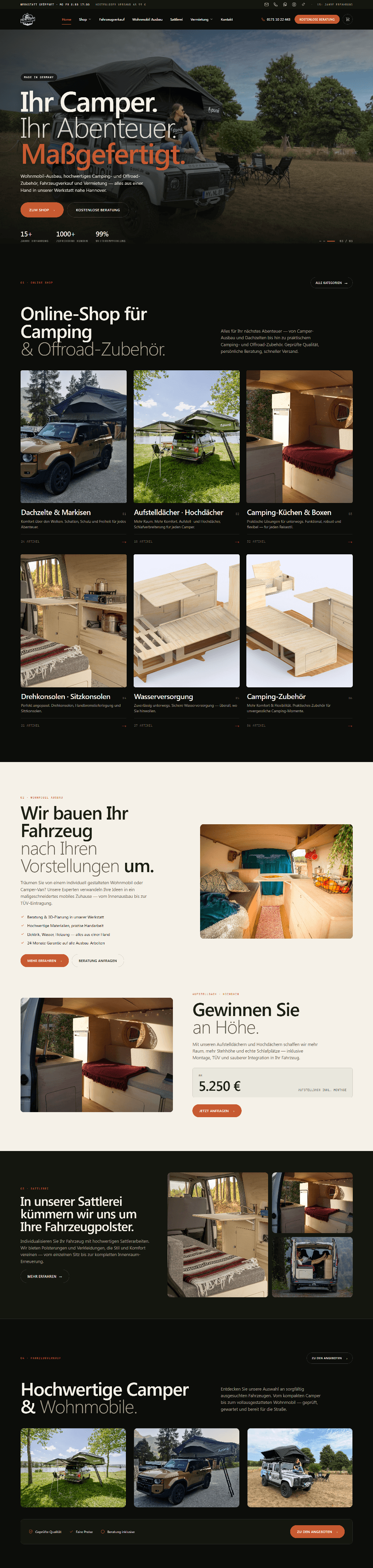
Freizeit Camper represents a different WordPress context, with WooCommerce bringing ecommerce requirements into the wider website experience. Product and commercial content need to coexist with the normal demands of a content-managed site, while analytics and search visibility form part of the broader digital setup.
Here, interface decisions cannot be separated completely from store behaviour. Catalogue structure, product presentation and mobile browsing have to work within WooCommerce rather than being designed as static screens first and treated as an ecommerce implementation problem later.
The broader lesson is that platform relationships matter. Once ecommerce becomes central to the project, WordPress web design, WooCommerce implementation and measurement need to be considered as connected parts of the same environment.
Construction & Repair Work: Keeping a Service-Business Website Proportionate
Construction & Repair Work sits at the more focused end of the spectrum. The project involved a service-business website rather than a large publishing or ecommerce environment, with analytics and search tools included in the wider setup.
In this situation, adding an elaborate CMS architecture simply because WordPress can support one would not make the website better. Clear service presentation, manageable content and a structure appropriate to the size of the business are more useful than unnecessary technical complexity.
That is an important part of scalable web design too. Scalability does not always mean building more. Sometimes it means leaving enough room for the website to grow without burdening the business with systems it does not yet need.
Where WordPress Web Design Is Heading
WordPress design is increasingly centred on reusable systems rather than isolated page layouts. Block-based editing, patterns and structured component libraries can give content teams useful flexibility without requiring every new page to be designed independently.
At the same time, websites are connected to more external systems: CRM platforms, analytics, consent tools, marketing automation, booking services and ecommerce applications. Every additional dependency has an operational cost, so mature WordPress planning involves deciding what not to add as well as what the website needs.
Accessibility, performance and mobile usability are also harder to treat as finishing stages. They influence navigation, component behaviour, content hierarchy and visual decisions from the beginning.
Frequently Asked Questions About WordPress Web Design
What is WordPress web design?
WordPress web design is the process of planning and designing a website that will be managed through WordPress. It can include information architecture, UX, visual design, responsive behaviour, component planning and consideration of how the finished layouts will be managed through the CMS.
Is WordPress good for business websites?
WordPress can work well for many business websites, particularly where content needs to be updated, expanded or managed internally. Its suitability still depends on the required functionality, operational needs and how the platform is implemented.
Is WordPress web design the same as WordPress development?
No. The disciplines overlap, but they solve different parts of the project. Web design focuses on structure, user experience, interface and responsive behaviour. Development focuses on implementing those decisions and building the functionality and technical architecture the website requires.
Do I need custom WordPress web design?
Not necessarily. Custom design is most useful where a business has distinctive UX, brand, content or functional requirements that standardised layouts cannot address well. Straightforward projects may benefit from a simpler approach.
Can an existing WordPress website be redesigned without starting again?
Often, yes. The current theme, templates, content, URLs, plugins and technical condition should be assessed first. Some websites need a substantial rebuild; others can be improved through targeted structural or design changes.
Can a Figma design be converted into WordPress?
Yes. The implementation still needs to define responsive behaviour, CMS editing requirements, interactions, reusable components and functionality that may not be fully represented in static Figma screens.
Should I use Gutenberg or Elementor?
It depends on editing requirements, existing infrastructure and how much visual flexibility the content team needs. Neither tool is automatically the right choice for every project; the component system and publishing workflow matter as much as the editor.
Is WordPress suitable for ecommerce?
WordPress can support ecommerce through WooCommerce. Store projects introduce additional requirements around product architecture, browsing, checkout, payments, integrations and ongoing operations, so they should be planned as ecommerce systems rather than ordinary websites with shopping functionality added later.
How much does WordPress web design cost in the UK?
Cost depends on scope rather than WordPress alone. UX work, custom design, templates, components, content migration, functionality, integrations, ecommerce and the condition of an existing website can all affect the work required.
How long does a WordPress web design project take?
Project length depends on design complexity, content readiness, functionality, integrations, stakeholder approvals and whether an existing website needs to be migrated or restructured. A useful timeline therefore needs to be based on the actual project.
Planning the Right WordPress Web Design Approach
The strongest WordPress projects do not begin with a list of plugins, animations or page-builder features. They begin with what the website needs to communicate, who needs to use it and how the platform is expected to change after launch.
For one business, the appropriate answer may be a deliberately simple WordPress website with a small reusable component set. Another may need custom UX and a substantial content architecture. An established organisation may benefit more from restructuring an existing website than replacing it, while an ecommerce company may need WooCommerce to shape the project from the outset.
Prime Lion Digital approaches WordPress web design around those distinctions rather than treating every project as the same type of build. If you are planning a new WordPress website or assessing what needs to change in an existing one, contact Prime Lion Digital with the current website, project brief or initial requirements so the appropriate design and technical direction can be considered.