
CRM Systems for Bookkeepers in UK
Leave your details and our team will get back to you shortly to discuss your website, SEO or digital growth project.
A CRM system for bookkeepers should make it easier to see what is happening with every enquiry, quote, follow-up and prospective client. It should fit the way the bookkeeping business works, rather than forcing the practice into a generic sales pipeline.
Prime Lion Digital develops custom CRM systems for UK bookkeepers and bookkeeping firms. We map the existing process first — services, enquiries, responsibilities, quoting, follow-up, onboarding and reporting — then design the system around the requirements that genuinely matter.
We do not resell third-party CRM software, and we do not assume custom development is always the right answer. A sole bookkeeper with a manageable enquiry volume may be perfectly well served by email, bookkeeping software and a properly maintained spreadsheet. Bespoke development becomes more relevant when information is fragmented, follow-up is inconsistent, several people are involved or existing software requires repeated workarounds.
Discuss your bookkeeping CRM requirements:
+44 7488 818286
enquiries@primeliondigital.co.uk
A CRM Built Around How Your Bookkeeping Business Actually Works
Bookkeeping practices rarely have identical workflows. One may provide straightforward monthly bookkeeping packages. Another may combine bookkeeping with payroll, VAT support, catch-up work and other finance services. Some enquiries can be priced quickly; others need documents, a conversation or internal review before anyone can prepare a sensible quote.
That operational detail matters. A generic CRM can store a contact and move it through a pipeline, but the useful question is whether that pipeline reflects what actually happens inside the business.
We look at who receives an enquiry, what information is needed, who decides whether the prospect is suitable, how pricing is handled, who owns the next action and what happens when the normal process does not apply. Those decisions shape the CRM.
Enquiry → Qualification → Requirements → Quote → Follow-Up → Decision → Onboarding
Example of a Custom CRM System We Developed
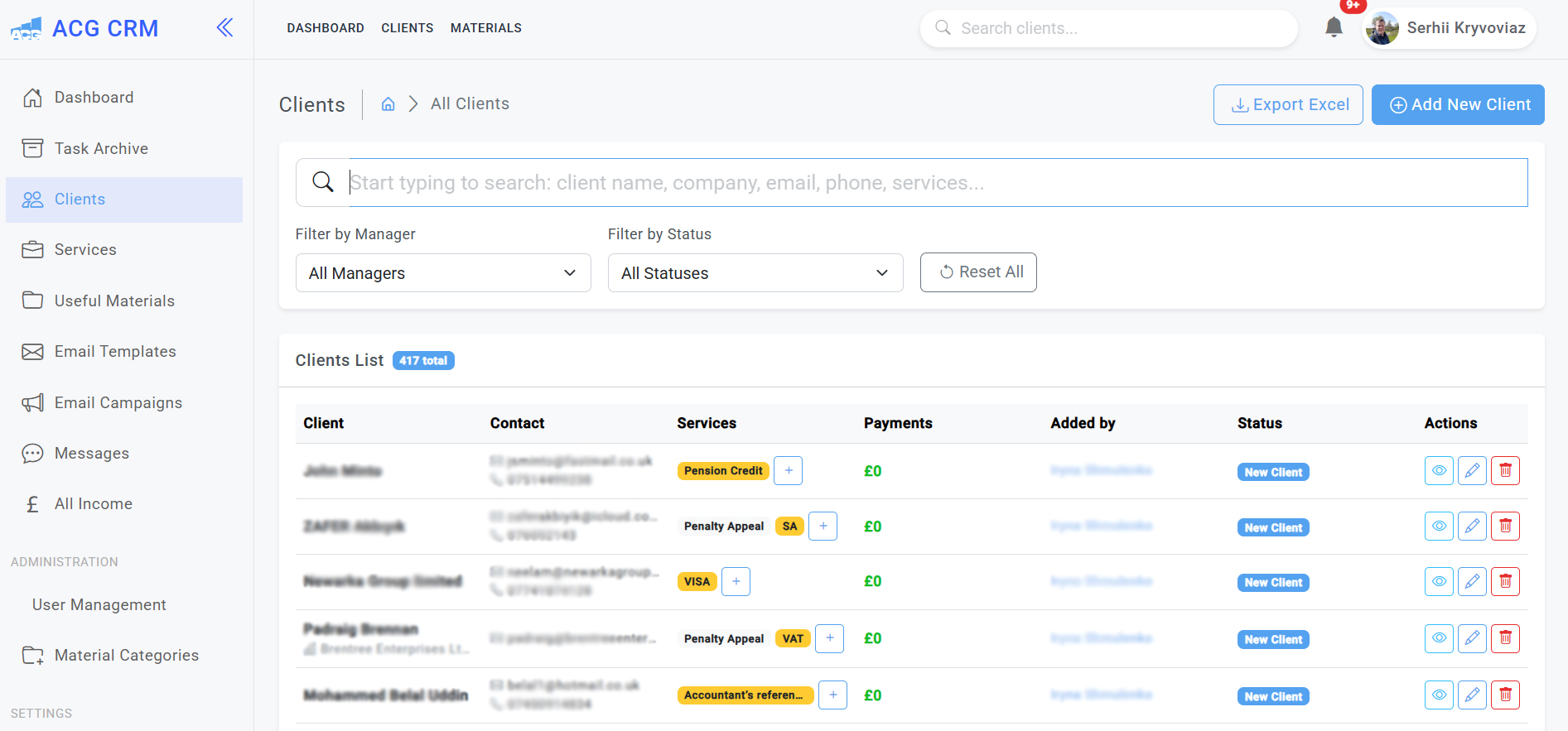
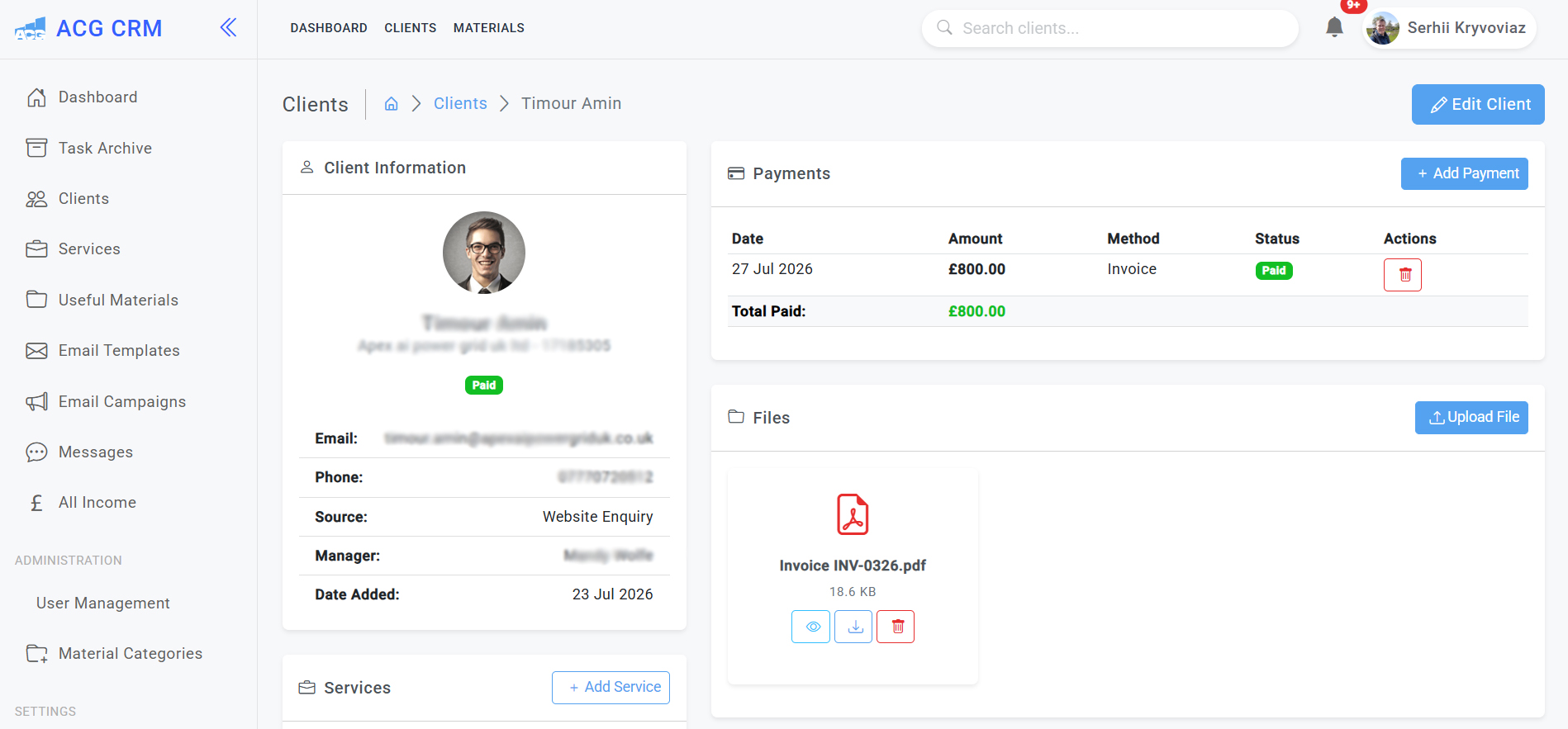
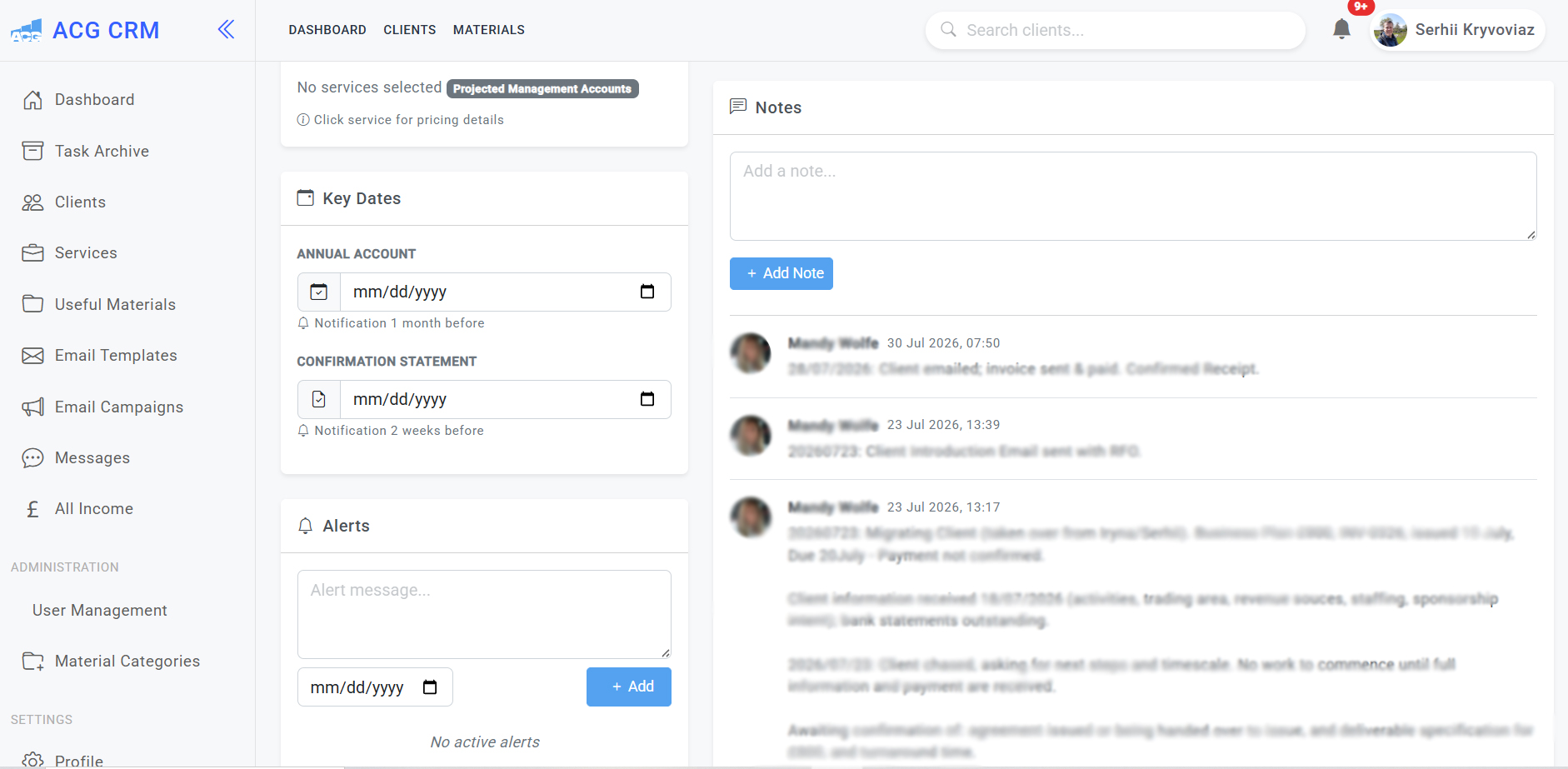
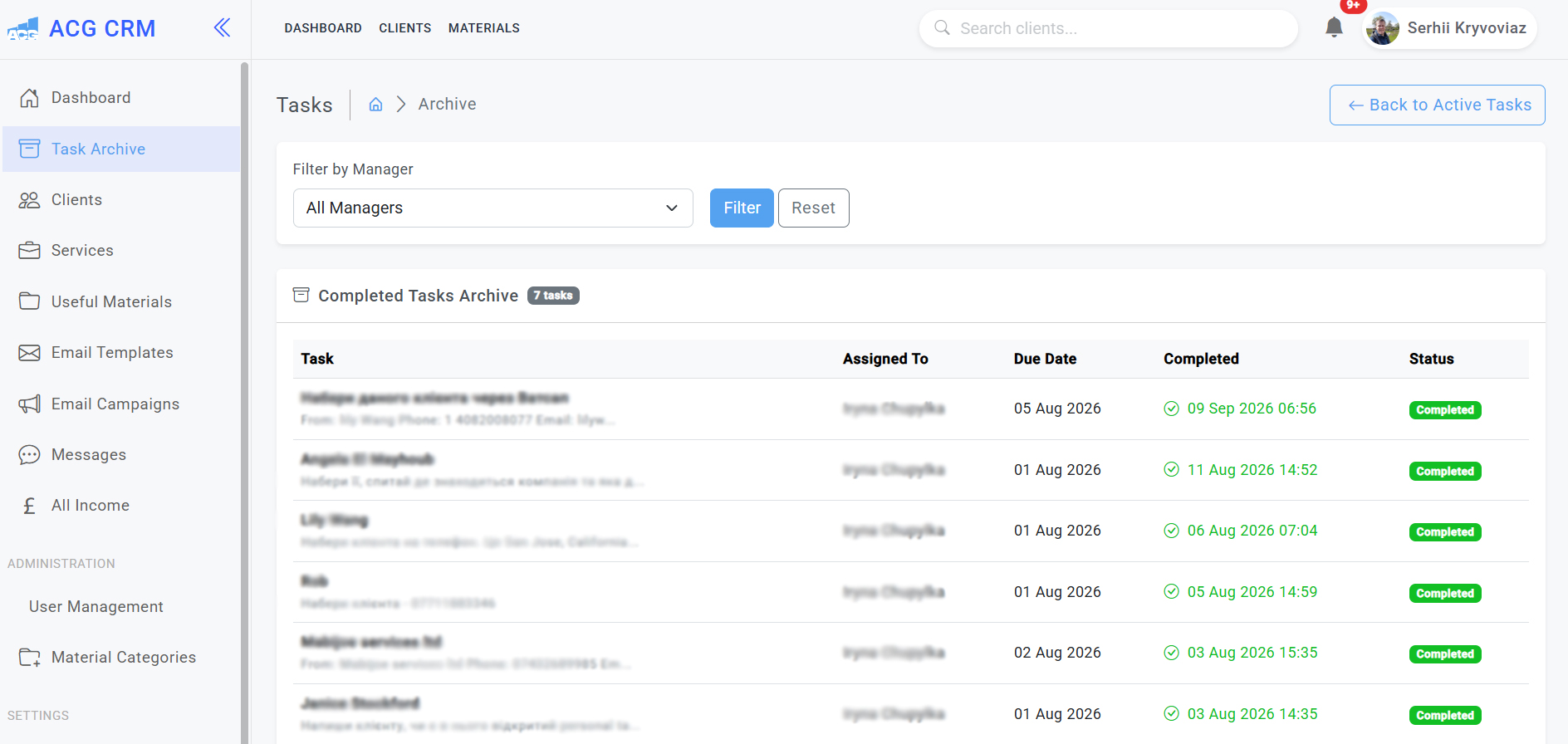
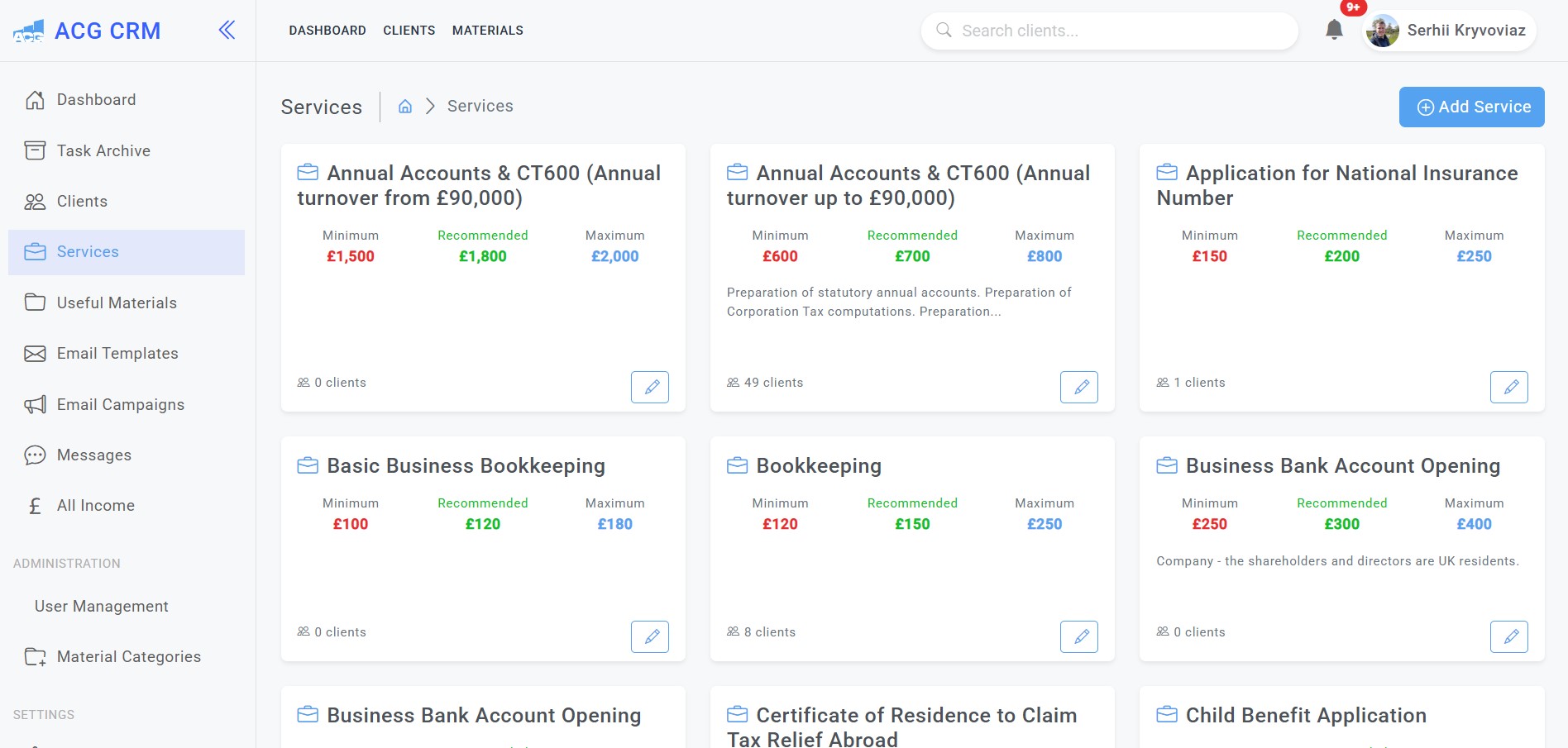
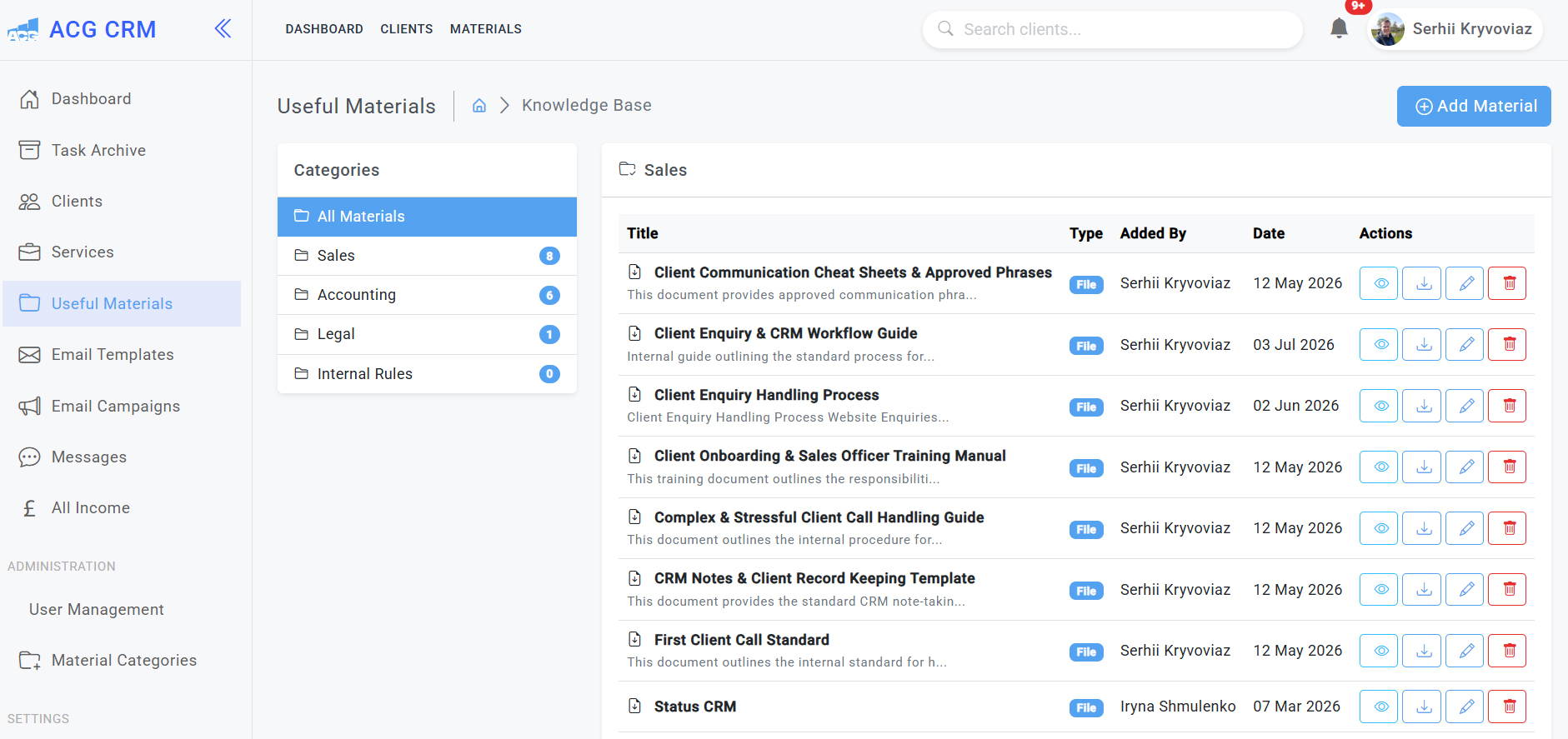
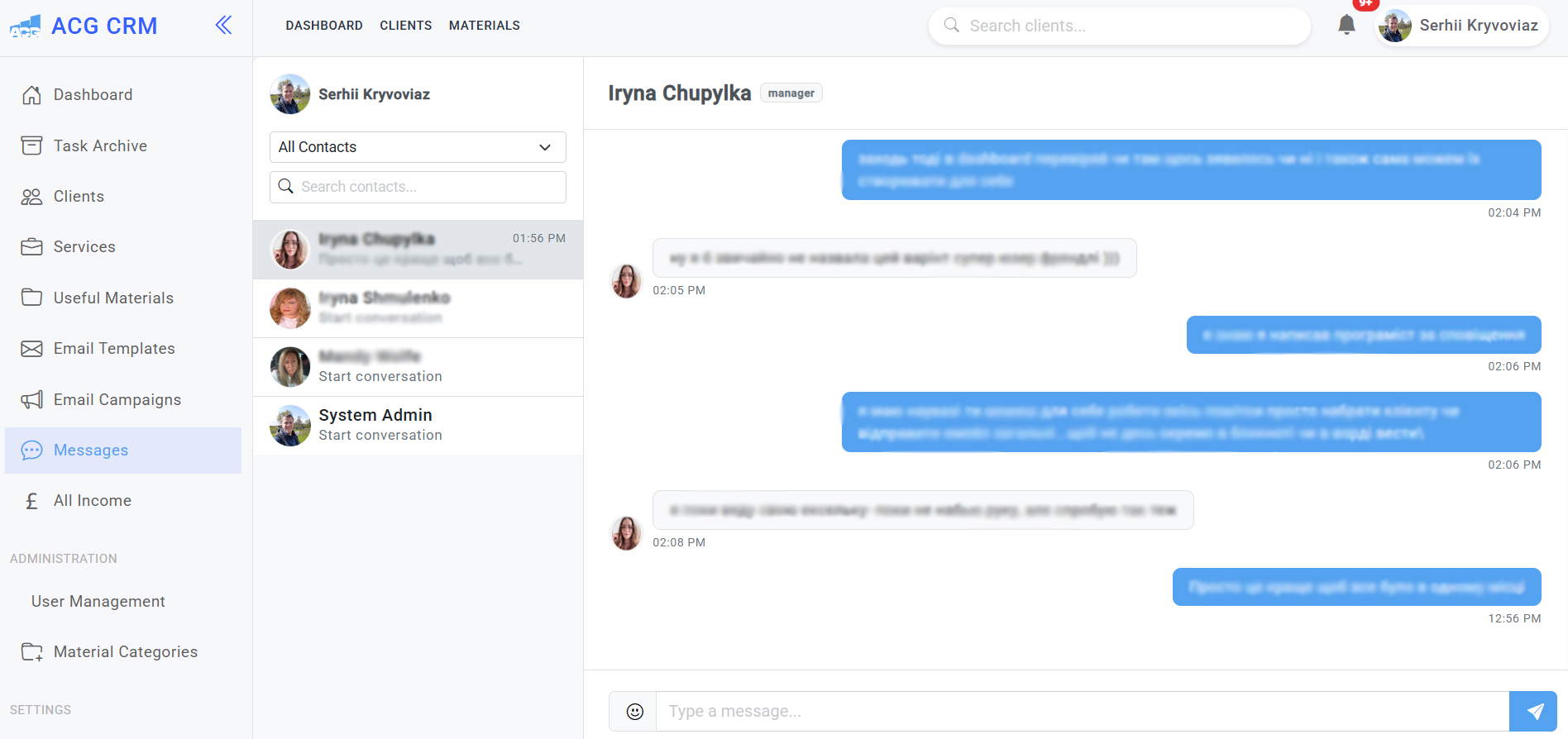
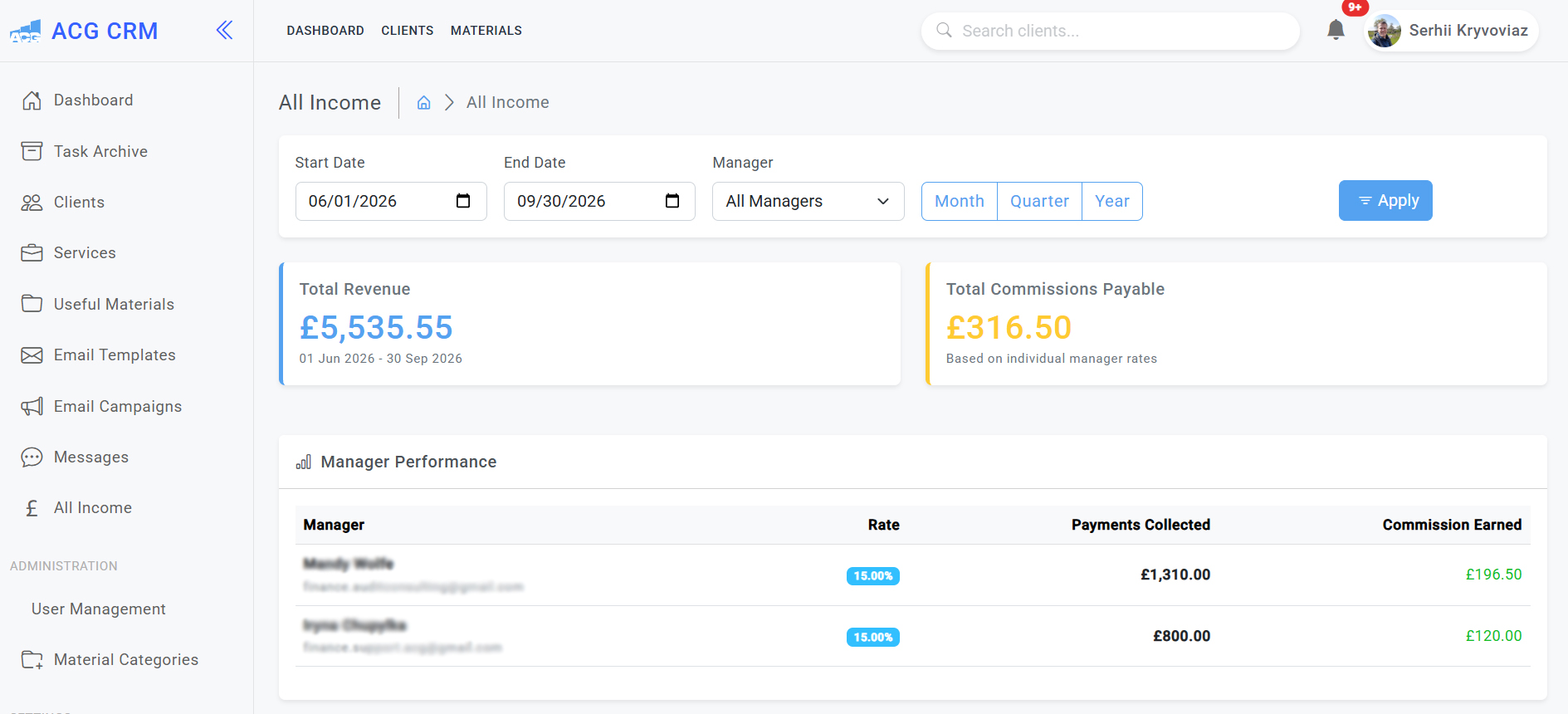
Here is a real example of a custom CRM system developed by Prime Lion Digital for a UK accounting and tax services company. The platform was designed around the company’s day-to-day workflow, bringing client management, services, tasks, payments, internal communication, documents, key dates and reporting into one central system.
The CRM was built specifically around the business requirements rather than adapting the company to a generic off-the-shelf platform. Below are examples of different sections and functionality within the system.
Client Management Dashboard
Client Profile, Payments & Documents
Key Dates, Notes & Alerts
Task Management & Archive
Services & Pricing Management
Internal Knowledge Base & Resources
Internal Team Messaging
Revenue & Commission Tracking
When Does a Bookkeeper Actually Need a CRM?
There is no particular number of clients or employees at which a bookkeeping practice suddenly needs CRM software. The warning signs are usually operational.
Enquiries may be spread across several inboxes. Follow-up dates may live in personal calendars or somebody’s memory. A shared spreadsheet may show a status but not the conversation behind it. Once several people are involved, it can become difficult to answer a simple question: who is responsible for this prospect now?
That is where a structured CRM can start earning its place.
Equally, adding software to a simple, reliable process can create more administration than it removes. Before recommending custom development, it is worth establishing whether the problem is genuinely the system — or whether a smaller process change would solve it.
When Does CRM Become Operationally Useful?
The figures below are illustrative rather than industry benchmarks. They show how relatively small gaps in follow-up can become more significant as enquiry volume increases.
| Monthly Enquiries | Follow-Up Completion | Enquiries Followed Up | Potentially Missed or Delayed | Operational Position |
|---|---|---|---|---|
| 10 | 90% | 9 | 1 | A simple manual process may still be manageable |
| 20 | 85% | 17 | 3 | Reminders and clearer status tracking become useful |
| 40 | 80% | 32 | 8 | Manual follow-up starts creating noticeable gaps |
| 60 | 80% | 48 | 12 | Central ownership and next-action tracking become more important |
| 100 | 85% | 85 | 15 | A structured CRM workflow can become operationally significant |
Illustrative examples only. These figures are not UK bookkeeping industry benchmarks. Actual CRM requirements depend on workflow complexity, team structure and how enquiries are currently managed.
What Should a CRM for Bookkeepers Manage?
The scope should reflect the practice. A bookkeeping CRM does not need every feature found in enterprise sales software; it needs enough structure to control the parts of the client journey that matter.
New Enquiries and Lead Capture
Website forms, telephone enquiries, referrals and other lead sources can be brought into one operational view. The record might contain the enquiry source, services required, business details, assigned person, current status and next action.
Qualification and Service Requirements
Not every enquiry is suitable. A consistent qualification process helps the team record what the prospect needs, what information is missing and whether the practice can realistically take the work on.
Quotes and Proposals
Where pricing is sufficiently structured, the CRM can support quote preparation, approval and status tracking. More complex work can still be reviewed by the appropriate person rather than being forced through an automated calculation.
Follow-Up and Next Actions
This is often where a relatively simple CRM creates the most practical value. Who needs to contact the prospect? When? What are we waiting for? Has the quote been sent? Has anyone responded?
Client Onboarding
Once a prospect accepts, the record can move into the appropriate onboarding process. Depending on the practice, that may involve engagement documentation, identity checks, information requests, system access or hand-off to the person responsible for ongoing work.
Team Responsibilities
Shared visibility becomes more important as a practice grows. Clear ownership reduces duplicated work and makes it less likely that an enquiry is left untouched because everybody assumed somebody else was handling it.
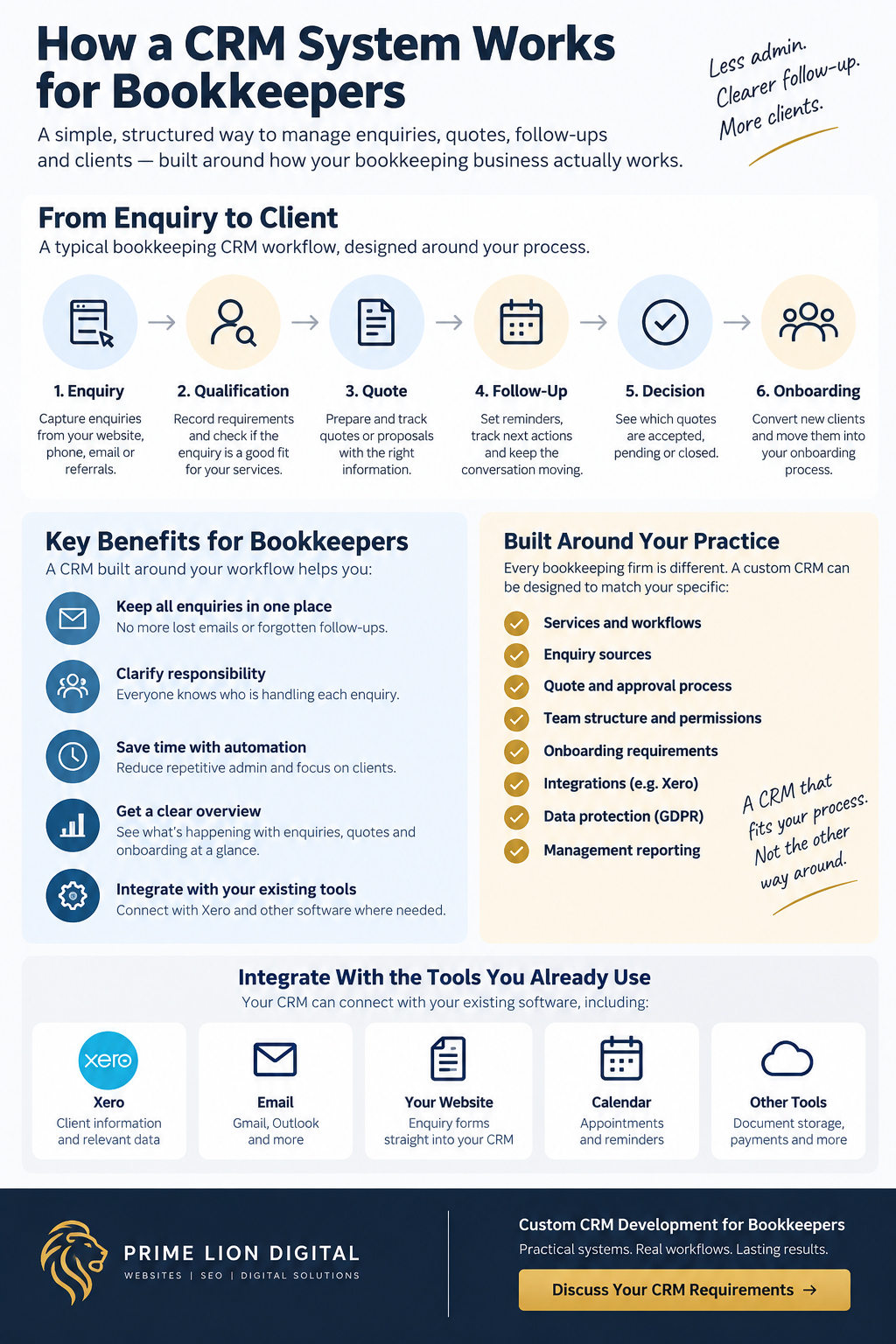
CRM vs Bookkeeping Software: What Is the Difference?
Xero, QuickBooks, FreeAgent and similar platforms perform a different core role from a CRM.
Bookkeeping software is primarily concerned with financial records and accounting processes. CRM software deals with the relationship and workflow around a prospect or client: how an enquiry arrived, what the person needs, who owns the conversation, whether a quote has been issued and what needs to happen next.
For many practices, there is no reason to recreate bookkeeping functionality inside a CRM. The better objective is to create a clear operational layer around acquisition, follow-up and onboarding while allowing specialist financial systems to continue doing the jobs they were designed for.
Off-the-Shelf vs Custom CRM for Bookkeepers
Custom does not automatically mean better.
If an established CRM already matches the workflow, offers the integrations the business needs and can be configured without creating awkward workarounds, using it may be quicker and less expensive than commissioning bespoke software.
The case for custom development becomes stronger when the practice repeatedly has to work around the product. Typical signs include maintaining a second spreadsheet because the CRM cannot represent important information, copying the same details between systems, using pipeline stages that do not match the real process or paying for a large platform while relying on a small fraction of it.
A useful way to think about the decision is:
Existing software fits the workflow → configure it.
Existing software mostly fits → configure or integrate it.
Repeated workarounds are becoming part of the workflow → investigate whether custom development is justified.
The aim is not to build bespoke software for the sake of owning bespoke software. It is to remove an operational constraint that existing tools cannot solve sensibly.
Illustrative CRM Requirements Fit
A useful CRM decision is not simply custom versus off-the-shelf. The proportion of requirements already covered by existing software can help frame the discussion.
| Illustrative Requirements | Existing Software Covers | Unresolved Requirements | Likely Direction to Investigate |
|---|---|---|---|
| 20 | 19 (95%) | 1 | Configure the existing system |
| 20 | 17 (85%) | 3 | Configuration may be sufficient |
| 20 | 14 (70%) | 6 | Configuration plus integration may be worth exploring |
| 20 | 10 (50%) | 10 | Compare integration, workarounds and custom development |
| 20 | 6 (30%) | 14 | Custom CRM may deserve serious consideration |
Illustrative decision-support example only. A percentage alone should not determine the technology choice: the importance of each requirement, implementation cost, integrations and operational consequences also matter.
Define the Workflow Before Choosing the Features
Feature lists are an easy place to start a CRM discussion. They are rarely the best place.
Take automated emails. Which email should be sent? What event triggers it? Should it always be automatic? Who needs to know it was sent? What happens when the enquiry falls outside the normal process?
Those questions reveal far more than a checkbox marked “email automation”.
We prefer to work through the system in this order:
People → Process → Information → Exceptions → Integrations → Reporting → Software
This also exposes the awkward cases. A straightforward monthly bookkeeping enquiry might follow a standard route, while a prospect needing catch-up bookkeeping, payroll and VAT support could require additional information and internal review before anybody approves a quote. A useful CRM needs to handle both without making the everyday process unnecessarily complicated.
From Website Enquiry to Bookkeeping Client
A CRM becomes particularly useful when the point of enquiry connects cleanly with what happens afterwards.
A prospect may find the practice through Google, follow a recommendation or visit the website directly. Without a structured workflow, their form submission can arrive in a shared mailbox, be forwarded to somebody else and later appear as another row in a spreadsheet.
Where appropriate, the website can instead create the CRM record once, retain the relevant enquiry and source information, assign responsibility and establish the next action.
That creates a natural connection with the wider acquisition system. Our web design for bookkeepers and SEO for bookkeepers services address earlier parts of the journey; the CRM helps organise what happens when an opportunity reaches the business.
CRM Quoting and Proposal Workflows
Quoting is a good example of why bookkeeping CRM requirements need to be mapped rather than assumed.
A standard monthly service may have relatively predictable pricing. Catch-up bookkeeping can depend on the volume and condition of the records. A prospect asking for several services may need a combined estimate, while another quote might require approval before it can be sent.
A custom system can support the administrative parts of this process: recording estimated work, preparing quote information, tracking approval, showing whether a proposal has been sent and surfacing open quotes that need attention.
Professional judgement can remain exactly where it belongs — with the person responsible for assessing the work.
CRM Automation: What Should — and Should Not — Be Automated
Automation is most useful when the rule is clear and the consequences are predictable.
Creating a follow-up task after a quote is sent is relatively straightforward. The same may be true of assigning an enquiry according to an agreed service category or creating an internal reminder when no action has been recorded for a defined period.
Unusual client circumstances, complex scopes and sensitive communications are different. They may need somebody to look at the facts before deciding what happens next.
The objective is therefore selective automation: remove repeatable administration without removing necessary judgement.
Connecting a CRM With Xero and Existing Systems
Most bookkeeping practices already have a technology stack. There may be a website, Xero or another bookkeeping platform, email, calendars, document storage, payment systems and spreadsheets containing years of useful information.
An integration should start with a business question rather than the name of an application.
For example, asking for a CRM system with Xero integration does not yet define the requirement. Does the team need to know whether a contact already exists? Which client details need to be visible? Should information move in one direction or both? Which system remains authoritative when the same field contains different values?
Technical feasibility depends on the available APIs, permissions, data structures and the exact information that needs to move. We establish those points before promising an integration or designing a workflow around it.
CRM Requirements Checklist for a Bookkeeping Business
A useful CRM requirements checklist describes the business before it describes the interface.
- Users, roles and access permissions.
- Enquiry sources, service types and qualification information.
- Pipeline stages, responsibilities and next actions.
- Quote, proposal and approval requirements.
- Automation, integrations and reporting needs.
- Historical data that needs to be cleaned or migrated.
- Exceptions that do not follow the standard workflow.
Another useful framework is:
Users → Workflow → Records → Statuses → Permissions → Automation → Integrations → Reporting → Migration
This exercise often changes the eventual specification. Features that initially appear essential can turn out to solve no meaningful problem, while small operational gaps can become central to the project.
Not sure what belongs in the specification? We can map the existing process before development and separate essential requirements from functionality that can wait.
Client Data, Permissions and GDPR Considerations
A bookkeeping CRM can contain names, contact details, correspondence, service requirements and other information relating to prospects and clients. Data protection therefore needs to be considered during system design, not added as a compliance statement at the end.
The practical questions include what data is collected, who can see or change it, how users authenticate, what activity needs to be logged, where information is stored and how retention or deletion requirements are handled.
The controls required will depend on the system and the organisation using it.
A CRM can be designed to support a bookkeeping firm’s data-protection processes, but software alone does not make an organisation GDPR compliant. Lawful processing, internal policies, staff behaviour and wider organisational controls still matter.
Reporting That Shows What Is Happening With Enquiries
A dashboard is useful only if it answers a question somebody actually needs to ask.
For a bookkeeping practice, that might mean understanding how many enquiries have arrived, which services they relate to, where they came from, how many are waiting for a response, which quotes remain open and where opportunities tend to stop progressing.
That distinction can affect commercial decisions. Healthy enquiry volume combined with poor follow-up points to a different problem from consistent follow-up and very few suitable prospects. The first may need better operational control; the second may sit earlier in the acquisition journey.
The CRM provides evidence. The business still has to interpret it.
CRM for a Sole Bookkeeper vs a Growing Bookkeeping Firm
A sole bookkeeper may need little more than contact details, enquiry source, service required, status, notes and a reliable next-action date.
A small team has different pressures. Shared ownership, activity history and clear hand-offs become more useful. As the practice grows further, role-based permissions, multiple workflows, quote approvals, integrations and management reporting may become justified.
Complexity should be earned by a real requirement. Building enterprise-style functionality into a small practice because it might be useful one day usually makes the system more expensive to develop and harder to use now.
Migrating From Spreadsheets or an Existing CRM
Migration is rarely as simple as importing a file.
Old records may contain duplicates, inconsistent service names, incomplete details or statuses that nobody uses consistently anymore. Moving all of that into a new CRM without review simply gives the old data problems a new interface.
We first determine which information is worth retaining, how it maps to the new structure and what should be cleaned before migration.
There is also a practical cutover decision. At some point, the old system must stop being the authoritative record and the new CRM must take over. If users are unclear about that moment, parallel spreadsheets and duplicate records can appear almost immediately.
How We Develop CRM Systems for Bookkeepers
Understand the Current Process
We start with the way the practice actually works. Existing forms, spreadsheets, inboxes and software often tell us more than a feature wishlist because they reveal where people have created their own workarounds.
Map Requirements and Exceptions
Users, records, stages, permissions, responsibilities and common exceptions are mapped before development. Integrations and reporting requirements are considered at the same stage.
Design the CRM Architecture
The workflow is translated into the system structure and user experience. Common actions should be straightforward, but users still need enough context to make decisions when an enquiry does not follow the normal path.
Develop and Test
Development follows the agreed scope. Testing covers the core workflow, permissions, data handling and relevant integrations, using realistic scenarios rather than only the ideal journey.
Migrate Relevant Data
Where migration forms part of the project, agreed historical information is prepared and transferred into the new structure. The approach depends on the source data, its quality and the amount that needs to be retained.
Launch, Review and Refine
Real day-to-day use usually exposes small improvements that were difficult to see during specification. Adoption matters. A technically capable CRM has limited value if users find it easier to keep their own parallel records.
Real CRM Project and Practical Bookkeeping Scenarios
Related UK Accounting and Tax CRM — Real Operational Project
Prime Lion Digital developed a custom CRM for a UK accounting and tax business where growing enquiry volume created a need for clearer operational control.
The system was built around the organisation’s actual workflow rather than a generic sales pipeline. Defined statuses included NEW CLIENT → IN PROGRESS → PAID → COMPLETED → ON HOLD → UNDER SUPPORT, while the wider process covered initial response, review and estimation, agreement and invoice, delivery and completion.
This gave the business a central operational view of work moving through the organisation and reduced reliance on disconnected records.
The wider digital acquisition project reached approximately 4,000 monthly organic visitors, alongside 100+ website enquiries and 30+ telephone enquiries recorded in a month. These are outcomes from the broader website and acquisition work, not results generated by the CRM. Their relevance is practical: once inbound volume reaches that level, ownership, status visibility and consistent follow-up become increasingly important.
Operational Context From a Related UK Accounting and Tax Project
| Metric | Recorded Level | Approx. Weekly Equivalent | Why It Matters Operationally |
|---|---|---|---|
| Monthly Organic Visitors | Approx. 3,000 | Approx. 690 | Creates a meaningful volume of potential client journeys to monitor |
| Website Enquiries | 100+ | Approx. 23+ | Requires consistent ownership, status tracking and follow-up |
| Telephone Enquiries | 30+ | Approx. 7+ | Offline enquiries also need to enter the same operational process |
| Website Enquiry Rate | Approx. 3.3%+ | — | Shows why acquisition data and CRM workflow need to remain clearly distinguished |
Figures relate to the wider Prime Lion Digital website and acquisition project for a UK accounting and tax business. Weekly equivalents are mathematical approximations based on monthly figures. The acquisition results were not generated by the CRM itself.
Illustrative Scenario: A Sole Bookkeeper Moving Beyond Email
Consider a sole bookkeeper receiving enquiries through the website, telephone calls and referrals. At a modest volume, email and a spreadsheet may work perfectly well. The problem starts when follow-up dates are kept mentally, older prospects disappear down the inbox and reconstructing a previous conversation takes longer than it should.
A proportionate CRM might contain only a central enquiry record, service requirement, status, notes and next-action date. The useful measure would be operational rather than a fabricated sales percentage: can every active enquiry be identified quickly, and is the next action clear?
Illustrative Scenario: A Growing Bookkeeping Firm Moving From a Shared Spreadsheet
A growing practice can reach a different limit. Several people may update the same spreadsheet while the conversations themselves remain in separate inboxes. When a prospect needs input from more than one person, ownership becomes harder to see.
A shared CRM could introduce defined responsibility, activity history, quote status, next actions and different workflows for common service types. Management would then have one operational view rather than reconciling several partial versions of the same client journey.
Any commercial improvement would need to be measured against real operating data after implementation. The immediate objective is more basic, and more important: create a system the team can rely on.
Common CRM Problems in Small Service Businesses
The most expensive CRM problem is not always missing functionality.
Sometimes there are so many fields that users stop maintaining the system properly. Sometimes every enquiry is forced through the same pipeline even though different services require different decisions. Elsewhere, automation has been added without deciding who remains responsible when something unusual happens.
A parallel spreadsheet is another warning sign. If a business owns a CRM but still needs a separate spreadsheet to understand what is happening, either important requirements were missed or the system is too awkward to maintain reliably.
Reporting can expose the same weakness. A polished dashboard built on inconsistent statuses creates false confidence rather than useful management information.
Good CRM design involves restraint as well as functionality.
What Does a CRM System for Bookkeepers Cost?
The cost of a custom CRM depends on what it needs to do. A focused system for enquiry management and follow-up is a different development project from a multi-user platform involving several workflows, quoting, permissions, data migration, automation, reporting and external integrations.
Prime Lion Digital therefore defines the requirements before confirming scope and price. This also gives us an opportunity to identify functionality that would add development cost without solving a meaningful business problem.
In some cases, an existing SaaS product will be the more economical choice. Where custom development is justified, the investment should go into functionality the practice genuinely needs rather than recreating every feature available in a large commercial CRM platform.
How Long Does a Custom Bookkeeping CRM Take to Build?
Timescale is affected by more than the number of screens. Workflow complexity, integrations, data migration, user roles, permissions, testing requirements and the speed at which business decisions can be confirmed all matter.
A focused enquiry-management system and a CRM connecting several operational workflows are therefore very different projects.
The requirements stage also affects delivery. Questions such as who can change a status, which system owns a particular piece of data or what happens when an enquiry takes an unusual route may appear minor, but unresolved decisions tend to reappear during development.
We establish the main scope, dependencies and implementation stages before development rather than attaching a standard timeframe to the word “CRM”.
Frequently Asked Questions
What is a CRM for bookkeepers?
A CRM for bookkeepers organises the relationships and workflows around prospective and existing clients. Depending on the practice, it can manage enquiries, qualification, service requirements, quotes, follow-up, responsibilities and onboarding.
Does a sole bookkeeper need a CRM?
Not necessarily. If enquiries are manageable and the current process is reliable, email, bookkeeping software and a simple spreadsheet may be sufficient. A CRM becomes more useful when follow-up, visibility or shared record-keeping starts becoming difficult to control.
What should a bookkeeping CRM include?
Common requirements include enquiry capture, contact records, service requirements, statuses, ownership, notes, next actions, quoting, onboarding, permissions and reporting. The final specification should reflect the practice rather than a predetermined feature list.
What is the difference between CRM and bookkeeping software?
Bookkeeping software primarily manages financial records and accounting processes. CRM software manages the relationship and workflow around prospects and clients. They can potentially exchange information, but they perform different core roles.
Is custom CRM better than off-the-shelf CRM software?
No. Off-the-shelf software can be the better choice when it already fits the workflow and provides the required functionality at a sensible cost. Custom development is most relevant where genuine operational requirements cannot be handled efficiently by existing products.
Can a CRM integrate with Xero?
Potentially. The scope depends on the information that needs to move, available APIs, permissions and the intended workflow. The integration requirements should be defined before development is confirmed.
Can website enquiries go directly into the CRM?
Yes, where this is part of the agreed architecture. A website enquiry can potentially create or update a CRM record, retain relevant source information and trigger the appropriate next step.
Can a CRM create or manage quotes?
Yes. Depending on the requirements, it can support quote information, approvals, status tracking and follow-up. Where pricing requires professional judgement, the CRM can support that process without attempting to replace the decision-maker.
Can a CRM automate client follow-up?
Certain activities can be automated, including reminders and predefined administrative actions. Whether client communication itself should be automated depends on the circumstances and the amount of human review required.
How should GDPR be considered when developing a CRM?
Data collection, access, retention, security and other data-protection requirements should be considered during system design. CRM functionality can support a firm’s GDPR processes, but software alone does not make the organisation GDPR compliant.
Can you migrate data from spreadsheets or an existing CRM?
Yes, where migration is included in the scope. Existing data should normally be reviewed and mapped before import so that duplicates, obsolete information and inconsistent fields are not simply transferred into the new system.
How much does a CRM system for bookkeepers cost?
Pricing depends on workflow complexity, users, functionality, integrations, migration, automation and reporting requirements. Prime Lion Digital maps the requirements before confirming the project scope and fee.
How long does a custom bookkeeping CRM take to develop?
The timescale depends on the agreed scope. Integrations, data migration, multiple user roles, permissions and more complex workflows can all increase the amount of design, development and testing required.
Build a CRM Around Your Bookkeeping Business
A CRM should not give a bookkeeping practice another system to maintain for the sake of it. It should make important information easier to see, clarify responsibility and provide a reliable structure for the parts of the client journey that currently depend on disconnected tools or manual follow-up.
Prime Lion Digital can review how enquiries and prospective clients move through your business, map the requirements and determine whether custom development is justified. Where the wider website, SEO and acquisition journey also needs attention, our digital services for bookkeepers and bookkeeping firms connect those areas around the same client journey.
Discuss your CRM requirements with Prime Lion Digital
+44 7488 818286
enquiries@primeliondigital.co.uk