
CRM Systems for Accountants and Accounting Firms
Leave your details and our team will get back to you shortly to discuss your website, SEO or digital growth project.
A CRM for accountants should do more than store contact details. It should give your practice a clear view of every prospective client, what they need, who is responsible for the next action and where they are in the journey from first enquiry to engagement.
Prime Lion Digital designs and develops CRM systems for UK accountants, chartered accountants and accounting firms around the way the practice actually works. We map the process first, then build the system around enquiries, qualification, estimates, proposals, follow-up, onboarding and internal responsibilities.
The principle is simple: the workflow should define the CRM, not the other way around.
A CRM Built Around How Your Accounting Practice Actually Works
Two accounting firms can offer similar services and still manage new business very differently. One may have a partner review every enquiry before a quote is issued. Another may use a client manager to qualify prospects before work reaches an accountant. A larger practice might route opportunities by service, specialist team or client type.
That is why a generic pipeline such as “Lead → Opportunity → Won” often tells only part of the story.
Before deciding what the CRM needs to do, we look at what actually happens. Who receives a new enquiry? What information is needed to qualify it? Who prepares an estimate? What happens when a prospect does not respond? When does responsibility move from the person handling the enquiry to the team delivering the work?
Those decisions shape the system far more usefully than starting with a long feature list.
Example of a Custom CRM System We Developed for an Accounting Firm
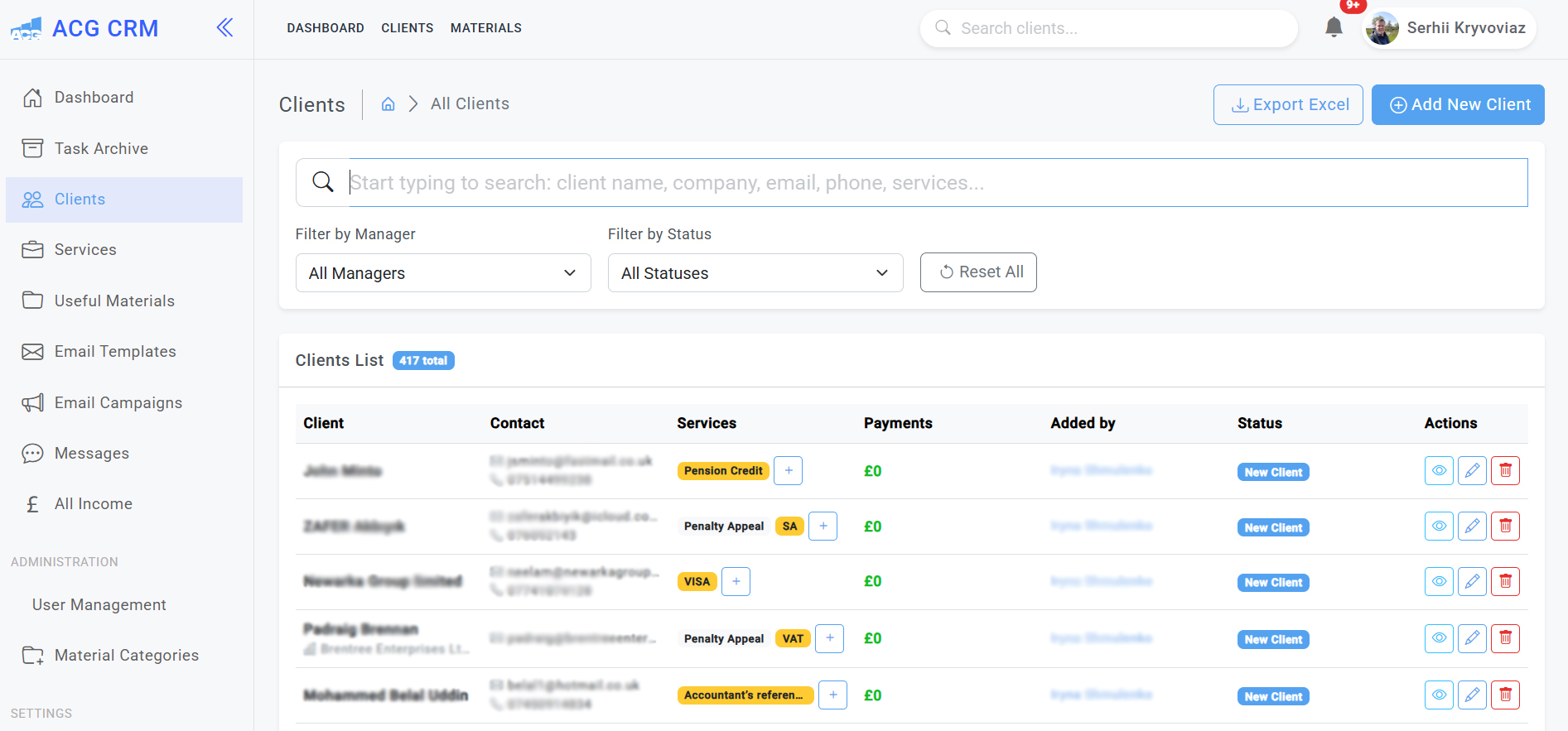
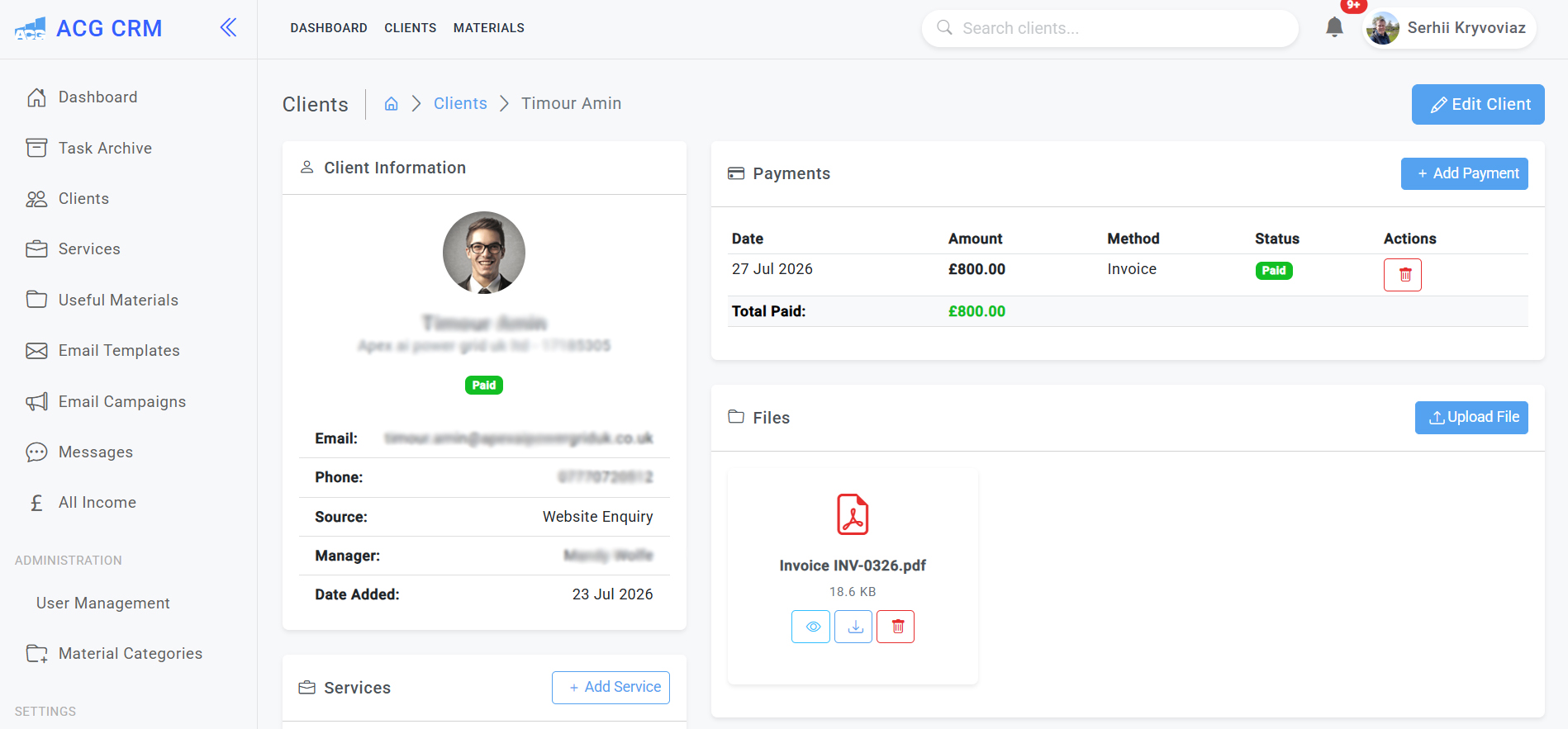
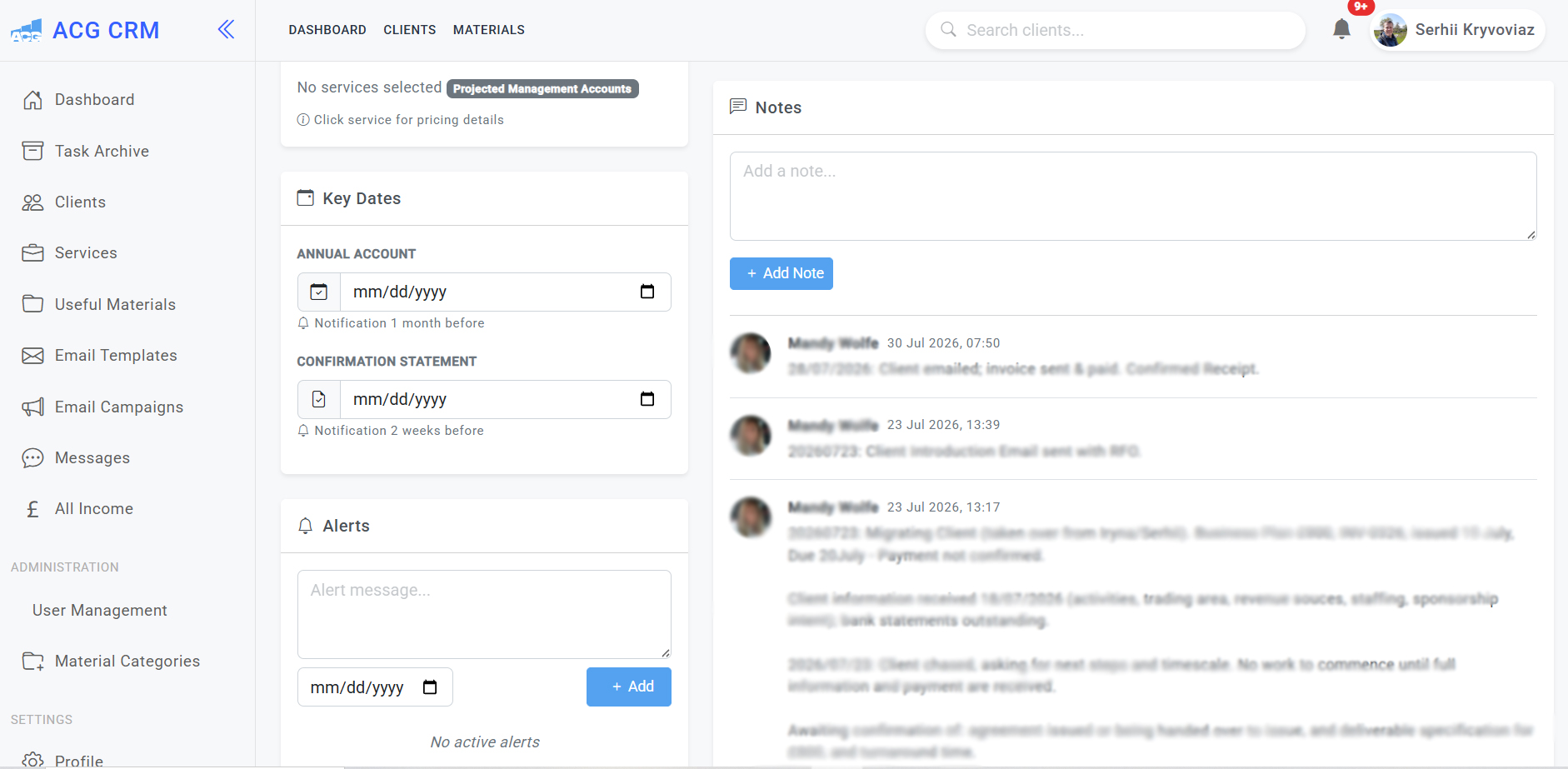
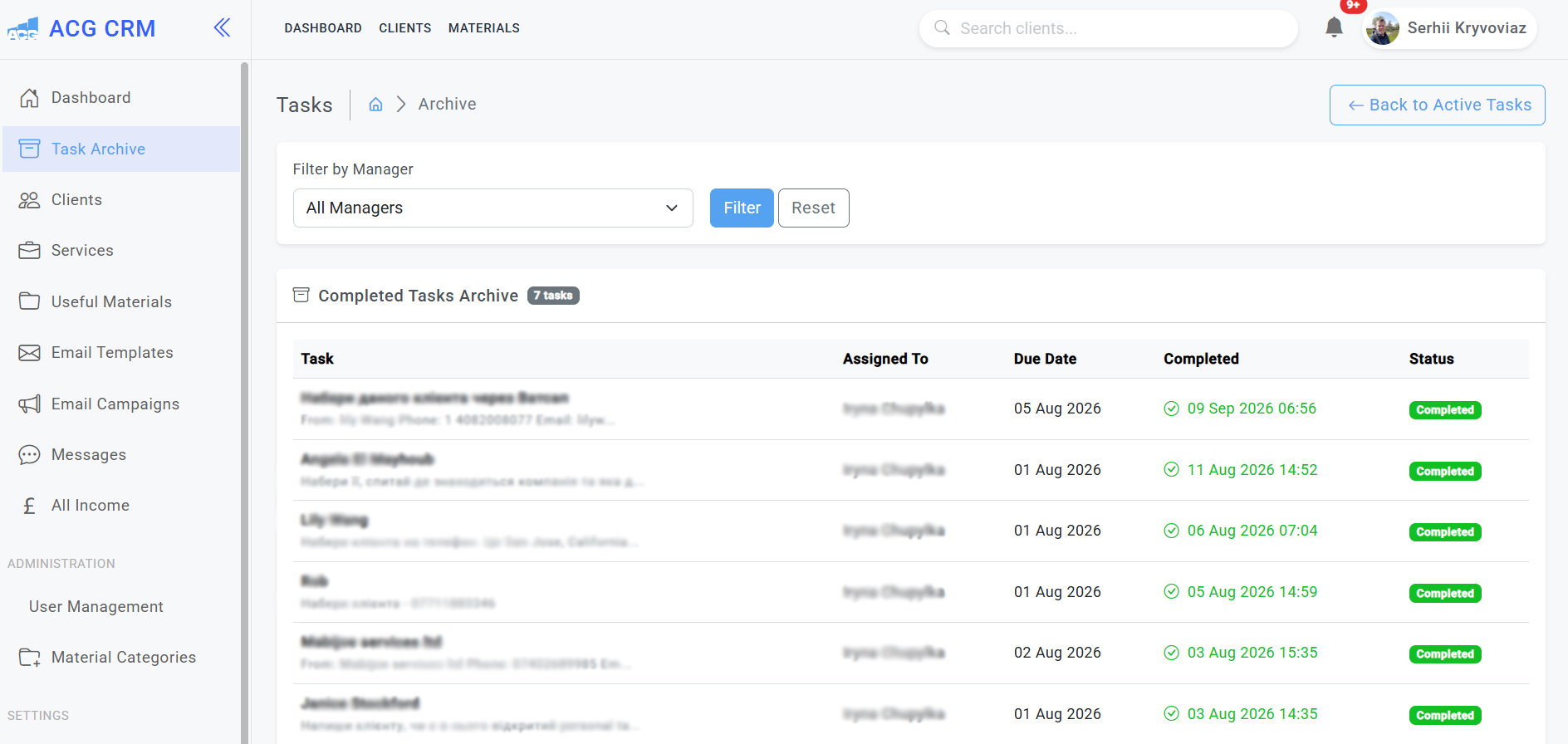
Below is a real example of a custom CRM system developed by Prime Lion Digital for a UK accounting and tax services company. The platform was built around the firm’s actual day-to-day processes, bringing client management, services, tasks, payments, documents, internal communication, key dates, reminders and management reporting into one central system.
Rather than adapting the accounting practice to a generic off-the-shelf CRM, we designed the system around its existing workflow, responsibilities and client journey. The examples below show some of the key sections and functionality developed for the platform.
Client Management Dashboard
Client Profile, Payments & Documents
Key Dates, Notes & Alerts
Task Management & Archive
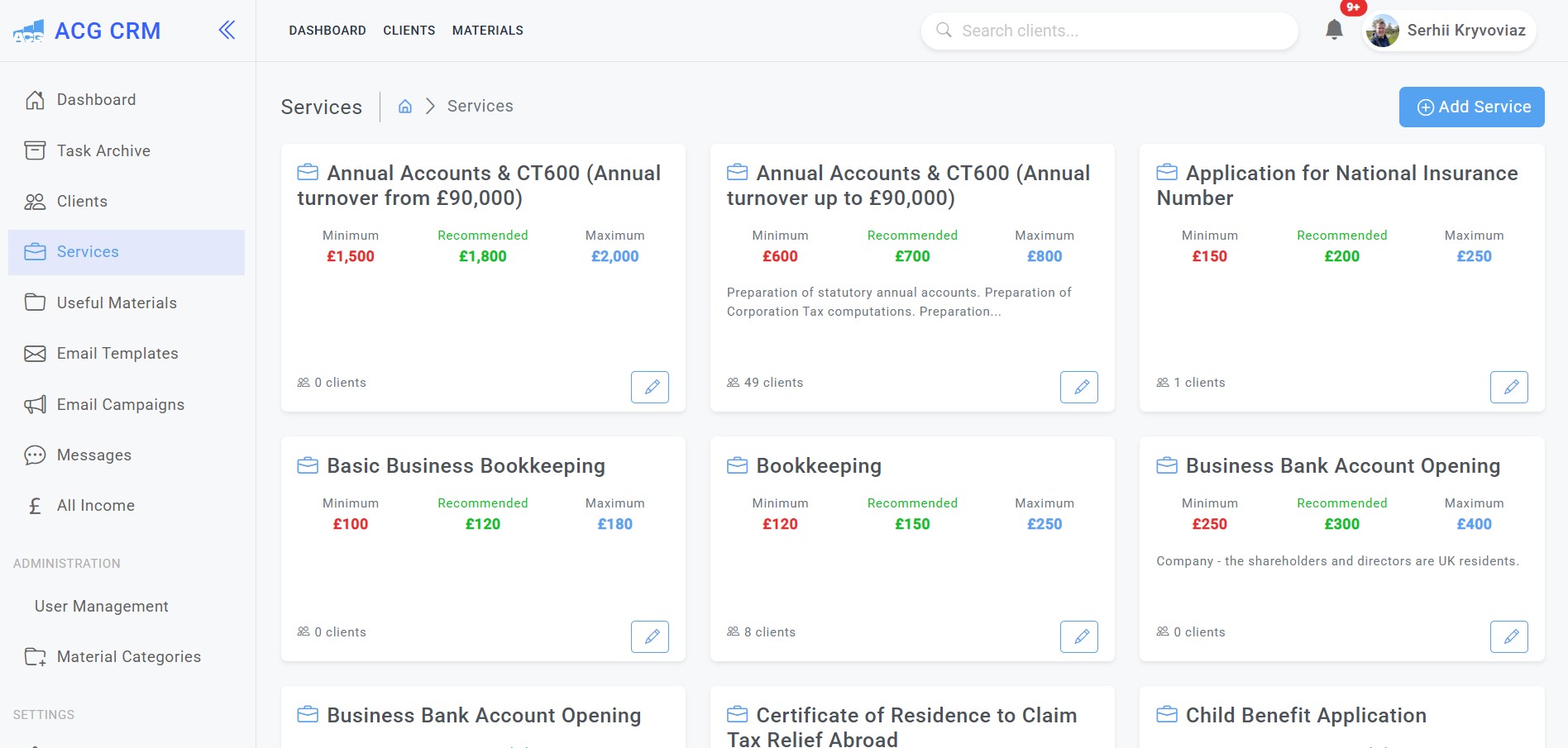
Services & Pricing Management
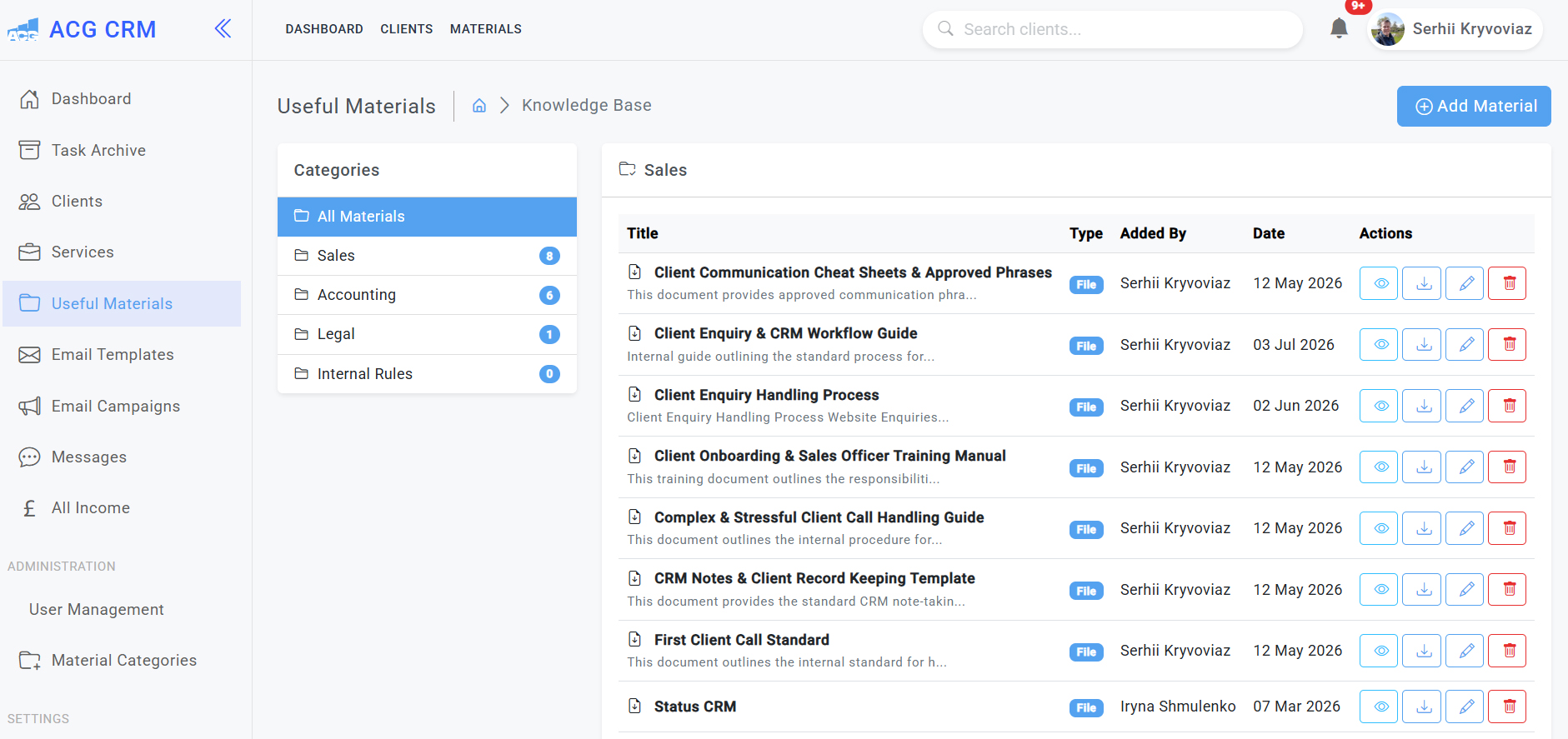
Internal Knowledge Base & Resources
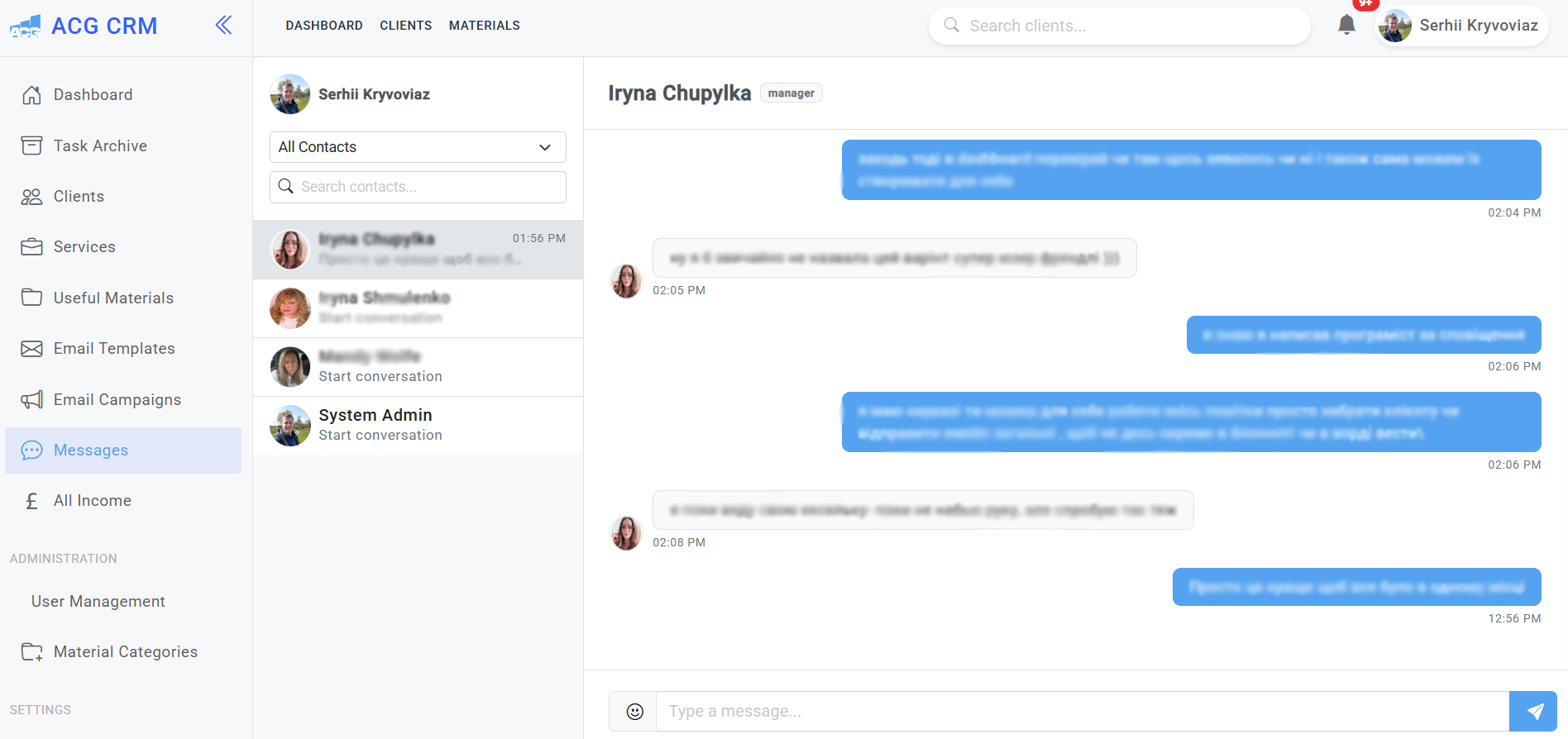
Internal Team Messaging
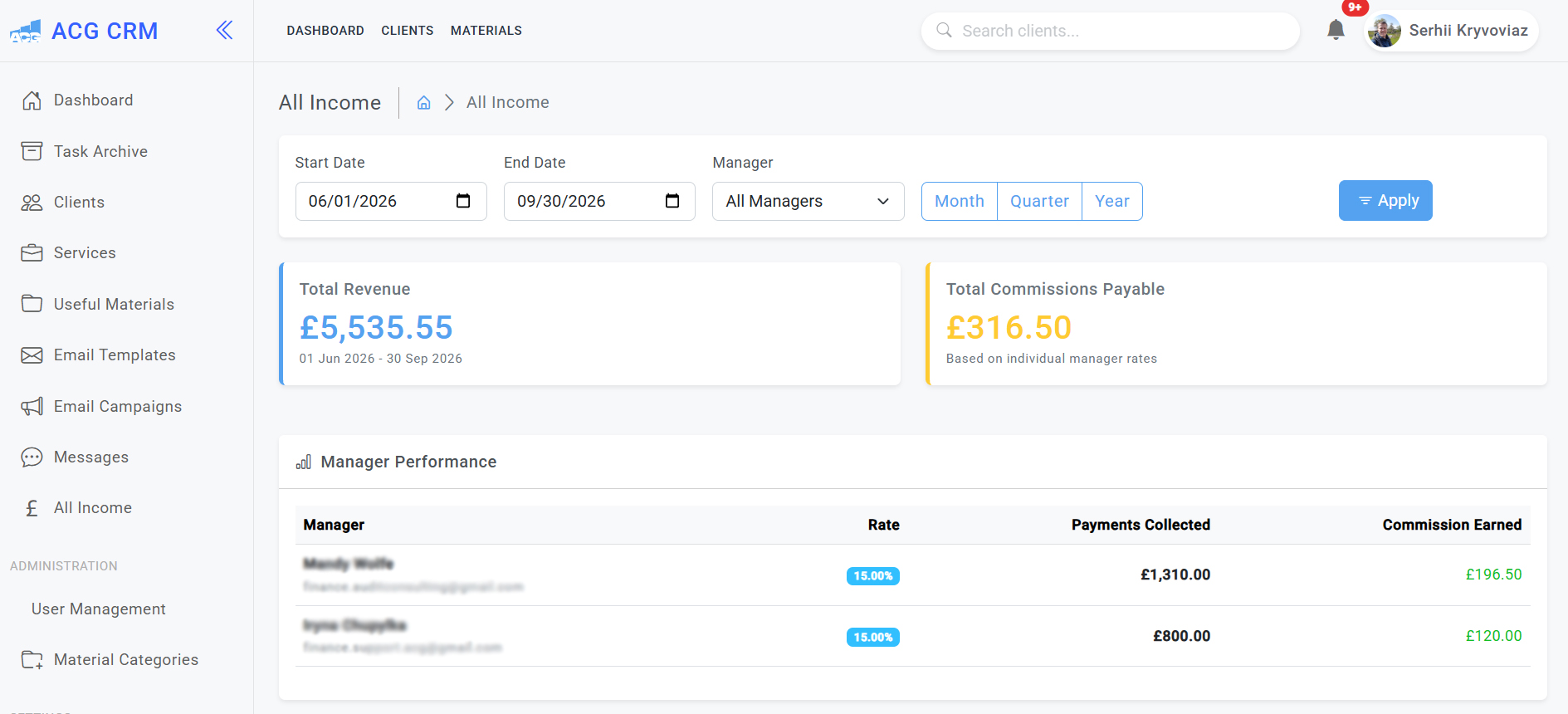
Revenue & Commission Tracking
When Does an Accounting Firm Need a CRM?
Not every accounting practice needs a bespoke CRM. A small firm with a manageable number of enquiries may work perfectly well with email, a spreadsheet and its existing accounting or practice management software.
The need for something more structured usually becomes clearer as enquiries start moving between several people or systems. Website forms arrive in one place, telephone enquiries are noted elsewhere, referrals sit in inboxes and follow-up depends increasingly on individual memory.
At that point, the problem is not simply a lack of software. It is a lack of visibility and ownership. Staff need to know what has happened, what should happen next and who is responsible for doing it.
What Should a CRM for Accountants Actually Manage?
The right scope depends on the practice. A CRM for a small accounting firm may only need a focused enquiry and follow-up process. A growing multi-service practice may require different qualification routes, user permissions, automation and more detailed reporting.
New Enquiries and Lead Capture
Website enquiries can enter the CRM as structured records rather than being copied manually into another spreadsheet. Useful information might include the service required, contact details, enquiry source and the person responsible for the next action.
Telephone enquiries and referrals should be able to enter the same process. The team should not need separate pipelines simply because prospects contacted the practice in different ways.
Qualification and Service Requirements
Not every enquiry is suitable. A prospective client may need a service the firm does not provide, fall outside the preferred client profile or require specialist work that needs internal review before an estimate can be prepared.
A useful CRM makes those decisions visible. Relevant information can be collected early, the opportunity can be assigned correctly and unsuitable enquiries can be closed without leaving ambiguous records in the pipeline.
Estimates, Proposals and Follow-Up
One of the most useful things a CRM can do is make the next action obvious.
If an estimate has been prepared, the team should know whether it has been sent. If a proposal is awaiting a decision, that status should be visible. If the prospect has not replied, follow-up should not depend on somebody remembering an email from ten days earlier.
Client Onboarding
Winning the work is not the end of the process. Information collected during the enquiry should not disappear when the prospect becomes a client.
A well-planned hand-off can carry the relevant service requirements, agreed scope and existing information into onboarding so the delivery team is not starting again from an empty record.
Team Responsibilities and Communication
Ownership becomes more important as a practice grows. Client managers, accountants, tax specialists and directors may all become involved at different points. The CRM should make the current responsibility clear while retaining enough history for authorised colleagues to understand what has already happened.
CRM vs Practice Management Software: What Is the Difference?
The terms overlap, but they do not necessarily describe the same job.
CRM generally concentrates on relationships and opportunities: prospects, enquiries, qualification, communication, follow-up and the journey towards engagement. Practice management software usually goes further into delivering client work, including jobs, deadlines, recurring compliance tasks and workload management.
Some accounting platforms cover both areas. Others do one particularly well.
For that reason, a CRM project should not begin with the assumption that everything already in use needs replacing. If the practice has effective software for accounts production, tax, payroll or practice management, the better solution may be to build or improve the missing CRM layer around it.
Off-the-Shelf vs Custom CRM for an Accounting Firm
Search for the best CRM for accountants in the UK and you will find plenty of established platforms. For many practices, one of them will be the right choice.
An off-the-shelf CRM makes sense when the existing workflow fits the platform reasonably well, the required integrations are available and the team can configure the system without creating layers of manual workarounds. It is usually quicker to introduce and avoids the initial investment of bespoke development.
A custom CRM becomes more relevant when the software repeatedly gets in the way of the process. Perhaps different services need different qualification routes. Estimates require internal approval. Responsibility moves between teams. Management needs reporting the current platform cannot produce reliably. Or staff have built spreadsheets and manual processes around the CRM because important stages simply do not fit.
Custom does not automatically mean better, and off-the-shelf does not automatically mean cheaper once extensive workarounds are involved. The useful question is how large the gap is between the way your practice needs to operate and what an existing platform can support sensibly.
Designing the Accounting Workflow Before Developing the CRM
A typical accounting enquiry might follow:
Enquiry → Initial Review → Qualification → Estimate → Proposal → Follow-Up → Decision → Onboarding
The difficult part is rarely drawing that ideal sequence. It is dealing with everything around it.
What happens when somebody requests several services? Who handles an enquiry requiring specialist tax advice? What if the proposal is sent and the prospect disappears for three months? Can the opportunity be reopened without losing its history? Who can approve pricing? What happens when responsibility changes while an enquiry is active?
We work through those operational details before development. A CRM that handles only the perfect journey can look impressive in a demonstration and still become frustrating in day-to-day use.
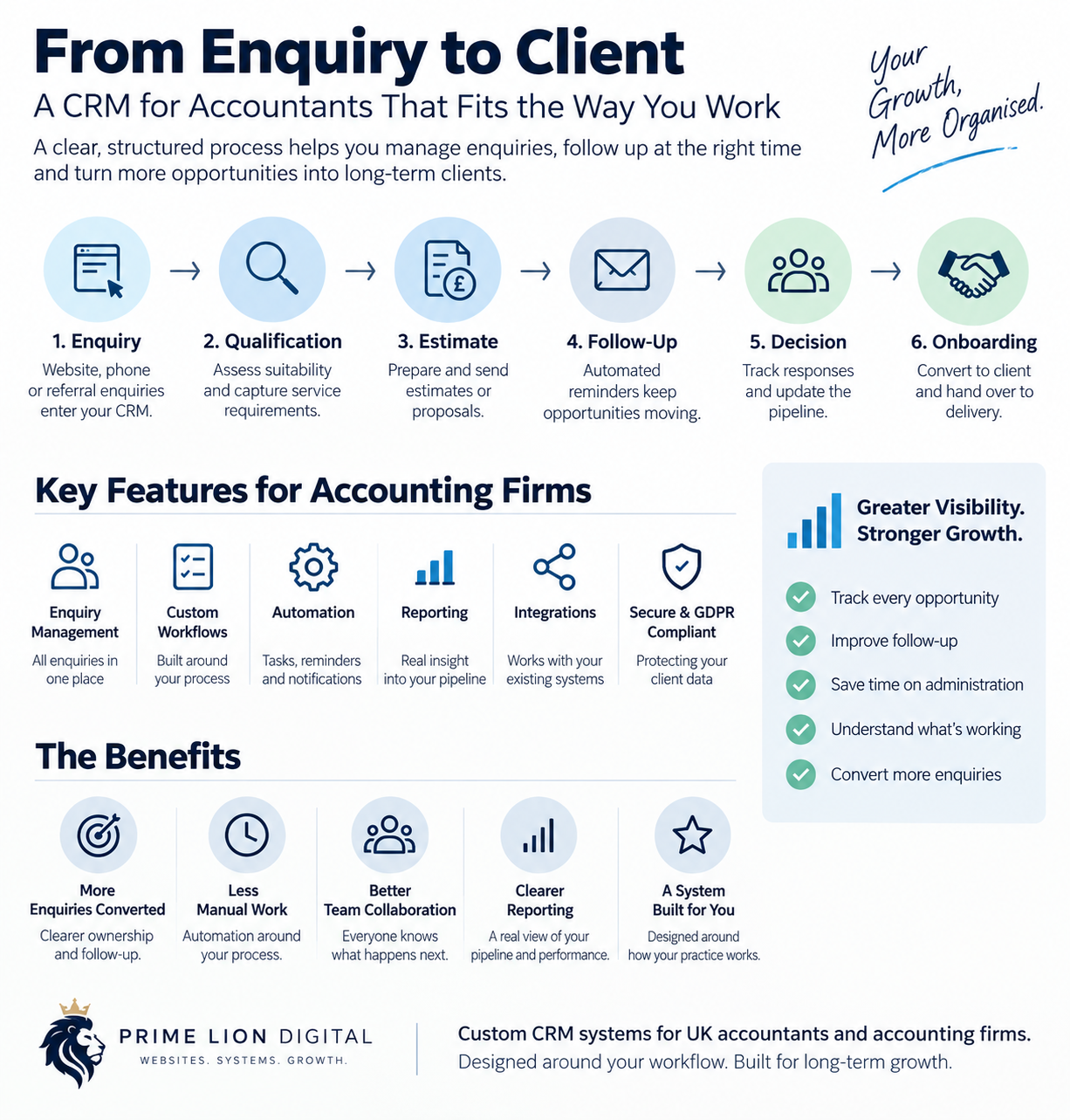
From Website Enquiry to Accounting Client
A CRM becomes more useful when it connects the acquisition journey instead of sitting separately from it.
Website and Form Enquiries
Where the architecture supports it, website forms can create structured opportunities in the CRM. This reduces repetitive data entry and allows qualification to begin from information the prospect has already supplied.
It also creates a practical connection between website development for accountants and the systems responsible for handling enquiries after they arrive.
Telephone and Referral Leads
Not every valuable client begins with a website form. Telephone calls, introductions and referrals need a simple route into the same controlled process so management can see the whole pipeline rather than only digitally generated leads.
Qualification, Proposal and Decision
The team can record what the prospect needs, whether the work is commercially suitable and who needs to review it. From there, the CRM can show which opportunities are awaiting an estimate, which proposals have been issued and where a decision or follow-up is outstanding.
Client Hand-Off
Once work is accepted, relevant information can move into onboarding or the next operational workflow. The exact hand-off should reflect the accounting and practice management systems already in use rather than duplicating them unnecessarily.
CRM Automation for Accounting Practices
Automation is most useful when it removes predictable administration. A change of status might create a task, a follow-up date might trigger a reminder, or an internal review could notify the person responsible.
Professional and commercial judgement is different. Whether a complex enquiry is appropriate, how work should be scoped or who needs to review a specialist matter may still require a person to decide.
We therefore automate around a defined process rather than trying to automate the judgement inside it.
Integrating Your CRM With Existing Accounting Systems
Most accounting firms already have a technology stack. There may be accounting software, payroll systems, email, document storage, payment tools, website forms and practice management software in daily use.
A new CRM system for an accounting firm has to fit into that environment. During discovery, we identify which systems should remain, where information is being entered twice and which hand-offs create genuine operational friction.
Integrations depend on the platforms involved, their APIs and the information that needs to move between them. We do not recommend connecting systems simply because a connection is technically possible. Each integration should remove a real problem or improve a meaningful part of the workflow.
This is where our wider digital services for accountants and accounting firms can be useful: the website, acquisition journey and internal systems can be considered as connected parts of the same operation.
Permissions, Client Data and GDPR
Accounting practices handle sensitive personal and commercial information, so access needs to be considered during system design rather than added at the end.
The CRM should reflect who genuinely needs access to particular information and what different roles are allowed to view or change. A client manager, administrator, accountant and director may not need identical permissions.
The system should also support the firm’s wider data protection approach. A CRM does not make a business GDPR compliant by itself; compliance depends on how information is collected, used, retained and secured across the organisation.
Reporting That Helps Partners Understand the Pipeline
A dashboard is only useful if it answers a question somebody actually needs to ask.
For a partner or practice manager, that might mean seeing how many enquiries are open, which require attention, what services prospects are asking for, where opportunities are becoming stuck or how long they remain at particular stages.
Where reliable acquisition data is available, CRM reporting can also help connect lead source with downstream enquiry quality. That creates a more useful commercial view than clicks and traffic alone and complements a wider digital marketing strategy for accountants.
We decide what management needs to understand before designing reports. Ten dashboards with no clear management question behind them are still ten unhelpful dashboards.
CRM for Small Accounting Firms vs Growing Practices
A small accounting firm should not inherit the complexity of a fifty-person practice simply because the CRM can support it. A focused system for enquiries, ownership and follow-up may be enough.
As the firm grows, different pressures appear. More employees create more hand-offs. Service lines may need different qualification rules. Management wants visibility without participating in every enquiry. Permissions, automation and reporting become more valuable.
The aim is to keep today’s system proportionate while making sensible architectural decisions about what may need to change later.
| Practice Size | Typical CRM Users | Typical Workflow Complexity | CRM Approach |
|---|---|---|---|
| Small Practice | 1–5 users | 1–2 core enquiry routes | Focused CRM for enquiries, ownership and follow-up |
| Growing Practice | 5–15 users | 2–5 service or qualification routes | Structured workflows, permissions, automation and reporting |
| Established Multi-Team Firm | 15+ users | Multiple services, teams and hand-offs | More advanced CRM architecture, integrations and role-based access |
Migrating From Spreadsheets or an Existing CRM
Migration should not mean copying everything simply because it exists.
Older spreadsheets and CRM systems often contain duplicate contacts, inconsistent statuses, abandoned opportunities and fields that nobody uses anymore. Moving all of that into a new platform recreates old problems inside new software.
Before migration, we establish what needs to be retained, how records should map to the new structure and which data requires cleaning. We also look at which parts of the old system staff genuinely use. A feature that exists today is not automatically a requirement for tomorrow.
How We Develop CRM Systems for Accounting Firms
Workflow Discovery
We begin by mapping how enquiries and related client processes work in practice: who is involved, where decisions happen, what exceptions occur and which systems are already part of the process.
System Architecture
The workflow is translated into records, statuses, relationships, permissions, actions and reporting requirements. This is also where we decide what should remain in existing accounting or practice management platforms and what belongs in the CRM.
UX and Interface Planning
Staff need to see what requires attention without navigating through unnecessary screens. Interfaces are planned around frequent tasks, responsibility and useful context rather than the number of features we can display.
Development
Development then follows the agreed system logic. We prioritise the core workflow before secondary enhancements so that complexity does not grow faster than the business problem being solved.
Integration and Data Migration
Required integrations are implemented and existing data prepared for migration where appropriate. When website enquiries form part of the process, this work can connect directly with our accounting website development capability.
Testing and Team Adoption
Testing needs to reflect real work. We follow realistic scenarios through the system: a new enquiry, an unsuitable prospect, an unanswered proposal, a returning lead, a change of owner and a successful hand-off.
Then there is adoption. A technically capable CRM that employees avoid using will quickly produce incomplete records and unreliable reporting. The system has to make sense to the people expected to maintain it.
Ongoing Improvement
Real use exposes details that are difficult to predict in a specification. The CRM should therefore be capable of evolving as the practice, team and service mix change.
Accounting CRM Project and Practical Outcomes
Custom CRM for a UK Accounting and Tax Practice
Prime Lion Digital developed a custom CRM and business management system for a UK accounting and tax business after working with the processes behind its client acquisition and service delivery.
The system was built around the firm’s actual operational stages rather than a generic sales template. Records could move through New Client → In Progress → Paid → Completed → On Hold → Under Support.
Behind those statuses sat the practical workflow: initial response, review and estimation, agreement and invoicing, delivery and completion. That gave the business a structured way to move work from a new enquiry into paid delivery and, where relevant, ongoing support.
The important outcome was not a larger feature list. It was that the CRM reflected the stages, responsibilities and commercial process the accounting business was already trying to manage.
Connecting Digital Acquisition With the Internal Workflow
The same project shows why the systems behind marketing become more important as inbound activity grows.
Work across website architecture, accounting service pages, SEO, supporting content and digital acquisition helped the site reach around 4,000 monthly organic visitors. In a recorded month, the business received more than 100 website enquiries and over 30 telephone enquiries.
Those are acquisition results, not outcomes generated by the CRM. Their relevance here is operational. A growing volume of inbound opportunities increases the need for clear ownership, qualification, status tracking and follow-up. The CRM provided that structured layer behind the acquisition process.
You can see the wider website and growth work in our accounting and consulting digital project case study.
| Project Indicator | Recorded Result | Why It Matters Operationally |
|---|---|---|
| Monthly Organic Visitors | ~4,000 | Growing inbound visibility creates more opportunities for the practice to manage |
| Website Enquiries | 100+ | Enquiries need structured qualification, ownership and follow-up |
| Telephone Enquiries | 50+ | Offline leads need to enter the same pipeline as website enquiries |
| Core CRM Statuses | 6 | New Client, In Progress, Paid, Completed, On Hold and Under Support |
Implementation Scenario: A Growing Practice Moving Beyond Spreadsheets
Consider a growing accounting practice where website, email, telephone and referral enquiries are recorded in a shared spreadsheet. Several people update it, but not always in the same way. One person may be preparing an estimate while somebody else assumes the enquiry is still waiting for review. Follow-up lives largely in individual inboxes.
The sensible first step is not complex automation. It is defining the stages, ownership rules and information required at each point.
A focused CRM could then centralise the enquiry record, assign responsibility, show the next action, retain useful context and give management a clearer view of the pipeline. The expected benefit is better operational consistency and visibility. Any improvement in response time, conversion or administrative effort should be measured after implementation rather than assumed in advance.
Common CRM Problems We See in Accounting Practices
CRM problems are often process problems that have become visible through software.
- The pipeline does not reflect how the practice actually qualifies new work.
- Staff can see an enquiry but cannot see who owns the next action.
- Website, telephone and referral leads are managed in different places.
- Too many fields or unnecessary steps discourage staff from maintaining records properly.
- Automation has been added before the underlying workflow was agreed.
- The CRM duplicates work already handled effectively elsewhere.
- Reports exist, but partners still cannot answer basic questions about the current pipeline.
Adding more features rarely fixes these problems on its own. The underlying process normally needs attention first.
What Does a CRM System for Accountants Cost?
There is no useful fixed price for bespoke CRM development without understanding what the system needs to do.
A focused enquiry-management CRM is a different project from a platform involving several user roles, custom dashboards, automated workflows, integrations, data migration and multiple operational modules. Cost is shaped by that complexity rather than simply by the number of users.
We define the operational requirements before estimating development. This also gives us an opportunity to challenge functionality that sounds useful during an initial discussion but does not justify the extra cost or complexity.
How Long Does a Custom Accounting CRM Take to Build?
A focused first version built around one well-defined workflow can be delivered far more efficiently than a system involving multiple integrations, legacy data, complex permissions and several operational areas.
Discovery is part of the timescale too. A practice with a clearly understood process can move into architecture relatively quickly. If different employees currently handle the same situation in different ways, those decisions need to be resolved before software should encode them.
For larger projects, phased development is often more practical. The core workflow can be built and tested first, followed by integrations, reporting or secondary modules once the foundation is working in real use.
Choosing the Right CRM Approach for Your Accounting Firm
The first decision is not which developer to hire. It is whether the problem genuinely requires custom development.
When comparing CRM software for accounting firms, look beyond the feature list. Consider how enquiries enter the system, how they are qualified, when responsibility changes, what happens when the normal process breaks, which existing platforms need to remain and what management actually needs to measure.
If an established platform can support those requirements without creating substantial workarounds, it may be the better commercial choice. If the team is already compensating for the software with spreadsheets, manual hand-offs and processes outside the system, bespoke development becomes easier to justify.
For a custom project, good discovery and workflow design matter at least as much as the programming. The system has to reflect the business before the business can rely on the system.
Frequently Asked Questions
What is a CRM for accountants?
A CRM for accountants is a system used to manage relationships and processes around prospects and clients. Depending on the practice, it can cover enquiry capture, qualification, communication, follow-up, proposals, onboarding, responsibility and pipeline reporting.
Does an accounting firm need a CRM?
Not necessarily. A small practice with a simple enquiry process may be adequately served by existing software. CRM becomes more useful as enquiry volume, staff involvement, follow-up requirements and workflow complexity increase.
What is the difference between CRM and accounting practice management software?
CRM generally focuses more on prospects, relationships, enquiries and the journey towards engagement. Practice management software tends to focus on client work, jobs, deadlines and recurring operations. Some systems combine both.
What should a CRM for an accounting firm include?
Useful functionality may include enquiry records, qualification, pipeline stages, responsibility, follow-up, communication history, onboarding hand-offs, reporting and integrations. The right feature set should follow the firm’s workflow rather than a generic checklist.
Is a custom CRM better than an off-the-shelf CRM?
No. Established CRM software can be quicker and more economical when it already fits the required process. Custom development becomes more relevant where workflows, integrations, permissions or reporting requirements cannot be handled efficiently without substantial workarounds.
Can a CRM connect with our accounting software?
Potentially. Integration depends on the platforms involved, available APIs, permissions and the information that needs to move between them. Each integration should be assessed against a practical requirement.
Can website enquiries go directly into the CRM?
Yes, where the website and CRM architecture support it. Enquiry information can be passed into the CRM so staff can begin qualification and follow-up without manually recreating the record.
Can a CRM automate client follow-up?
It can automate reminders, task creation, notifications and certain communications. Professional or commercial decisions should still retain appropriate human judgement.
Is a CRM suitable for a small accounting firm?
Yes, provided the scope remains proportionate. A small firm may benefit from a straightforward CRM for enquiries and follow-up without the complexity required by a larger multi-team practice.
Can you migrate data from spreadsheets or our existing CRM?
Migration can form part of the project. Existing data should normally be reviewed and cleaned first so duplicates, obsolete information and inconsistent statuses are not simply transferred into the new system.
How much does a CRM system for accountants cost?
Cost depends on workflow complexity, functionality, integrations, user roles, migration, automation and reporting requirements. We define the required system before providing a project estimate.
How long does a custom accounting CRM take to develop?
Timescales vary with scope. A focused enquiry-management CRM is considerably different from a larger platform involving multiple integrations, permissions and legacy data. Larger projects can be phased so core functionality is tested before further development.
Build a CRM Around Your Accounting Practice
If enquiries are being managed across inboxes, spreadsheets and disconnected systems, the useful first step is to understand where the process is actually breaking down.
Prime Lion Digital can review how your practice handles enquiries, qualification, follow-up, onboarding and internal responsibility, then determine whether an existing platform, better integration or a custom CRM is the more sensible approach.
Where bespoke development is justified, we design the system around the workflow your team needs to manage rather than forcing the practice into a predefined CRM model.
Discuss your accounting CRM requirements with Prime Lion Digital.