Headless WordPress Development Services for UK Businesses
Tell us a little about what you’re looking for, and our team will be in touch to discuss how we can help.
Headless WordPress separates content management from the website or application visitors use. WordPress remains responsible for content and editorial workflows, while a separate frontend retrieves that content through APIs and controls how it is presented.
That separation can be useful. It can also introduce another application, another deployment process and another set of technical dependencies to maintain.
Prime Lion Digital provides headless WordPress development for UK businesses with a genuine reason to separate WordPress from the frontend. We work across architecture, WordPress CMS development, APIs, Next.js and React frontends, integrations, migrations and the workflows needed to keep those parts working together.
The question is not whether headless WordPress is more modern. It is whether separating the CMS and frontend solves a problem worth maintaining.
What Is Headless WordPress — and Why Separate the Frontend?
In a conventional WordPress website, WordPress usually manages both the content and the pages delivered to visitors. Themes, templates, plugins and the CMS work together to produce the frontend.
A headless or decoupled WordPress architecture changes that relationship. WordPress continues to manage content, but a separate application handles presentation. Content is exposed through the WordPress REST API or another appropriate API layer and consumed by a frontend built with technologies such as Next.js or React.
 The editorial team can therefore continue working in WordPress while developers have greater control over the visitor-facing application.
That becomes useful when the frontend has requirements that a conventional WordPress implementation would handle awkwardly, when the same content needs to reach several digital channels, or when WordPress needs to operate inside a wider application architecture.
It is not automatically useful simply because a website uses WordPress.
When Headless WordPress Makes Commercial Sense
Headless architecture should solve a business or technical requirement rather than become the requirement itself.
Conventional WordPress remains appropriate for many company websites, publishing platforms and ecommerce projects. It provides an established relationship between content management, templates, plugins, previews and publishing. Separating those layers creates flexibility, but some of those conveniences then need to be deliberately recreated.
Headless WordPress becomes more compelling when a business needs a specialised frontend experience, already works within a React or Next.js environment, wants to distribute the same structured content to several applications, or needs the CMS to evolve independently from the presentation layer.
For a straightforward service website with conventional content and interaction requirements, introducing a second application may add cost without creating equivalent business value.
Headless is an architecture decision, not a performance setting.
Our Headless WordPress Development Services
A headless project involves more than replacing a WordPress theme with a JavaScript frontend. The CMS, content model, APIs, frontend, publishing workflow and deployment process still need to behave as one coherent platform.
Headless WordPress Architecture
We plan where WordPress sits within the wider technical environment before frontend development begins. That includes deciding what remains inside WordPress, what belongs in the frontend, how content is exposed, how systems communicate and which dependencies the business will need to maintain after launch.
If the wider requirement is still being defined, the project can begin within our WordPress development services rather than assuming a headless architecture from the outset.
Next.js and React Frontend Development
A separate frontend allows the visitor experience to be developed outside the WordPress theme layer. Next.js and React can support component-driven interfaces, application-style experiences and projects where the presentation layer needs greater independence from WordPress.
The framework itself is only part of the decision. Rendering, routing, data fetching, caching, preview behaviour and deployment need to reflect how the website will actually operate.
WordPress REST API Development
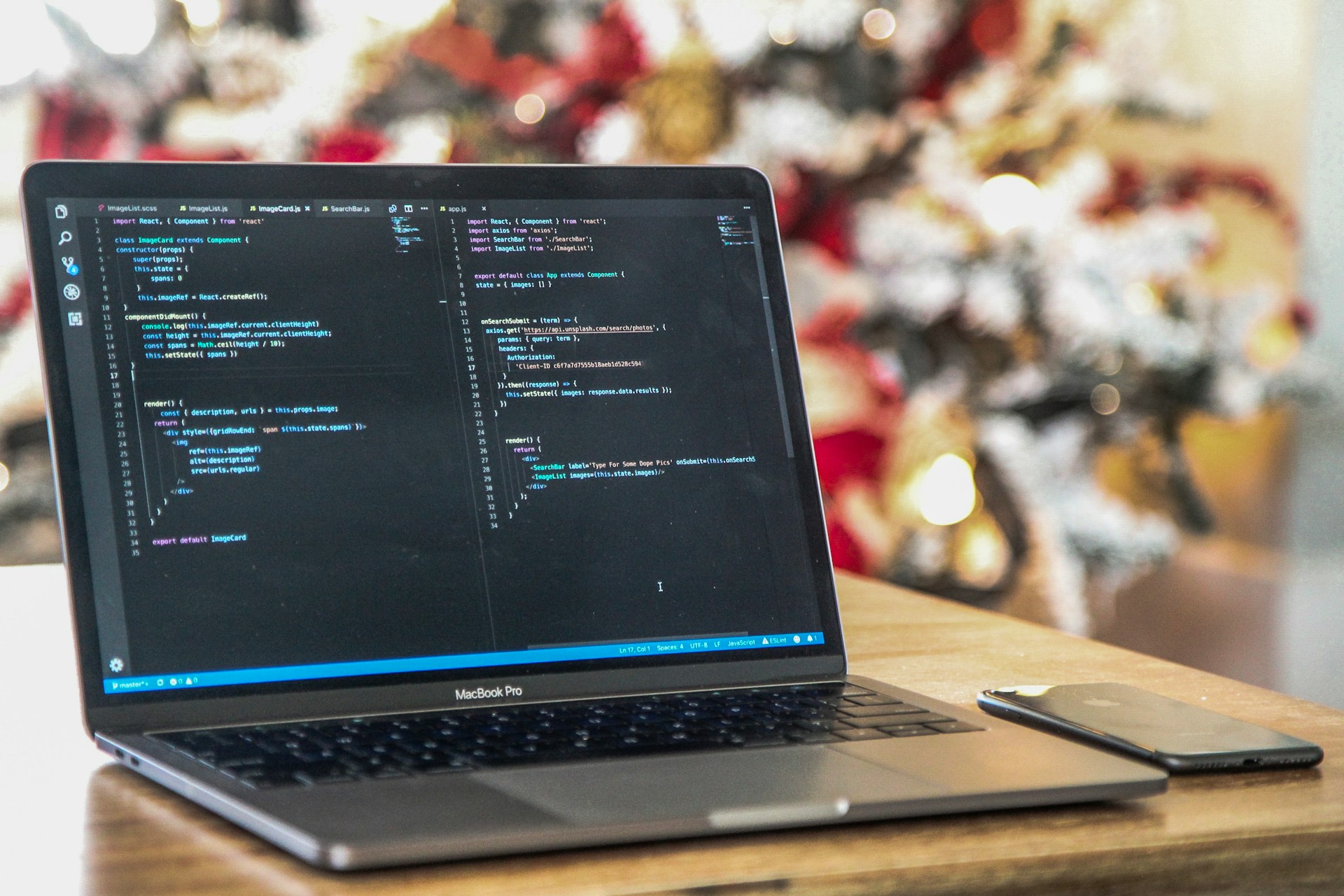 WordPress can expose structured content through its REST API for use by external applications. Standard posts and pages may be only the beginning. Custom post types, taxonomies, structured fields, relationships, authentication and project-specific data can all affect the API architecture.
Where WordPress also needs to exchange information with CRM platforms or other business systems, the work can overlap with wider API integration services.
Headless CMS and Content Modelling
A separate frontend does not remove the need for a well-designed CMS. In practice, it often makes content modelling more important.
Content types, fields, taxonomies and relationships need to make sense to editors while supplying predictable structured data to the frontend. We structure WordPress around what the organisation publishes rather than forcing editors to understand how the frontend application is coded.
Integrations and Data Connections
A headless website may sit between several systems. WordPress might provide editorial content while another platform supplies product, account or operational data. Forms may send enquiries to a CRM. Search may be handled by a specialist service. Authentication may belong to another application.
The practical question is where each piece of data should live and which system is authoritative for it. Without that clarity, headless architecture can distribute technical confusion across more platforms rather than solve it.
Migration to Headless WordPress
An existing WordPress website can move towards a headless architecture without treating the project as a blank slate. Content, URLs, metadata, redirects, media, taxonomies, analytics and integrations may all need to survive the transition.
The migration therefore starts with understanding what the current website already does successfully, not simply replacing its frontend.
Do You Actually Need Headless WordPress?
This is usually the most important question in the project.
A technically sophisticated architecture is not automatically a commercially sensible one. Headless development is easier to justify when the separation creates a capability the business genuinely needs.
| Requirement or situation | Headless suitability | What to consider |
|---|---|---|
| Standard SME or professional-services website | Usually unnecessary | Conventional WordPress will often meet the requirement with less infrastructure and maintenance |
| Content-heavy marketing website | Depends on the frontend requirements | Publishing scale alone does not automatically justify a separate frontend |
| Highly interactive or application-style frontend | Potentially strong fit | Assess whether separating the frontend materially improves the product experience or development model |
| Existing React or Next.js environment | Strong candidate for assessment | WordPress may work effectively as the editorial CMS behind the existing frontend technology |
| Content required across multiple digital channels | Potentially strong fit | Structured content can be managed centrally and consumed by different applications |
| Existing WordPress website already works well | May add unnecessary complexity | Identify the specific limitation the new architecture would solve before rebuilding |
| Independent frontend and CMS teams | Potentially suitable | API contracts, deployment ownership and editorial workflows become more important |
If there is no clear answer to what headless architecture solves, assess the requirement before committing to it.
Traditional WordPress vs Headless WordPress
The distinction is not that one approach is modern and the other outdated. They optimise for different requirements.
| Area | Traditional WordPress | Headless WordPress |
|---|---|---|
| Content management | WordPress | WordPress |
| Frontend | WordPress theme and templates | Separate application such as Next.js or React |
| Content delivery | WordPress renders visitor-facing pages | Frontend retrieves content through an API layer |
| Editorial workflow | Established WordPress publishing and preview behaviour | Publishing and preview may require additional integration |
| Plugin behaviour | Plugins can affect the CMS and frontend directly | Frontend-dependent functionality may require separate implementation |
| Frontend flexibility | Works within the WordPress theme ecosystem | Greater independence over frontend technology and architecture |
| Infrastructure | Typically one closely connected platform | CMS, API and frontend need to operate together |
| Maintenance | Usually simpler operationally | Requires coordination across multiple technical layers |
For some projects, that separation is exactly what makes the architecture useful. For others, it solves a problem that does not exist.
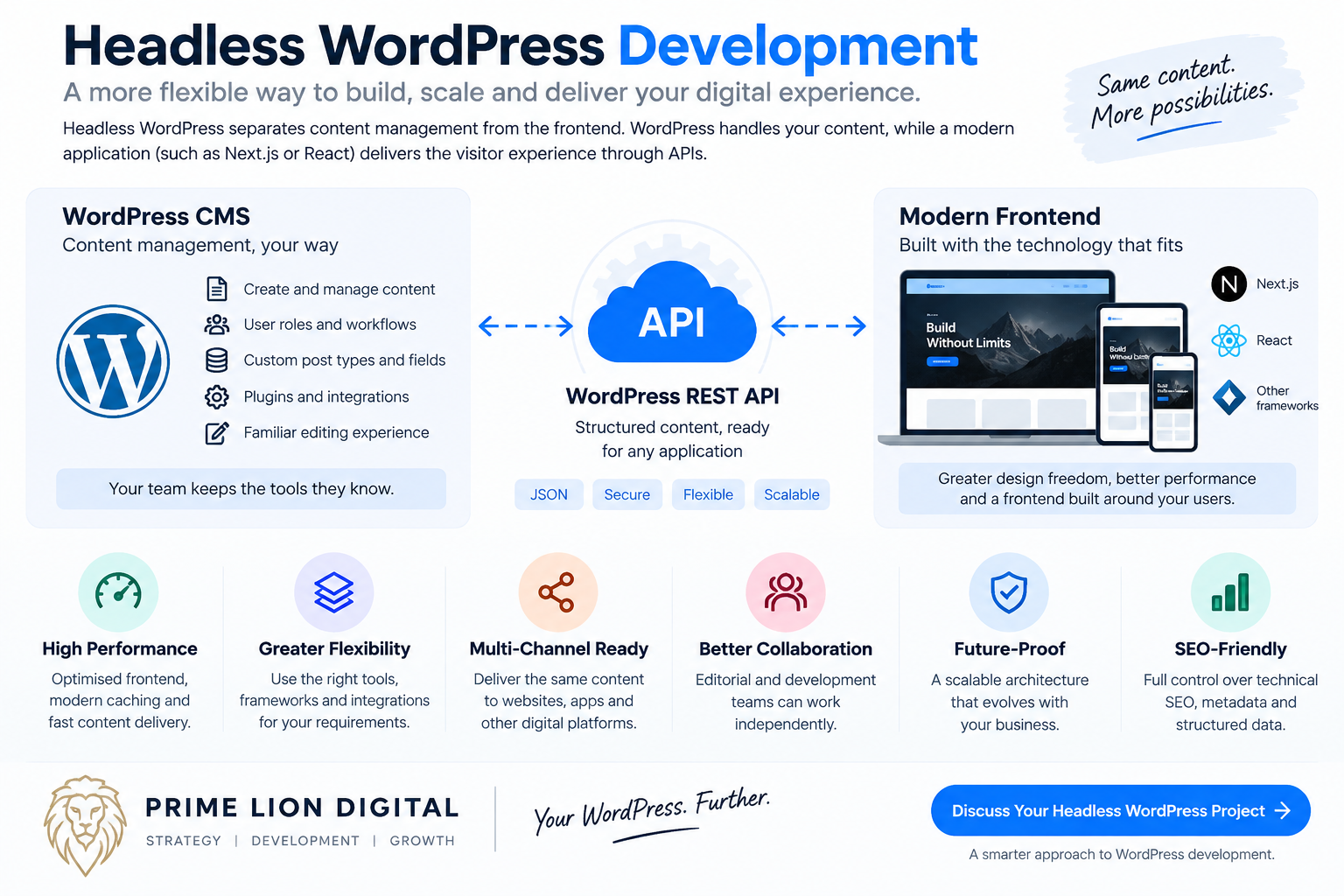
WordPress as the CMS, a Separate Application as the Frontend
 One practical advantage of headless WordPress is that editorial teams do not necessarily have to abandon a CMS they already understand.
Writers and marketers can manage structured content in WordPress while the frontend team works independently on the visitor experience. WordPress becomes the content source rather than the system responsible for rendering every page.
The relationship between the two systems still needs to be deliberate. If an editor changes a URL, the frontend needs to understand the new route. If a new content type is introduced, the API and application need to know how to handle it. Scheduled, draft and unpublished content need predictable behaviour outside the conventional WordPress theme environment.
The CMS should therefore be designed around editorial tasks, while the API provides a stable contract between WordPress and the frontend.
Next.js, React and Frontend Architecture
Next.js is a common option for a headless WordPress frontend because it provides a React-based environment with several approaches to rendering and content delivery.
That does not mean every project should use the same Next.js architecture.
A largely editorial website may have different rendering and caching requirements from a logged-in application. Frequently changing content can require a different publishing workflow from content that changes occasionally. Search, personalisation, authentication and third-party services can alter the frontend architecture further.
The useful question is not whether a particular framework appears on the technology list. It is whether the frontend supports the content model, user experience, deployment process and operational requirements of the project.
Content Modelling and the Editorial Experience
A headless website can work well for visitors and still be frustrating for the people publishing it.
This often happens when the CMS is designed around what developers want from the API rather than what editors need to accomplish in WordPress.
Content modelling should answer practical questions. What information needs to be reusable? Which fields should be controlled? Which content belongs in a dedicated content type? How are relationships managed? Can an editor understand where a change will appear without knowing how the frontend is built?
Gutenberg, structured fields, custom post types and taxonomies can all remain part of a headless WordPress environment. The difference is that the frontend is no longer automatically rendering their output in the conventional WordPress way.
Preview deserves particular attention. Editors often need to see unpublished changes before they go live. In a decoupled environment, preview behaviour needs to bridge WordPress permissions, draft content and the separate frontend application.
What Happens to WordPress Plugins in a Headless Build?
One of the easiest mistakes in headless planning is assuming that a plugin working inside WordPress means its functionality will automatically appear on the separate frontend.
It depends on what the plugin actually does.
A plugin that changes administrative behaviour may continue to be useful. A plugin that stores structured information can also remain valuable if its data is exposed appropriately. Functionality that depends on WordPress-rendered templates, shortcodes or frontend scripts is different: it may need another implementation.
SEO metadata is a good example. A WordPress SEO plugin can still provide the editorial interface for titles, descriptions and other information, but the frontend has to retrieve and render that data correctly.
The same issue can affect forms, breadcrumbs, related content, search, redirects, structured data and memberships.
A plugin working in WordPress does not mean its frontend behaviour automatically exists in Next.js.
SEO in a Headless WordPress Architecture
Headless WordPress is not automatically better or worse for SEO. The outcome depends on how the frontend is implemented.
The separate application needs to handle technical signals that would normally be produced within the WordPress frontend: titles and descriptions, canonical URLs, headings, internal links, robots directives, structured data, sitemaps, redirects and HTTP status behaviour.
Rendering strategy matters as well. Search engines need reliable access to the content and links intended for indexing. JavaScript should not make important content unnecessarily difficult to discover or render.
Migrations require particular care. Replacing an established WordPress frontend without preserving URLs, redirects, metadata and internal linking can damage existing search visibility even if the new application is technically sophisticated.
Where organic visibility is commercially important, headless implementation should be planned alongside technical SEO from the architecture stage rather than checked only after deployment.
Performance, Caching and Content Delivery
Headless architecture can provide greater control over how frontend assets and content are delivered. It does not guarantee a fast website.
A poorly implemented React application can still ship excessive JavaScript, load unnecessary third-party scripts, handle images badly or make inefficient requests. Separating WordPress from the frontend changes the performance architecture; it does not remove the need to engineer it carefully.
Caching also becomes a system-level question. WordPress may cache API responses, the frontend may cache rendered content, and a CDN may sit in front of the application. When an editor publishes a change, those layers need to know when existing content is no longer current.
Depending on the architecture, publishing may trigger cache invalidation, revalidation or another update mechanism. The appropriate approach depends on how often content changes and how quickly those changes need to appear.
Frontend delivery can also overlap with broader website performance optimisation where Core Web Vitals, asset delivery and third-party scripts need attention beyond the CMS itself.
Security and Authentication in Headless WordPress
Separating the public frontend from WordPress changes the attack surface, but describing headless WordPress as automatically secure would be misleading.
WordPress still needs to be maintained. Accounts still need appropriate permissions. Plugins and dependencies still need attention. APIs should expose only the information they are intended to expose.
Authentication becomes particularly important where the frontend needs private information or logged-in functionality. The architecture should define what is public, what requires authentication, how credentials or tokens are handled and where sensitive operations are allowed to occur.
Migrating an Existing WordPress Website to Headless
A headless migration is not simply a frontend redesign.
An established WordPress website may already contain years of content, indexed URLs, backlinks, media, taxonomies, forms, redirects, analytics configuration and plugin-managed functionality. Some elements can remain in WordPress. Others need to be reproduced or handled differently by the new frontend.
The first step should therefore be an inventory rather than a rebuild.
We assess what WordPress currently controls, which functionality depends on the existing theme or plugins, what data needs to be exposed, which URLs must remain stable and where the proposed architecture creates dependencies that did not previously exist.
Content migration may not be necessary if WordPress remains the CMS, but content structures can still need adjustment so the frontend receives consistent, reusable data.
Where URLs change, redirects and search implications should be planned before launch. Broader requirements can also overlap with our website migration work.
Our Headless WordPress Development Process
A headless project needs coordination between content, backend and frontend decisions. Building the frontend first and deciding later how WordPress should supply it usually creates avoidable rework.
Discovery and Architecture Assessment
We start with the requirement rather than the framework. We review the existing technology, business objectives, editorial workflow, integrations, frontend requirements and the reasons headless architecture is being considered.
If conventional WordPress can meet the requirement more cleanly, that should be identified before additional infrastructure is created.
Content and Data Modelling
We define how information should be represented in WordPress and which relationships need to be available to the frontend. Existing structures can be retained where they remain useful and revised where they create unnecessary limitations.
API Planning
The API layer is planned around the information the frontend actually requires. That may include standard WordPress resources, custom content types, structured fields, taxonomies, navigation data and project-specific endpoints.
Frontend Development
The frontend is developed against the agreed content and API architecture. Components, routing, rendering, responsive behaviour and application interactions are implemented without relying on WordPress to supply the presentation layer.
Integration and Editorial Workflow
Publishing, previews, forms, search, analytics and external systems are tested as connected workflows. A feature is not complete simply because an individual API request works.
SEO, QA and Performance Validation
We test frontend behaviour, content rendering, metadata, redirects, analytics, accessibility considerations and performance in the environment users and search engines will actually encounter.
Deployment and Monitoring
WordPress and the frontend may have separate hosting and deployment processes. Responsibilities, environments, caching behaviour and post-launch checks should be clear before the platform goes live.
What Affects the Cost of Headless WordPress Development?
Headless WordPress development usually involves more architectural work than a comparable conventional WordPress build because the CMS and frontend need to be developed and operated as connected but separate layers.
A focused content platform has a very different scope from a project involving authentication, several APIs, complex search, ecommerce, personalisation or application-style functionality.
Cost is influenced by the existing WordPress environment, content model, number and complexity of frontend components, API requirements, integrations, preview workflow, migration work, authentication, hosting architecture, SEO requirements, testing and deployment.
The ongoing cost matters too. WordPress dependencies need maintenance, but so can the frontend framework, build process, hosting environment and integrations between systems.
That does not make headless architecture inherently expensive. It means the additional technical layer should create enough value to justify owning it.
How Long Does a Headless WordPress Project Take?
There is no useful standard timeline for every headless build.
A focused project with an established content model and clear frontend specification can move substantially faster than a migration where plugin behaviour, URLs, integrations and editorial workflows first need to be untangled.
Architecture decisions can affect the schedule as much as coding. Content modelling, API requirements, frontend design, third-party access, authentication and migration planning may need to be resolved before some development work can safely be completed.
Testing also covers the relationship between systems rather than the frontend alone. Publishing a page, changing a URL, updating metadata or submitting a form may involve several services even though the visitor experiences one website.
A realistic project plan should therefore account for discovery, architecture, development, content preparation, integration, QA, migration and deployment rather than treating coding time as the entire delivery schedule.
Where Headless WordPress Can — and Cannot — Make Sense
The following examples are architecture scenarios rather than claimed Prime Lion Digital client case studies. We do not present hypothetical performance figures as completed project results. Their purpose is to show how the commercial reasoning changes with the requirement.
Scenario 1: An Established WordPress Content Platform Needs a Separate Frontend
An organisation has a substantial WordPress content library and an editorial team already comfortable with the CMS. Its new frontend requirements, however, are becoming increasingly difficult to support cleanly within the existing theme architecture.
Replacing WordPress would create a second problem: content migration, staff retraining and disruption to established publishing processes.
A headless approach could retain WordPress as the editorial system while introducing a Next.js frontend. The project would need to account for much more than displaying API content. Preview, navigation, redirects, metadata, structured data, forms, analytics and publishing behaviour all need to survive the separation.
The commercial case is therefore based on preserving an established CMS while gaining frontend independence. Without that frontend requirement, changing architecture would be difficult to justify.
Scenario 2: One WordPress CMS Needs to Serve Several Digital Experiences
A business needs the same structured information across its main website and another digital application. Maintaining separate copies would increase editorial work and create a straightforward risk: the same information could become inconsistent between channels.
WordPress can instead act as a central content source, with each frontend consuming the information it requires.
The important work happens in the content model. Information has to be structured so it remains meaningful outside one page template. Relationships, taxonomies and reusable content become more important than reproducing the layout of the existing website inside the CMS.
Here, headless architecture has an operational purpose. One editorial source can support multiple experiences without requiring teams to maintain duplicate content.
Scenario 3: The Business Does Not Need Headless WordPress
A UK service business is planning a new marketing website. Performance, SEO and future growth matter, so headless WordPress initially appears attractive.
The actual requirements are conventional: service pages, location content, articles, enquiry forms, analytics and structured content managed by a small marketing team. There is no separate application, multi-channel content requirement or frontend constraint that requires a decoupled architecture.
In this case, a well-engineered conventional WordPress implementation can meet the requirement with fewer systems to develop and maintain.
The commercial outcome is not a percentage improvement invented for a case study. It is avoiding unnecessary architecture and putting budget into the parts of the project that actually affect the business.
Relevant WordPress Delivery Experience
Headless architecture introduces a different frontend relationship, but many of the underlying disciplines are shared with broader WordPress work: CMS structure, content architecture, integrations, technical SEO, analytics, performance and maintainable development.
Prime Lion Digital’s wider WordPress work includes content-led business websites, ecommerce implementations and focused service websites. These are not presented as headless case studies where a decoupled architecture was not used; they demonstrate the adjacent delivery experience that a headless project also depends on.
Audit Consulting Group — Content Architecture and Organic Growth
For Audit Consulting Group, the wider digital project combined WordPress development, a substantial content structure, technical SEO and analytics around an accounting and tax services website. The platform needed to support continued publishing and expansion rather than operate as a small static brochure site.
The project grew from no established organic presence to more than 4,000 monthly organic visitors and 100+ website enquiries per month. Those results are not attributed to headless architecture; they demonstrate the commercial importance of treating CMS structure, content, search visibility and measurement as connected parts of a website project.
Freizeit Camper — WordPress and Ecommerce Delivery
The Freizeit Camper project involved a WordPress and WooCommerce implementation with ecommerce structure, customer-journey considerations and analytics through Google Analytics 4 and Google Search Console.
The relevant lesson for more complex WordPress architecture is practical rather than statistical: the CMS, customer-facing experience, ecommerce functionality and measurement setup need to work as one system. No headless performance claim is made for this project.
Construction & Repair Work — Proportionate WordPress Development
For Construction & Repair Work, the requirement was deliberately narrower: a focused UK service-business website with the core build delivered in approximately two weeks, alongside Google Analytics 4 and Google Search Console setup.
It illustrates the other side of our architecture approach. Not every project benefits from additional technical layers. Where a conventional implementation meets the requirement cleanly, keeping the build proportionate can be the better engineering and commercial decision.
Why Work with Prime Lion Digital on a Headless WordPress Project?
Headless development crosses several disciplines. WordPress architecture, content modelling, APIs, frontend development, technical SEO, analytics, performance and deployment decisions affect one another even when they live in separate systems.
Our approach is to understand why that separation is needed before deciding how it should be built. That matters because headless projects become unnecessarily difficult when individual technology decisions are made without considering the complete publishing and customer experience.
We also plan for ownership after launch. The business should have appropriate access to WordPress, hosting, repositories, analytics and project infrastructure. Developers should be able to understand the API relationship without reverse-engineering undocumented decisions. Editors should know what happens when they publish.
And if a conventional WordPress implementation is the more proportionate solution, we are comfortable recommending it.
Frequently Asked Questions
What is headless WordPress development?
Headless WordPress development uses WordPress as the content management backend while a separate frontend application presents the content to visitors. The two layers communicate through APIs rather than relying on a conventional WordPress theme to render the complete website.
Is WordPress a headless CMS?
WordPress is traditionally used as both a CMS and website-rendering platform, but it can also operate as the content-management layer in a headless or decoupled architecture. Its content can be exposed to external applications while editors continue managing information inside WordPress.
What is the difference between WordPress and headless WordPress?
Traditional WordPress normally manages both content and the visitor-facing website. In a headless implementation, WordPress manages the content while a separate application handles the frontend. This creates greater frontend independence but introduces additional infrastructure and development considerations.
Is headless WordPress better than traditional WordPress?
Not universally. Headless WordPress can be appropriate when a project needs a separate application frontend, multi-channel content delivery or greater independence between the CMS and presentation layer. For many business websites, conventional WordPress remains simpler to develop, operate and maintain.
Can you use Next.js with WordPress?
Yes. WordPress can act as the CMS while a Next.js application retrieves and presents its content. A production implementation also needs to account for routing, previews, metadata, caching, redirects, forms and publishing behaviour rather than treating content retrieval as the complete integration.
Can you use React with headless WordPress?
Yes. React can be used to build a frontend that consumes content from WordPress. The appropriate architecture depends on the project and its requirements around rendering, routing, performance, authentication and deployment.
Is headless WordPress good for SEO?
Headless WordPress can support strong technical SEO, but it does not provide an automatic ranking advantage. The frontend still needs to implement crawlable content, metadata, canonical URLs, internal links, structured data, redirects and other search requirements correctly. Migration planning is particularly important where an existing website already has organic visibility.
Do WordPress plugins work with headless WordPress?
Some do, but compatibility depends on what the plugin does. Backend functionality and structured data may continue to work normally, while features that rely on WordPress-rendered templates, shortcodes or frontend scripts may need to be recreated or integrated separately.
How much does headless WordPress development cost?
Cost depends on the CMS structure, frontend complexity, APIs, integrations, migration requirements, authentication, preview workflow, SEO requirements and deployment architecture. Because headless projects involve separate CMS and frontend layers, a detailed technical scope is more useful than estimating from page count alone.
Can an existing WordPress website be migrated to headless?
Yes. WordPress can remain the CMS while the existing frontend is replaced by a separate application. Before migration, content structures, plugin dependencies, URLs, redirects, metadata, forms, analytics and other functionality that currently depends on the WordPress theme should be assessed.
Who should use headless WordPress?
Headless WordPress is most relevant where separating content management from frontend delivery creates a clear technical or operational advantage. That can include application-style frontends, existing React or Next.js environments, multi-channel content delivery and projects where frontend teams need to work independently from the CMS. It is usually unnecessary when conventional WordPress already meets the requirement cleanly.
Discuss Your Headless WordPress Development Project
If you are considering headless WordPress, the useful first step is to establish what the architecture is expected to solve.
Prime Lion Digital can review a new project or an existing WordPress environment, identify the content, frontend, API and integration requirements, and determine whether a decoupled approach is technically and commercially justified.
If headless is the right route, we can plan and develop the WordPress CMS, API layer and frontend as connected parts of the same system. If it is not, we can recommend a simpler WordPress development approach instead.
Discuss your headless WordPress development project with Prime Lion Digital