Custom WordPress Plugin Development for Business-Specific Functionality
Need WordPress to do something that standard plugins cannot handle cleanly? Prime Lion Digital develops custom WordPress plugins for specific business logic, workflows, WooCommerce functionality and system integrations.
Our custom WordPress plugin development services start from £400. We begin with the requirement — what needs to happen, what rules apply and which users or systems are involved — before deciding how the plugin should be built.
Discuss Your Plugin Requirement
Tell us a little about what you’re looking for, and our team will be in touch to discuss how we can help.
When Does a Business Need a Custom WordPress Plugin?
WordPress already has an extensive plugin ecosystem, and an established plugin is often the right solution. Custom development becomes useful when the requirement is specific enough that existing options create workarounds rather than solving the underlying problem.
You may need a custom WordPress plugin when:
- an existing plugin provides most of what you need but cannot support an important business rule;
- several plugins are being combined simply to reproduce one workflow;
- staff are adapting their process around the website instead of the website supporting the process;
- WordPress needs to send information to or receive information from another business system;
- WooCommerce needs specific behaviour that cannot be achieved cleanly through normal configuration or a suitable existing extension;
- important functionality currently sits inside the theme even though it should operate independently of the site’s presentation.
Custom does not automatically mean better. The first decision is whether the requirement genuinely needs custom code at all.
What Should a Custom WordPress Plugin Actually Be Responsible For?
A good custom plugin has a clear job. It should own a specific piece of functionality rather than becoming a place for every unusual website requirement.
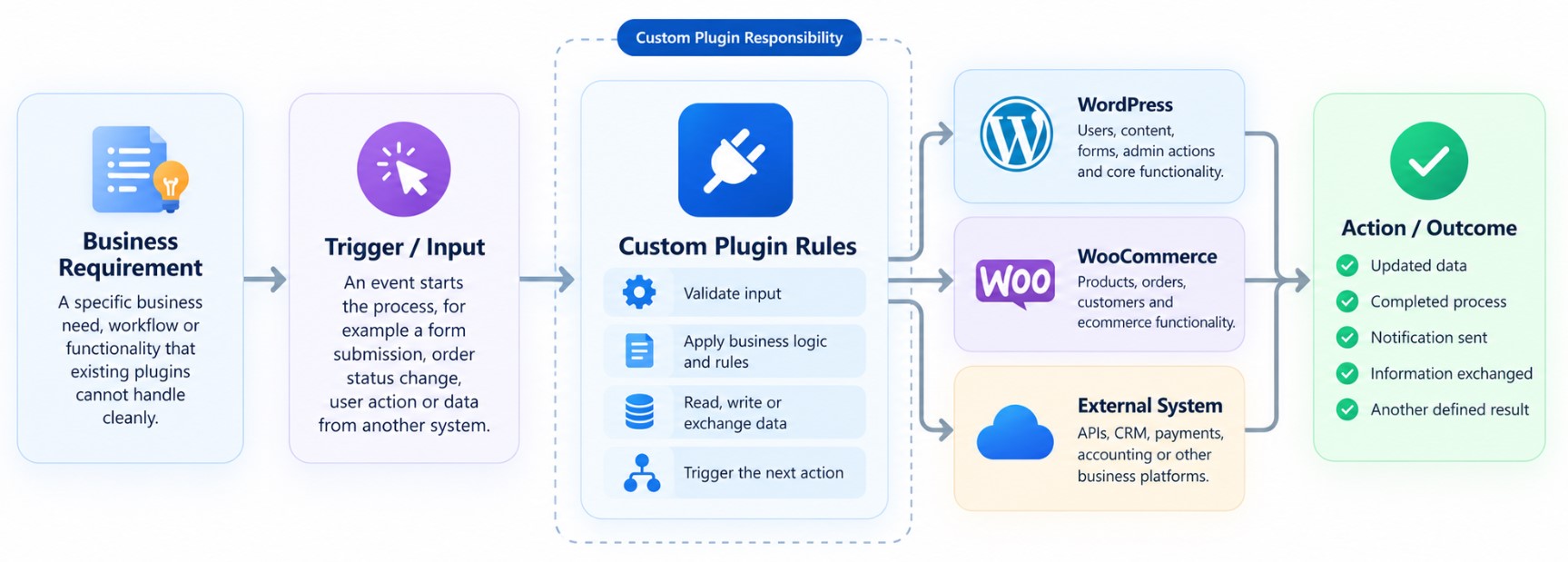
We define that responsibility by looking at what starts the process, what information the plugin needs, which rules it should apply, what belongs to WordPress or WooCommerce, whether another system is involved and what should happen at the end.
For example, a plugin might respond when a form is submitted, an order changes status, an administrator performs an action or another system sends information to WordPress. The plugin can then validate the relevant information, apply the required rules and trigger the appropriate next action.
What Can a Custom WordPress Plugin Do?
The functionality depends on the project. Rather than starting with a fixed feature list, we define what WordPress needs to do and build the plugin around that responsibility.
Business Logic and Rules
Apply calculations, conditions, validation rules or other business-specific logic when particular actions or events occur.
Custom WordPress Behaviour
Add functionality around users, content, forms, administrative actions or other WordPress processes where standard behaviour is not sufficient.
WooCommerce Extensions
Extend specific product, customer, order or operational behaviour where standard WooCommerce configuration or an appropriate existing extension does not meet the requirement.
API and System Interaction
Allow WordPress to exchange relevant information with another system where suitable API access and project requirements support the integration.
Administration and Automation
Create purpose-built administrative actions, settings or automated responses around a clearly defined workflow.
Custom WordPress Plugin Development Use Cases
Build a Business-Specific Workflow
Your team may already use WordPress to collect or manage information, but the real process includes stages or rules that generic plugins do not understand. A custom plugin can control the relevant logic between the initial action and the required result.
Connect WordPress With Another System
Where suitable interfaces are available, a plugin can manage the WordPress-side logic required to send information to or receive information from another platform.
Extend WooCommerce Functionality
If a store has a product, order, customer or operational requirement that does not fit standard WooCommerce behaviour, a focused plugin may extend that particular part of the ecommerce workflow.
Create Internal WordPress Functionality
Not every plugin is customer-facing. Custom functionality can support administrators or internal teams with actions, structured information or processes that the standard WordPress interface does not provide.
Extend an Existing WordPress Plugin
Sometimes the right solution is not replacing an existing plugin. If it provides a suitable foundation and an appropriate extension route, we can assess whether the missing behaviour can be added without rebuilding the entire function.
Build the Functionality Around the Process You Actually Need
The purpose of custom plugin development is not simply to produce more custom code. It is to give a specific requirement an appropriate place within your WordPress system.
Depending on the project, that can help reduce awkward plugin combinations, support a business-specific workflow, connect WordPress with another system or keep functional logic separate from the site’s presentation layer.
It can also make responsibilities clearer: what WordPress handles, what the custom plugin controls and what remains the responsibility of another platform.
How Custom Plugin Logic Works
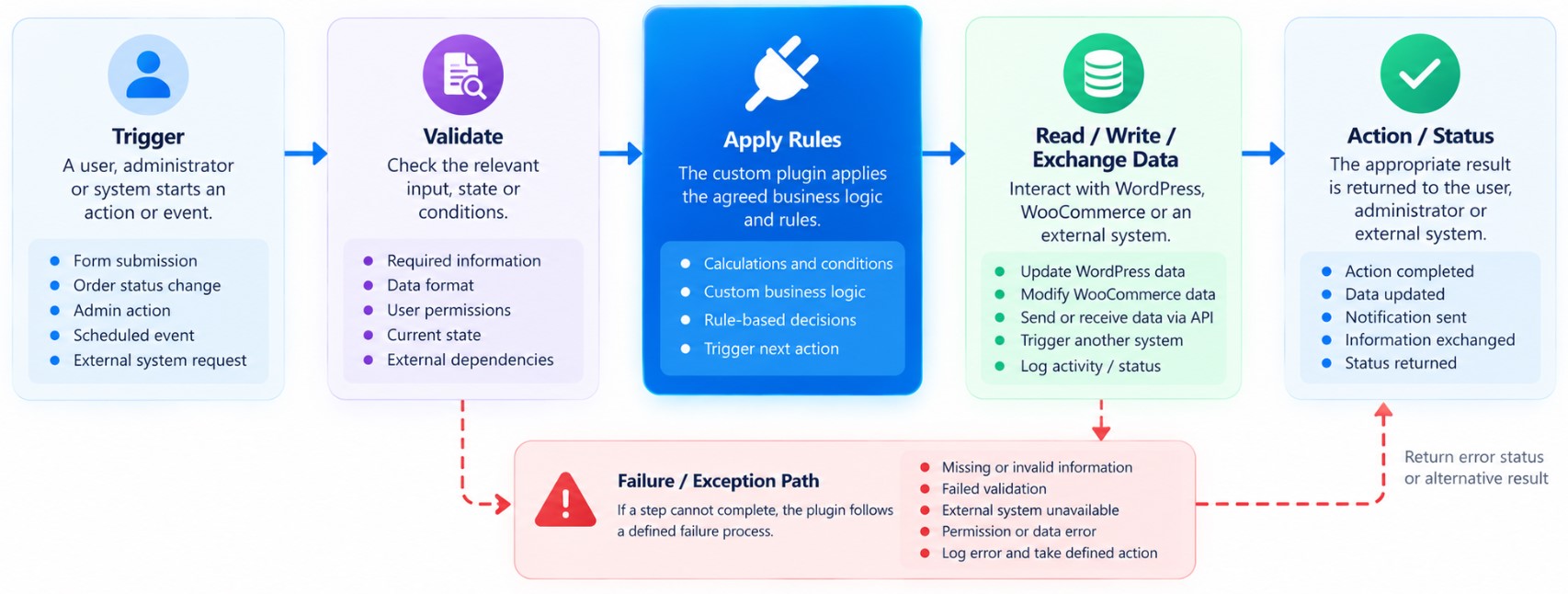
The action a customer or administrator sees may be simple, but several things can happen behind it.
- Trigger — A user, administrator or system starts an action or event.
- Validate — The plugin checks the relevant input, state or conditions.
- Apply Rules — The agreed business logic determines what should happen next.
- Read, Write or Exchange Data — The plugin interacts with WordPress, WooCommerce or another system where the workflow requires it.
- Return an Action or Status — The appropriate result is returned to the user, administrator or connected system.
The workflow should also define what happens when the expected action cannot complete — for example, when required information is missing or an external system is unavailable.
Where Does the Custom Plugin Sit Within WordPress?
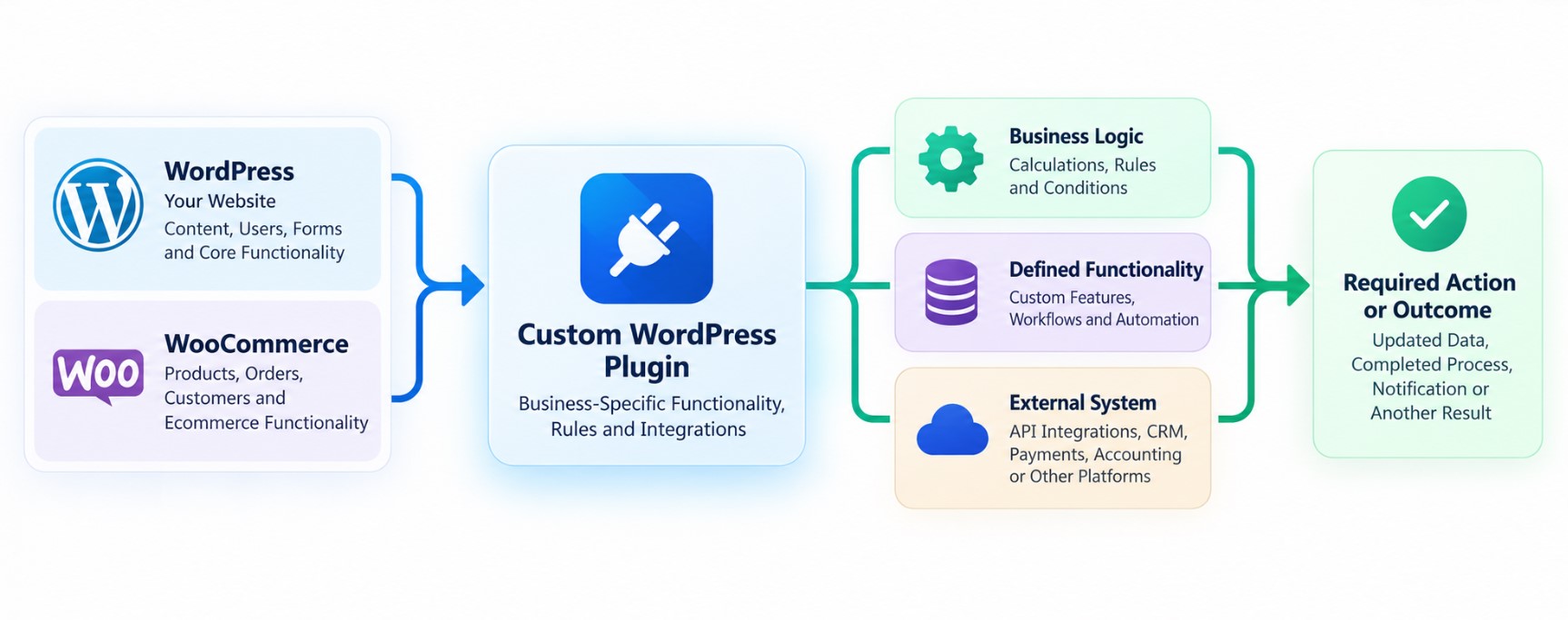
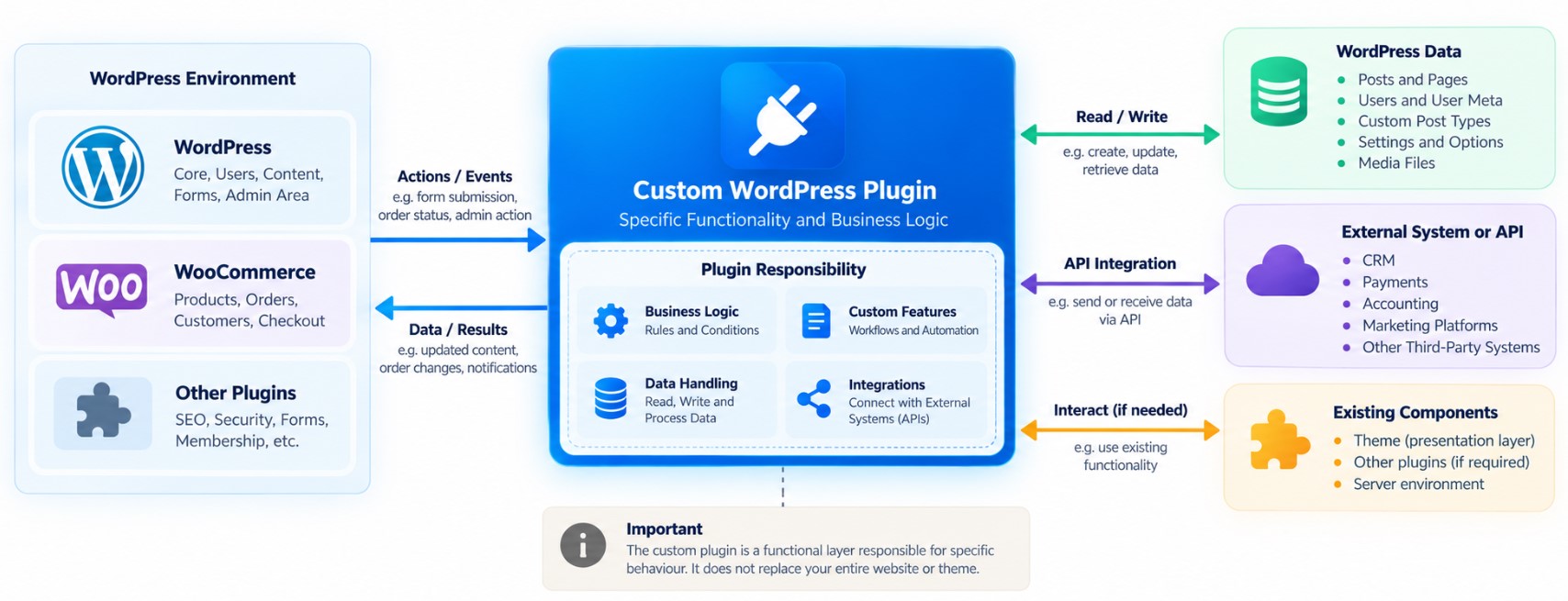
A plugin is one part of the wider WordPress environment. Its responsibility should therefore be defined in relation to the website, existing plugins, WooCommerce, data and any external systems.
Functionality that should continue to exist independently of a particular website design will often belong at plugin level rather than being embedded unnecessarily in the theme.
The exact architecture depends on your existing website and the functionality being developed, but the objective is the same: give the custom logic a clear boundary and avoid making the plugin responsible for unrelated parts of the website.
Connecting WordPress With Other Business Systems
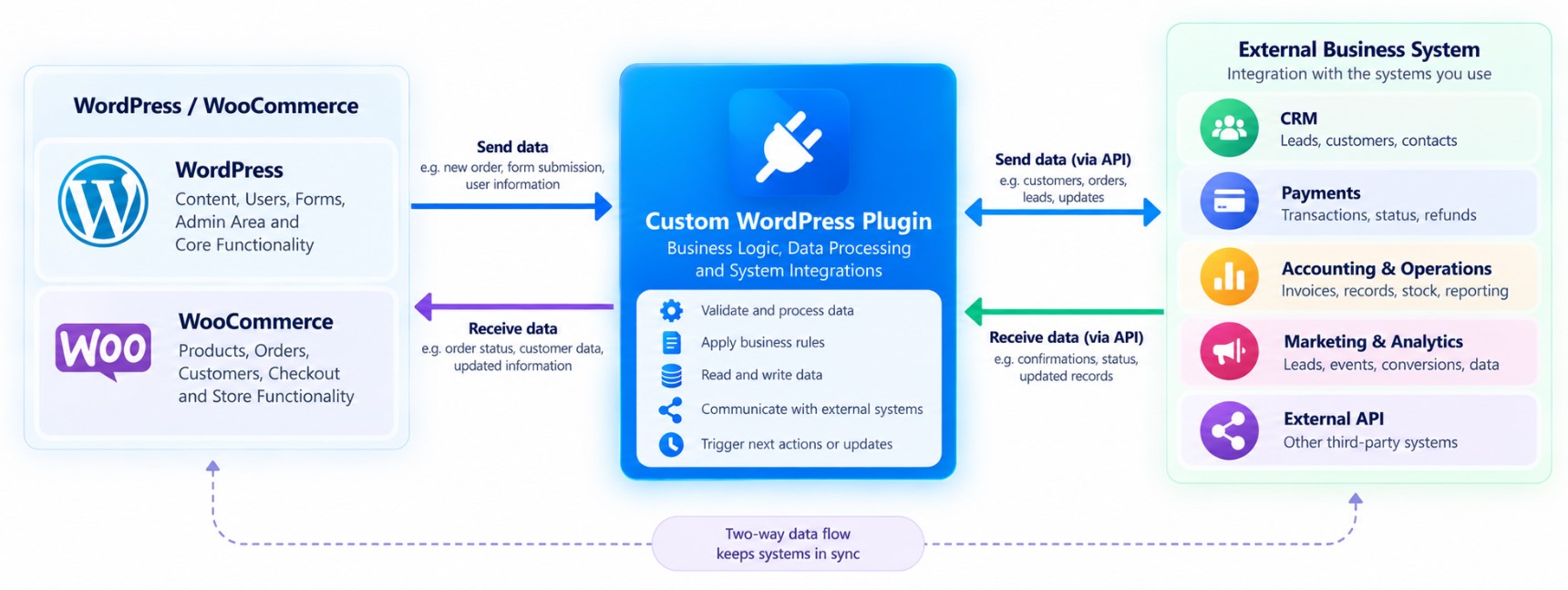
Some custom plugins exist primarily because WordPress needs to participate in a wider business process.
Depending on the project and the access provided by the external platform, this could involve categories of systems such as CRM, ecommerce, payments, accounting or operational software, marketing platforms, analytics services or other external APIs.
But an integration is more than connecting two endpoints. Before development, we need to understand:
- what information needs to move;
- which direction it should move in;
- what triggers the exchange;
- which system remains the source of truth;
- how access to the external system is handled;
- what should happen if information is invalid or the other system is unavailable.
What Our Custom WordPress Plugin Development Service Can Cover
The development engagement is structured around the agreed functionality rather than a predetermined plugin package.
- requirements definition;
- review of the existing WordPress environment and relevant dependencies;
- plugin scope and architecture;
- custom plugin development;
- testing of the agreed functionality and relevant states;
- deployment;
- agreed documentation or handover information where required.
Security, Compatibility and Maintainability
Custom functionality becomes part of the wider WordPress environment, so security and maintainability need to be considered in relation to what the plugin actually does.
Depending on the functionality, this can include input handling, user permissions, authentication for external connections, relevant data handling and dependencies on WordPress, WooCommerce or other plugins.
Those dependencies also matter after launch. Changes to WordPress, WooCommerce, another plugin or an external API can affect custom functionality, so permanent compatibility should not be assumed.
Can a Custom WordPress Plugin Grow With the Requirement?
It can be useful to consider likely future requirements when the initial plugin is being scoped. Additional rules, workflows, integrations or administrative functionality may affect how the first version should be structured.
That does not mean every possible future feature should be built immediately. A better starting point is the smallest complete plugin responsibility that solves the agreed requirement properly.
If later requirements become substantially different from the original responsibility, a separate component or broader WordPress development project may be more appropriate than continuously expanding the same plugin.
How We Develop a Custom WordPress Plugin
1. Define the Requirement
We establish what needs to happen, who or what triggers it and what a successful result should look like.
2. Review the Existing Environment
We look at the relevant WordPress setup, existing plugins, WooCommerce, data and external dependencies.
3. Agree the Scope and Plugin Responsibility
We define what belongs inside the plugin, how it needs to interact with other components and what is outside the agreed scope.
4. Develop the Plugin
We build the agreed functionality around the approved requirement and technical approach.
5. Test Expected and Failure States
Testing covers the relevant behaviours and conditions, including agreed situations where an action cannot complete as expected.
6. Deploy and Hand Over
Following approval, the plugin is implemented in the agreed environment with the relevant handover information included in the project scope.
What You Receive
| Deliverable | What It Covers | Typical Status |
|---|---|---|
| Functional requirement | The agreed purpose and behaviour of the plugin | Core |
| Technical scope | Relevant boundaries, dependencies and interactions | Core |
| Custom WordPress plugin | The functionality defined by the approved scope | Core |
| Admin or configuration interface | Controls needed to manage relevant plugin behaviour | Scope-dependent |
| Integration implementation | Agreed interaction with an external system | Scope-dependent |
| Testing | Agreed functional scenarios and relevant dependencies | Core |
| Documentation / handover | Relevant guidance for the delivered functionality | Scope-dependent |
| Deployment | Implementation in the agreed WordPress environment | Core |
Existing Plugin, Extension or Custom WordPress Plugin?
Custom development should be a decision, not the default response to every unusual WordPress requirement.
| Route | Best When | Main Advantage | Main Consideration |
|---|---|---|---|
| Existing plugin | A maintained solution already supports the requirement cleanly | Less custom development to own and maintain | You work within the product’s available functionality |
| Extend an existing plugin | A suitable plugin provides the foundation but one contained behaviour is missing | Keeps useful existing functionality | The extension depends partly on the underlying plugin |
| Custom WordPress plugin | The requirement is specific, clearly bounded and belongs at plugin level | Functionality can follow the required business logic | The custom code becomes part of your ongoing technical environment |
| Broader custom WordPress development | The requirement affects several parts of the website rather than one contained function | The wider architecture can be considered together | The project scope is broader than plugin development |
Expert Insight: More Custom Code Does Not Automatically Mean a Better Plugin
One of the most important plugin decisions happens before development starts: deciding exactly what the plugin should own.
If a maintained existing plugin already handles the requirement cleanly, rebuilding the same functionality can create unnecessary cost and maintenance. But the opposite extreme causes problems too: one custom plugin should not become a dumping ground for every unusual requirement on the website.
A stronger approach is to give the plugin a clear responsibility. Define what triggers it, which rules it controls, what data it needs, which dependencies it relies on and what should happen when the expected process succeeds or fails.
The objective is not the largest amount of custom development. It is a contained piece of functionality that solves the requirement cleanly.
Custom WordPress Plugin Development Cost
Our custom WordPress plugin development services start from £400.
Final pricing depends on the functionality, business logic, existing WordPress environment, integrations, WooCommerce dependencies, administration requirements and testing involved.
| Cost Factor | Why It Matters |
|---|---|
| Business logic | More rules, conditions and possible states increase development and testing scope |
| Existing WordPress environment | Current themes, plugins and custom functionality can introduce dependencies |
| WooCommerce | Product, customer, checkout or order behaviour may introduce additional interactions |
| External integrations | APIs require data-flow, authentication and failure-handling decisions |
| Administration and permissions | Custom controls or different user capabilities can add functionality |
| Testing | More workflows, states and dependencies require broader validation |
How Long Does Custom Plugin Development Take?
The delivery time depends on the scope. A contained piece of functionality is different from a plugin involving several workflows, WooCommerce and an external system.
We define the expected schedule after reviewing the functionality, existing environment, dependencies, testing requirements and any third-party systems involved.
What Clients Say
“We needed WordPress to follow a specific internal process and had already tried combining several plugins without getting the workflow quite right. Prime Lion Digital took time to understand what actually needed to happen before discussing the development. The final approach was much more focused than simply adding more functionality, and communication throughout the project was clear.”
Anna
London, UK
“We needed additional WooCommerce functionality but did not want unnecessary changes across the rest of the store. The requirement was clearly scoped first, and the work stayed focused on the part of the process we actually needed to change. Everything was explained in a practical way without making the project more complicated than necessary.”
Avi
London, UK
“Our main concern was connecting WordPress with another part of our business process without ending up with something difficult to manage. Prime Lion Digital explained the logic clearly, including what would happen inside WordPress and what remained dependent on the other system. The whole process was structured and easy to follow.”
Sarah
London, UK
Related WordPress Development Services
Custom WordPress Development
For requirements that affect several layers of WordPress rather than one contained plugin responsibility.
Custom WordPress Theme Development
For requirements centred on templates, layouts and the presentation layer rather than independent business logic.
Custom WordPress Website Development
For new websites where architecture, design and custom functionality need to be planned as one project.
WooCommerce Development
For broader ecommerce requirements extending beyond one contained WooCommerce plugin function.
WordPress Development Services
Explore the wider WordPress development service family if you are still deciding which approach fits your requirement.
Custom WordPress Plugin Development FAQs
What is custom WordPress plugin development?
It is the development of purpose-built functionality that operates within WordPress independently of a particular theme. A custom plugin can handle business rules, workflows, WordPress behaviour, WooCommerce functionality or system interactions according to the agreed scope.
When do I need a custom plugin instead of an existing plugin?
Custom development may make sense when an appropriate maintained plugin cannot support an important requirement cleanly. If an existing solution already does what you need, using it may be the more proportionate option.
Can you extend an existing WordPress plugin?
Potentially. We first need to understand the existing plugin, the missing behaviour and whether it provides an appropriate way to extend it. In some situations a separate custom plugin may be cleaner.
Can a custom plugin connect WordPress to another system or API?
Yes, where the external system provides suitable access and the required interaction can be properly scoped. The project needs to define the data, direction, triggers, access requirements and expected behaviour if the external service is unavailable.
Can you develop custom WooCommerce functionality?
Yes. Custom plugin development can be used for specific WooCommerce requirements where normal configuration or an appropriate existing extension does not meet the requirement cleanly.
How much does custom WordPress plugin development cost?
Our custom WordPress plugin development services start from £400. Final pricing depends on the functionality, business logic, integrations, existing environment and testing requirements.
How long does custom WordPress plugin development take?
It depends on the scope, existing WordPress environment, number of workflows, dependencies, integrations and testing required. We provide the expected delivery schedule after reviewing the requirement.
Can a custom WordPress plugin be expanded later?
Potentially. Future requirements can be considered when the initial plugin is structured, but new functionality should remain relevant to the plugin’s responsibility. Substantially different requirements may be better handled separately.
Who owns the custom WordPress plugin and its code?
Ownership and licensing should be confirmed as part of the agreed project terms before development begins.
What happens after the plugin is launched?
The required handover and any post-launch support should be agreed as part of the project scope. Custom software may require future work if WordPress, WooCommerce, connected systems or other dependencies change.
Will my custom plugin continue working after WordPress or WooCommerce updates?
Permanent compatibility cannot be guaranteed because WordPress, WooCommerce, third-party plugins and external APIs can change. Relevant dependencies should be considered during development, and future changes may require review or updates to the custom functionality.
Scope Your Custom WordPress Plugin
You do not need to write the technical specification yourself. Tell us what WordPress needs to do, what currently prevents it, who or what is involved and what the successful result should look like.
We can then determine whether a custom plugin is the right approach and scope the functionality that actually needs to be built.