WordPress Backend Customisation Built Around How Your Team Works
WordPress backend customisation adapts the WordPress admin area around the people, content, data and day-to-day tasks involved in managing your website. From focused editing and access improvements to more specialised management workflows, Prime Lion Digital can customise the backend without unnecessarily changing the visitor-facing website.
Projects start from £500, with scope based on the users, administrative tasks, content structure and functionality involved.
Discuss Your Backend Requirements
Tell us a little about what you’re looking for, and our team will be in touch to discuss how we can help.
When the Standard WordPress Backend No Longer Fits the Workflow
- editors regularly work around fields or controls they do not need;
- different users should manage different parts of the website;
- content needs a more structured editing process;
- staff need a dedicated management screen for a particular task;
- WooCommerce administration needs to reflect an internal operational process;
- routine administrative actions involve unnecessary manual steps;
- information or actions from another system need to be accessible through WordPress.
The objective is not to customise WordPress simply because it can be customised. It is to identify where the existing administration experience does not properly support the people using it.
What WordPress Backend Customisation Actually Changes
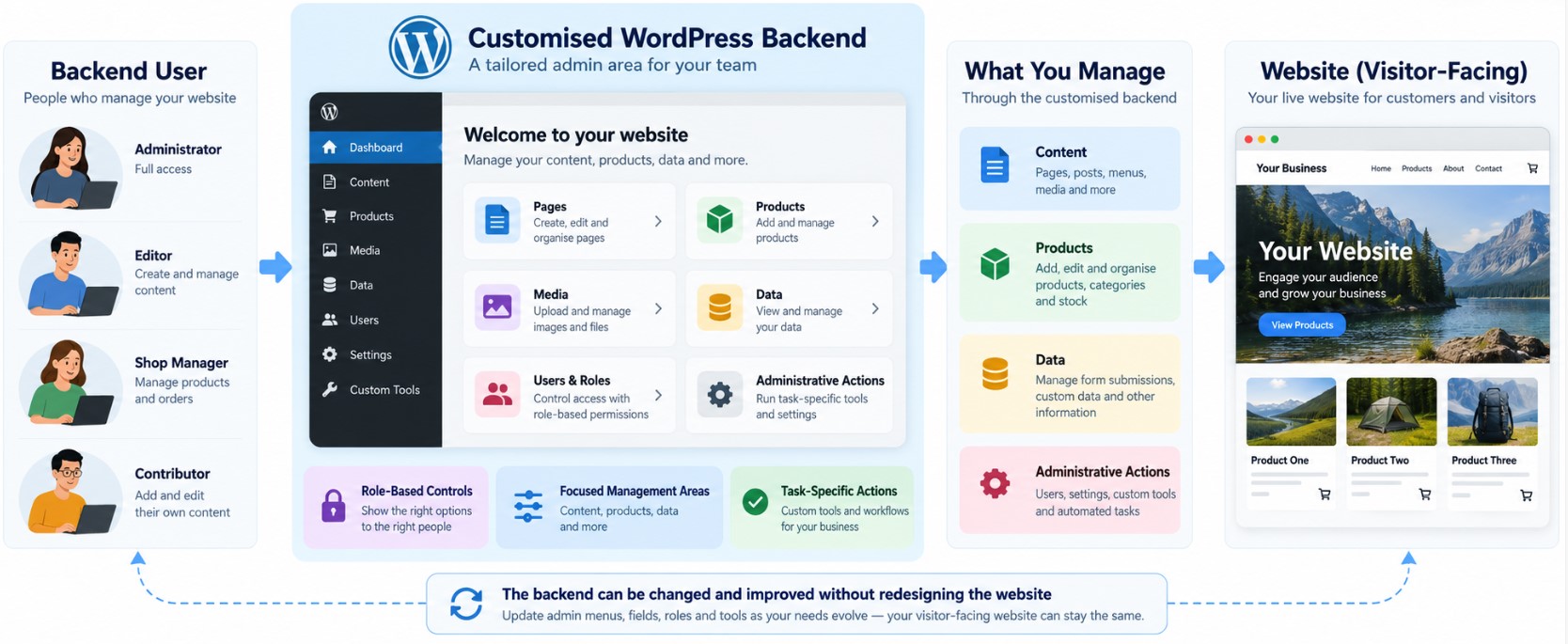
The frontend does not automatically need to change. Where the requirement is specifically administrative, substantial improvements can potentially be made behind the scenes while the public-facing website continues to operate as intended.
WordPress Backend Customisation Capabilities
Focused Admin Interfaces
WordPress administration areas can be adjusted so users have clearer access to the information and actions relevant to their responsibilities.
Structured Content Management
Editing interfaces can include structured fields and content controls designed around the information a team actually needs to maintain, rather than relying only on generic editing areas.
User Roles and Access
Backend access can be configured around different responsibilities so users can potentially see and manage the areas appropriate to their role while unnecessary or sensitive controls remain restricted.
Custom Admin Tools
Where a standard WordPress screen does not fit the task, a dedicated administrative interface or action can potentially be developed for a specific management requirement.
Workflow Support
Backend interactions can be designed around processes such as editing, reviewing, approving, updating or performing defined administrative actions where the project requires them.
WooCommerce Administration
For ecommerce websites, backend customisation may focus on how authorised staff work with relevant products, orders, store information or administrative actions. The exact changes depend on the WooCommerce setup and operational requirement.
Automation and Connected Actions
Where appropriate, a backend action may trigger additional WordPress functionality or interact with a connected system. More substantial business logic may instead belong within a custom plugin or wider development scope.
Where Should the Functionality Actually Live?
| Layer | What It Should Usually Handle | Typical Decision |
|---|---|---|
| Standard WordPress | Tasks already supported adequately through existing WordPress settings, roles or management controls. | Keep the standard functionality where it already solves the requirement cleanly. |
| Customised Backend | Admin screens, structured editing, role-specific management and task-focused administrative interactions. | Customise the management experience where the standard backend does not fit the user or workflow. |
| Custom Plugin / Functionality | Distinct business logic or functionality that needs its own defined responsibility. | Separate the functional logic when the requirement goes beyond adapting the administration experience. |
| External System | Information or processes that properly belong to another business platform. | Connect WordPress where useful rather than unnecessarily rebuilding the external system inside WordPress. |
This boundary helps keep the backend focused and avoids adding custom development where standard WordPress or another part of the system is the better fit.
Practical WordPress Backend Customisation Use Cases
Simplifying Content Editing
A content editor may only need to manage a defined set of page information but currently has to navigate controls unrelated to their job. The backend can potentially provide a more focused editing experience around the content they are responsible for.
Managing Structured Services, Products or Other Content
A marketing or content team may need to maintain information in a consistent structure. Custom fields and purpose-built editing controls can help organise that information around the content model rather than relying on free-form editing alone.
Giving Different Users Different Admin Experiences
Administrators, editors, marketing users and other staff may have different responsibilities. Backend access and management areas can be configured around those responsibilities instead of exposing the same administrative options to everyone.
Creating a Dedicated Management Screen
An internal team may have a specialised task that is awkward to manage through standard WordPress screens. A custom administration area can potentially bring the relevant information and actions together in one place.
Adapting WooCommerce Administration
An ecommerce administrator may need a more appropriate way to work with particular store information or actions. Backend changes can be scoped around that administrative process without assuming that the whole WooCommerce website needs rebuilding.
Supporting Review or Approval Workflows
Where different people create, review or approve information, WordPress can potentially support clearer administrative stages, permissions or actions depending on the workflow required.
Connecting a Backend Task to Another System
A user may need to view information from, or initiate an action involving, another business system. Where technically appropriate, WordPress can provide the administrative interaction while the external platform remains responsible for its own data or functionality.
What Can a Better-Fitted Backend Enable?
- Clearer day-to-day administration by focusing users on relevant information and actions.
- More structured content management where information needs to follow a defined format.
- Less unnecessary admin complexity for users who do not need access to every WordPress control.
- Clearer user responsibilities through appropriately configured roles and permissions.
- More consistent editing processes where structured interfaces are appropriate.
- Fewer unnecessary manual steps where a suitable administrative action or workflow can replace them.
The actual benefit depends on the existing website, the users involved and the administrative process being improved.
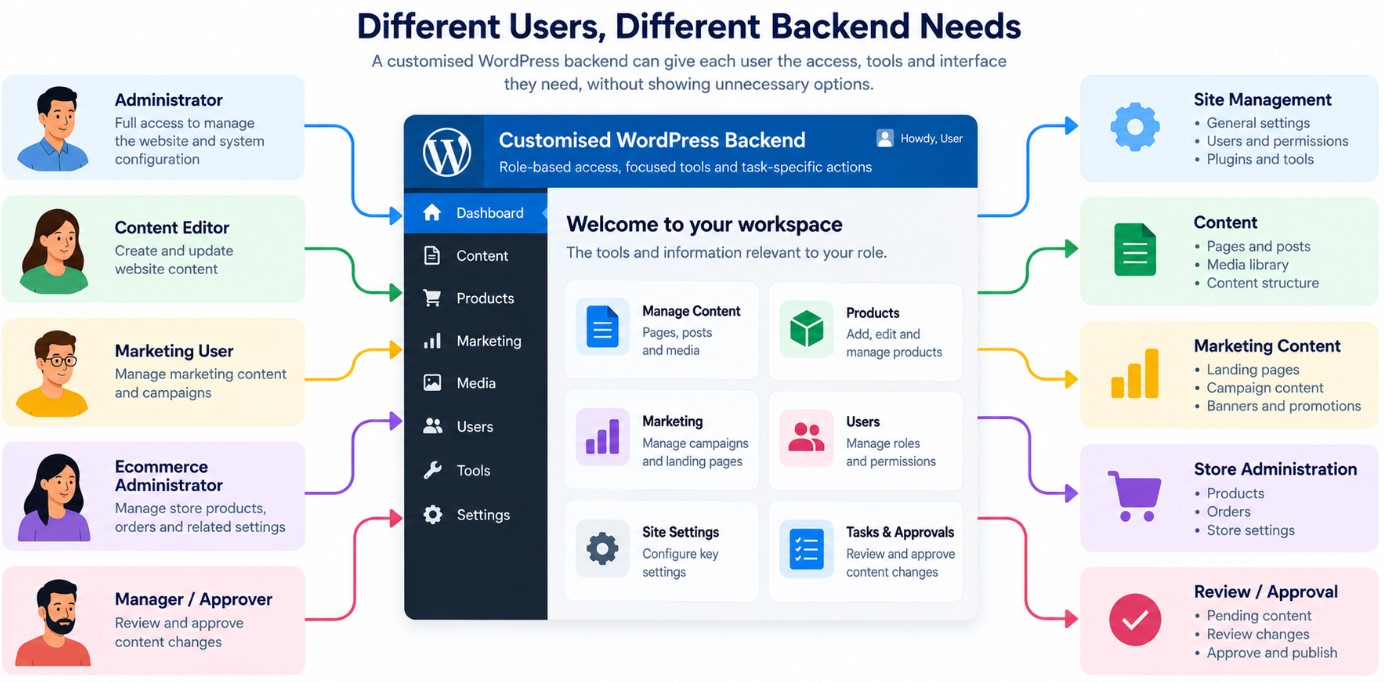
Different Users, Different Backend Needs
| User | Typical Need | Backend Focus |
|---|---|---|
| Administrator | Broader website and system management | Appropriate access to configuration, content and administrative functions |
| Content Editor | Create and update website content | Focused editing controls and relevant content areas |
| Marketing User | Manage campaign, landing-page or marketing-related content | Access to the content and controls required for marketing activity |
| Ecommerce Administrator | Manage relevant store operations | WooCommerce information and administrative actions required by the role |
| Manager / Approver | Review or approve defined changes | Relevant review information, status and permitted actions |
| Custom Role | Perform a specialised internal task | Only the management areas and actions required for that responsibility |
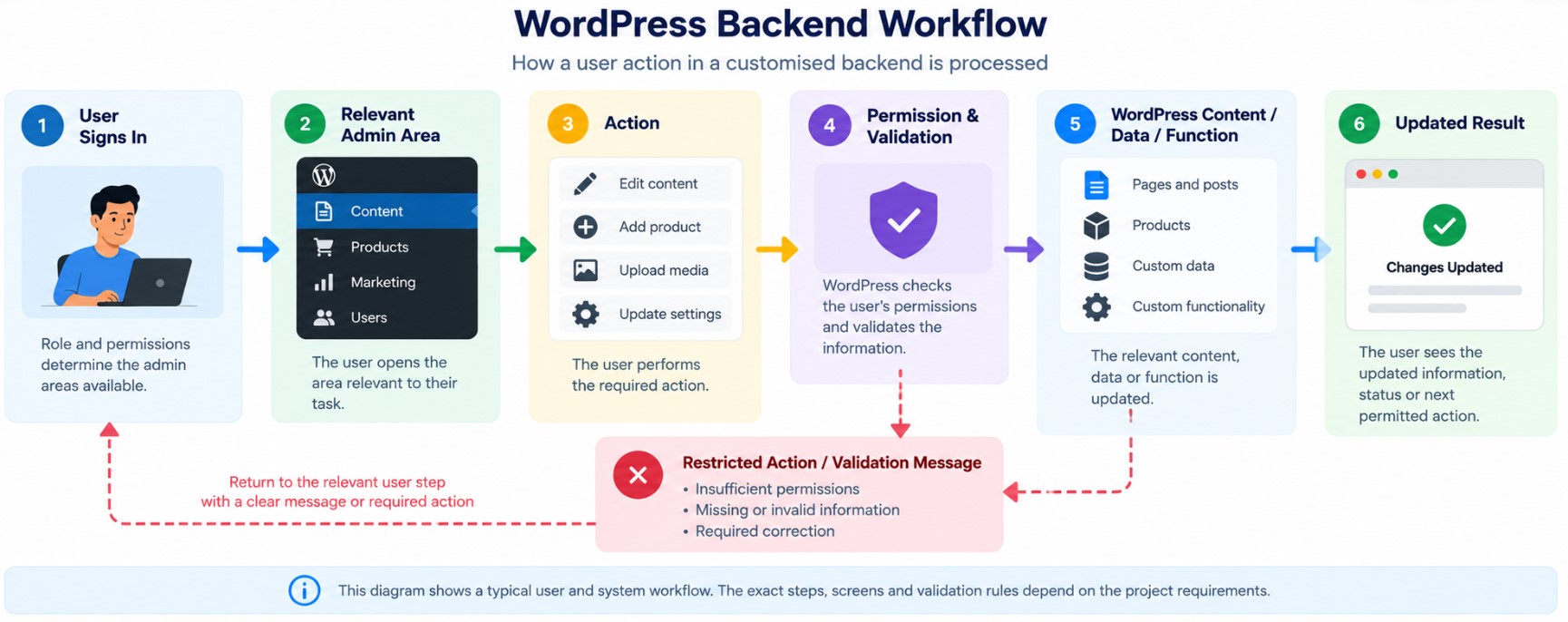
How a Customised WordPress Backend Workflow Can Work
- User signs in. Their role and permissions determine the administration areas available to them.
- User opens the relevant admin area. The interface presents the information and actions needed for the task.
- User performs an action. This could involve editing content, managing data, reviewing information or triggering a defined administrative process.
- Permissions and validation are applied. WordPress or the custom functionality checks the action according to the rules defined for the workflow.
- The relevant content, data or function is updated. Depending on scope, this may involve WordPress content, WooCommerce information, custom functionality or a connected system.
- The user sees the resulting state. The interface can present the updated information, status or next permitted action.
Where an action cannot be completed — for example because information is missing, validation fails or the user lacks permission — the workflow should also define an appropriate exception state rather than assuming every action succeeds.
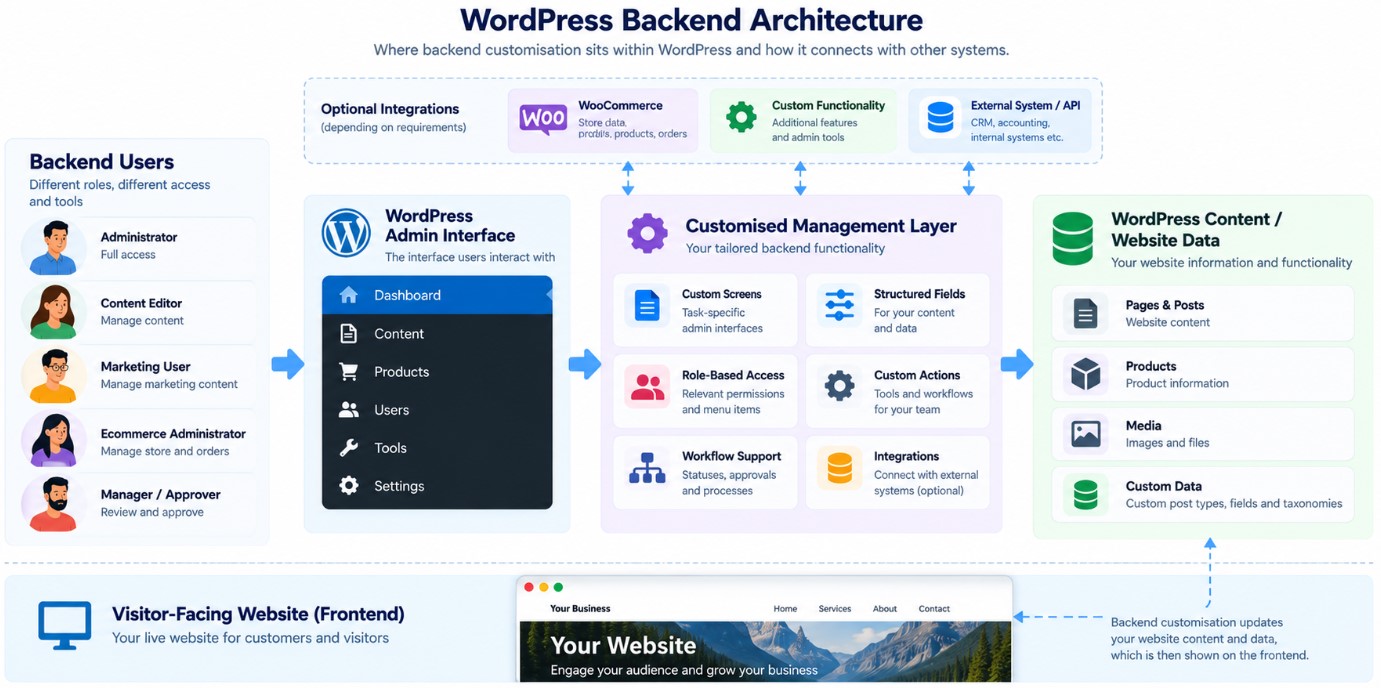
Where Backend Customisation Sits Within WordPress
Backend User ↔ WordPress Admin ↔ Customised Management Layer ↔ Content / Products / Website Data
Depending on the project, the management layer may also interact with WooCommerce, custom functionality or an external system. Those connections are scope-dependent rather than automatically included in every backend project.
Connecting the WordPress Backend With Other Systems
The important distinction is responsibility: backend customisation defines how the authorised user manages the information or action from WordPress, while deeper integration logic may belong within separate custom functionality or a custom WordPress plugin.
Security, Permissions and Administrative Control
- user authentication and existing WordPress access;
- roles and permissions for administrative areas and actions;
- validation of information submitted through custom interfaces;
- restriction of sensitive or higher-impact administrative actions;
- appropriate handling of personal or business information;
- authentication and permission requirements for connected systems or APIs;
- dependencies on WordPress, themes, plugins and future updates;
- backup and recovery considerations around deployment and subsequent changes.
The exact controls depend on what is being customised. Backend development should not be treated as an automatic compliance guarantee, and security requirements need to reflect the website, data and functionality involved.
What Our WordPress Backend Customisation Service Can Cover
- Requirements review — identify users, tasks, information, actions and current points of friction.
- Existing backend review — understand how the current WordPress setup supports or restricts the required process.
- Backend UX planning — determine how users should reach and complete the relevant tasks.
- Backend development and configuration — implement the agreed administration changes and functionality.
- Roles and access configuration — configure relevant permissions where this forms part of the project.
- Testing — check the agreed workflows, permissions, validation and administrative behaviour.
- Deployment — move the approved changes into the intended website environment.
- Handover — provide the agreed information needed to understand or use the implemented backend changes.
Can the Backend Change as Your Team and Website Grow?
Where the requirement expands substantially, it may make more sense to extend the administration layer, develop separate custom functionality or move part of the process to another system rather than continually adding complexity to the same backend screen.
How We Deliver WordPress Backend Customisation
1. Define the Administrative Requirement
We identify who uses the backend, what they need to manage, which actions matter and where the existing process does not fit.
2. Review the Existing WordPress Setup
We assess the relevant administration areas and existing functionality so the proposed change works with the actual website rather than an assumed setup.
3. Agree the Scope
We define which backend changes are required, what should remain standard and whether any requirement belongs in separate functionality or an integration.
4. Develop the Agreed Changes
We build or configure the backend elements included in the agreed project scope.
5. Test and Approve
The relevant workflows, permissions and administrative behaviour are checked, with client input where approval or operational validation is required.
6. Deploy and Hand Over
Approved changes are deployed to the intended environment and the agreed handover information is provided.
What You Receive
| Deliverable | Status | What It Covers |
|---|---|---|
| Backend Requirement Definition | Core | The agreed users, administrative tasks and backend requirement forming the project scope. |
| WordPress Backend Customisation | Core | The agreed backend changes implemented for the defined requirement. |
| Testing | Core | Testing of the implemented administrative behaviour relevant to the agreed scope. |
| Deployment | Core | Deployment of the approved changes to the intended WordPress environment. |
| Configured Management Interface | Scope-dependent | A focused or structured management interface where the requirement calls for one. |
| User / Access Configuration | Scope-dependent | Relevant roles or permissions included within the project. |
| Custom Admin Functionality | Scope-dependent | Specific administrative actions or tools required by the defined workflow. |
| WooCommerce Backend Changes | Scope-dependent | Agreed administrative changes related to WooCommerce. |
| Connected Workflow | Scope-dependent | Relevant connection between a WordPress administrative action and another system or function. |
| Handover Information | Scope-dependent | Agreed guidance or information for using or understanding the implemented changes. |
Standard WordPress Backend vs a Task-Focused Backend
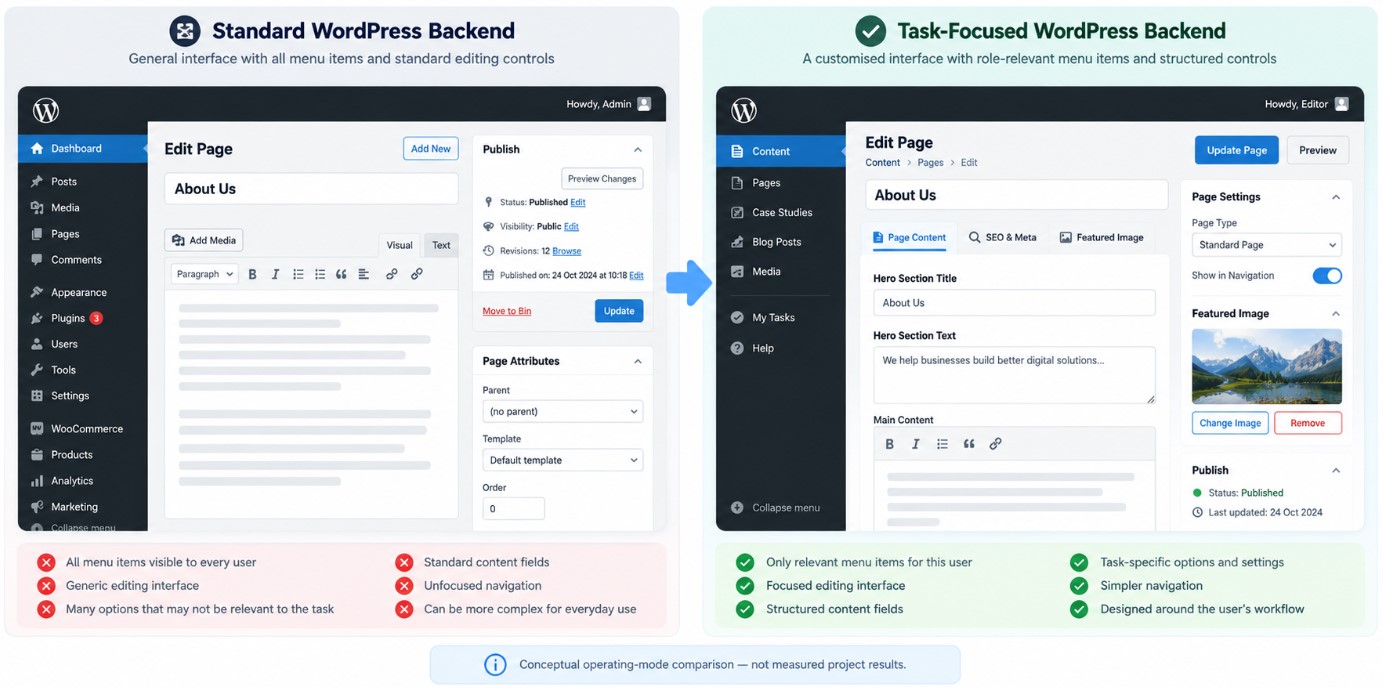
The following is a conceptual comparison rather than a measured client result.
| Area | Standard Administration | Task-Focused Customisation |
|---|---|---|
| Navigation | Standard WordPress administration structure | Can focus relevant users on the areas required for their responsibilities |
| Content Editing | Standard editing experience and existing fields | Can use structured controls around the information being managed |
| User Experience | Users work within the existing administration model | Administrative interactions can be designed around specific tasks |
| Access | Existing WordPress roles and permissions | Can be configured more specifically where the requirement calls for it |
| Specialised Tasks | Handled through available standard or existing plugin interfaces | A dedicated management screen or action can potentially be developed where justified |
How Much Backend Customisation Do You Actually Need?
A useful project does not have to redesign the entire administration environment.
Focused Customisation
Suitable where one clearly defined administrative task, editing process or user experience needs improvement. This can be the right starting point when the rest of WordPress already works adequately.
Broader Backend Customisation
Appropriate where several related users, content structures or management areas need to work together differently from the standard administration model.
More Extensive Custom Administration
May be appropriate where WordPress supports a more specialised internal management process involving several roles, workflows, custom administrative tools or connected functionality.
The larger option is not automatically the better option. Scope should follow the management requirement.
Backend Customisation, Custom Plugin or Broader WordPress Development?
| Option | When It May Make Sense | Primary Focus | Scope Consideration |
|---|---|---|---|
| Standard WordPress Configuration | WordPress or existing functionality already supports the required administrative process. | Settings and existing controls | Lowest custom-development requirement |
| WordPress Backend Customisation | The administration experience, content management or backend workflow needs adapting around specific users or tasks. | WordPress administration layer | Can remain tightly focused on the management requirement |
| Custom WordPress Plugin Development | The website needs distinct custom functionality or business logic with a clearly defined responsibility. | Functional / plugin layer | Useful when the requirement goes beyond the administration interface itself |
| Broader Custom WordPress Development | The requirement affects several parts of the website or requires a wider custom solution. | Multiple WordPress layers | Usually a broader project scope |
If the requirement is mainly about how staff manage the website, backend customisation may be enough. If the website needs new standalone functionality, Custom WordPress Plugin Development may be the more appropriate route.
Expert Insight: Customise the Task, Not WordPress for the Sake of It
It also helps establish an important technical boundary. A useful admin interface should make the underlying process easier to manage; it should not absorb every piece of business logic simply because WordPress is where the user happens to work.
The aim should therefore be the smallest meaningful backend change that supports the management requirement properly and leaves clear responsibility between WordPress administration, custom functionality and any external systems.
Review Your WordPress Admin Workflow
WordPress Backend Customisation Pricing
| Cost Factor | Why It Matters |
|---|---|
| Number of Admin Areas | A focused change to one management screen differs from a project involving several administration areas. |
| Users and Roles | Different access requirements can add role, permission and testing considerations. |
| Content / Data Structure | Structured fields or specialised data-management requirements affect the implementation. |
| Workflow Complexity | Multi-stage actions, validation or approval requirements may require additional logic. |
| WooCommerce Requirements | Store-related administration can introduce additional dependencies and testing. |
| Custom Administrative Actions | Purpose-built actions or tools require more development than interface adjustments alone. |
| Integrations | Connected systems depend on available APIs, authentication, data requirements and the responsibilities of each platform. |
| Existing WordPress Setup | The current theme, plugins, custom functionality and technical condition of the website can affect implementation and testing. |
Discuss Your Backend Requirements
How Long Does WordPress Backend Customisation Take?
- the clarity and size of the agreed scope;
- the existing WordPress setup;
- the number of users and roles involved;
- the complexity of custom management screens or actions;
- WooCommerce dependencies;
- external integrations;
- testing requirements;
- client review and approval requirements.
A focused backend change will normally involve a different level of work from a project covering several users, workflows and connected functions. The appropriate delivery plan can be established once the requirement has been reviewed.
Related WordPress Services
Custom WordPress Development
If the requirement extends beyond the administration experience and affects several parts of WordPress, a broader custom development scope may be more appropriate.
[INTERNAL LINK URL REQUIRED — Custom WordPress Development]
Custom WordPress Plugin Development
If the main requirement is new standalone functionality or business logic rather than the administration experience itself, custom plugin development may provide the clearer technical boundary.
Custom WordPress Plugin Development
Custom WordPress Website Development
For projects that require a broader custom website rather than changes to an existing administration workflow, custom website development covers the wider build.
WooCommerce Development
Where the requirement affects the wider ecommerce experience or store functionality rather than only backend administration, WooCommerce development may be the more appropriate scope.
WordPress Development Services
Explore the wider WordPress development service family if the requirement has not yet been narrowed to a specific development route.
WordPress Development Services
WordPress Backend Customisation FAQs
What is WordPress backend customisation?
WordPress backend customisation adapts the administration side of WordPress around particular users, content structures, management tasks or workflows. It can range from focused editing and access changes to custom management screens and more specialised administrative functionality.
What parts of the WordPress backend can be customised?
Depending on the website and requirement, customisation can potentially involve admin navigation, editing interfaces, custom fields, content-management screens, roles and permissions, WooCommerce administration, custom actions and connections to other functionality or systems.
Can you simplify the WordPress admin area for our team?
Potentially, yes. The first step is identifying what each user actually needs to manage. Relevant administration areas can then be reviewed to determine what should remain, what can be configured and what may require customisation.
Can different users see different backend options?
WordPress supports roles and permissions, and additional configuration or customisation may be possible where different users need access to different administrative areas or actions. The exact approach depends on the required responsibility model.
Can you create custom fields or management screens?
Yes, where they form part of the agreed scope. Structured fields can support consistent content management, while a custom administration screen may be appropriate when a specialised task does not fit existing WordPress interfaces.
Can you customise the WooCommerce backend?
WooCommerce administration can potentially be adapted around particular store-management requirements. The feasibility and appropriate approach depend on the existing WooCommerce setup, required workflow and any related plugins or custom functionality.
Can the WordPress backend connect to another business system?
Potentially. WordPress can interact with external systems where suitable integration methods are available. The project first needs to establish what information or action should be accessible from WordPress and which system should remain responsible for the underlying data or business logic.
Do I need backend customisation or a custom WordPress plugin?
If the main requirement is how authorised users manage content, data or administrative actions, backend customisation may be enough. If you need distinct new functionality or business logic, a custom plugin may provide a clearer solution. Some projects can involve both.
How much does WordPress backend customisation cost?
Projects start from £500. Cost depends on factors such as the number of admin areas, roles, workflows, custom fields, WooCommerce requirements, administrative actions, integrations and the existing WordPress setup.
How long does WordPress backend customisation take?
There is no single timeframe that applies to every project. Delivery depends on the scope, existing website, number of workflows and roles, custom functionality, integrations, testing and client approval requirements.
Will backend customisation affect the frontend of my website?
Not necessarily. If the requirement relates specifically to administration, the backend can potentially be changed without redesigning the visitor-facing website. Any frontend dependency should be identified during scope definition.
What happens when WordPress or plugins are updated?
That depends on how the customisation is implemented and which parts of WordPress, WooCommerce or other plugins it depends on. Update and dependency considerations should therefore be identified during development, and significant future changes may require the custom functionality to be reviewed or adjusted.
Scope Your WordPress Backend Customisation
WordPress backend customisation projects start from £500.